 |
 |
 |
|
 |


|
#1401
|
|||
|
|||
 Target/Compass/Clock windows 2.5.5
Hello, i am looking for the Target/Compass/Clock windows that you have pictured on the download page. it says its version 2.5.5. where can i get that?
thanks in advance. |


|
#1404
 09-30-2006, 01:11 PM
|
|||
|
|||
|
Phrite, you can get it in the latest release, the style is unchanged.
Kianil, check the "ProfitUI readme.txt" in your Everquest 2 folder, I update it with (almost) every version. And if you do not have that file, you have got a very old version.  Findarato, I hear you.  Maybe you want to make Leonid's pipe dreams into a ProfitUI skin? Maybe you want to make Leonid's pipe dreams into a ProfitUI skin?EDIT: To end your suffering, I've put together the attached green skin for you - I think you wanted green. I'm again quite limited on my free time at the moment so the next release for the UI as well as a full skin pack are still some time out.
__________________
P R O F I T U I ∙ R E B O R N [Auto-Updater] | [Portal] | [F.A.Q.] | [Support Forums] ~ Retired ~ If it does not work, you likely installed it incorrectly. Always try a clean install before reporting bugs. Last edited by gm9 : 09-30-2006 at 05:24 PM. |


|
#1405
10-01-2006, 05:49 PM
|
||||
|
||||
|
Quote:
I cant seem to see or view my pet window...any suggestions. My target sometimes changes from friend to foe. Can I change the Chat screen so it's all in one again...bit uncomfortable about the changing tabs to see who's sending a tell or what going in guild channel etc. Any help would be much thankful for.. P.S I dig the UI..it's outstanding and makes the game just that much more enjoyable. Cheers Akil |

|
#1406
10-02-2006, 01:27 AM
|
|||
|
|||
|
Alt-P for pet window.
Not sure about your targeting issue - it will change to the implied target if you click on it. Otherwise there may be something in the options (Alt-O). /shrugs Right click the chat window to remove tabs etc.
__________________
P R O F I T U I ∙ R E B O R N [Auto-Updater] | [Portal] | [F.A.Q.] | [Support Forums] ~ Retired ~ If it does not work, you likely installed it incorrectly. Always try a clean install before reporting bugs. |
|
#1407
10-02-2006, 08:40 PM
|
||||
|
||||
 Store window, possible bug?
Hiyas.
I was looking at the windows of this UI using the UIBuilder program, and noticed something that I'm not sure is intentional or not. It seems that the Store window (eq2ui_inventory_store.xml) has two "Store" windows. Here is the xml with everything collapsed: Code:
<?xml version="1.0" encoding="utf-8"?> <Page Activated="true" eq2usescomwndcontrols="true" Location="460,131" MaximumSize="434,1024" MinimumSize="434,471" Name="Store" PackLocation="center,center" PackLocationProp="-052/0001,-253/0001" ScrollExtent="434,471" Size="434,471" UserMovable="true" UserResizable="true" Visible="false"> <Page Activated="true" eq2usescomwndcontrols="true" Location="460,131" MaximumSize="434,1024" MinimumSize="434,471" Name="Store" PackLocation="center,center" PackLocationProp="-052/0001,-253/0001" ScrollExtent="434,471" Size="434,471" UserMovable="true" UserResizable="true" Visible="false"> Here are differencial reports: All Lines Differences with Context Just Differences
__________________
Thist |

|
#1408
10-03-2006, 03:49 AM
|
|||
|
|||
|
Thanks for the report, I had never noticed that.
However, I must have forgotten to remove that whole file from the package. The store window is the old window that would pop up if clicking on the market board in your house. With the new broker UI this window is no longer used so the file is redundant (no idea why SOE is still pushing it with the default UI).
__________________
P R O F I T U I ∙ R E B O R N [Auto-Updater] | [Portal] | [F.A.Q.] | [Support Forums] ~ Retired ~ If it does not work, you likely installed it incorrectly. Always try a clean install before reporting bugs. |
|
#1409
10-03-2006, 04:38 AM
|
||||
|
||||
|
Since I installed the latest version, my inventory window is no more aligned to the bottom right corner, but it's floating a bit higher. Everytime I log I have to unlock, move and lock in place again. Is there something I'm missing? Some ini I have to modify or delete? I include an image of the actual 'bug'.
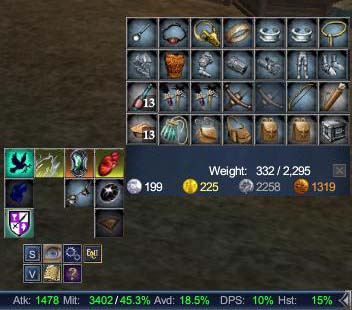 Thank you j. |

|
#1410
10-03-2006, 11:02 AM
|
||||
|
||||
|
Dayum.....alms for the poor?
 |

|
#1411
10-03-2006, 04:47 PM
|
|||
|
|||
|
I have no problems with that window here. Possibly a bug with your uisettings.ini - maybe try to delete it if it's important.
PS: Taking donations as well.
__________________
P R O F I T U I ∙ R E B O R N [Auto-Updater] | [Portal] | [F.A.Q.] | [Support Forums] ~ Retired ~ If it does not work, you likely installed it incorrectly. Always try a clean install before reporting bugs. |
|
#1412
10-03-2006, 05:26 PM
|
|||
|
|||

I downloaded this today and have a few problems.
The first was that that it didn't work with broker. I copied over my eq2 inventory iu files from default to the profit ui and it worked I find that resizing windows it to ackward as I kept needing to press f10 then open a new tool bar. I can also only see arrows to scroll throw my UI on one scrollbar. Overall with tweaks it could be much more user friendly |
|
#1413
10-04-2006, 01:50 AM
|
|||
|
|||
|
jediknight2k1, if the broker didn't work you downloaded the wrong version. Get the latest version here.

__________________
P R O F I T U I ∙ R E B O R N [Auto-Updater] | [Portal] | [F.A.Q.] | [Support Forums] ~ Retired ~ If it does not work, you likely installed it incorrectly. Always try a clean install before reporting bugs. |
|
#1414
10-04-2006, 02:15 AM
|
|||
|
|||
|
GM9, first I want to say thank you for all the time you've put into your incredible UI.
I have a simple question which will most likely result in a complex answer. I use the default UI with a couple small mods (target/implied window, tracking, and a couple others) I've been looking for a player window that has stats, resists AND Haste/DPS, however I cannot find one. Would there be a way for me to extract the player bar I see in your UI and add it to my own slightly modified default UI? I'm sure its not as simple as pulling a file from yours and putting it in my on UI folder, but is there anyway to do this at all? |
|
#1415
10-04-2006, 03:46 AM
|
|||
|
|||
|
For everything you rip you need to include the _ProfitUI_Styles.xml, and for the bottom bar you will want the eq2ui_mainhud_memorized.xml, and, if you want the graphics on the bar, the profit.dds. That should be all I think. Enjoy.
__________________
P R O F I T U I ∙ R E B O R N [Auto-Updater] | [Portal] | [F.A.Q.] | [Support Forums] ~ Retired ~ If it does not work, you likely installed it incorrectly. Always try a clean install before reporting bugs. |
|
#1416
10-04-2006, 05:49 AM
|
|||
|
|||
|
Quote:
 So if you're using 7.0.0 and haven't patched to 7.0.1 yet you might want to give it a try. |
|
#1418
10-04-2006, 11:51 AM
|
|||
|
|||
|
oh, as you said you were already using your own compilation I thought you knew how to put the pieces in. You will have to reference the styles.xml in eq2ui.xml and the memorized.xml in eq2ui_mainhud.xml via <include> statements (just check the current files to see what I mean). Then type /show_window MainHUD.Memorized to have the bottom bar show up (of course you could mod that line into another window to execute automatically (ProfitUI loads it via the experience window, I recommend you just copy that to your XP window).
__________________
P R O F I T U I ∙ R E B O R N [Auto-Updater] | [Portal] | [F.A.Q.] | [Support Forums] ~ Retired ~ If it does not work, you likely installed it incorrectly. Always try a clean install before reporting bugs. |
|
#1419
10-04-2006, 06:24 PM
|
||||
|
||||
|
I have a rather frivolous request...is there any way you could redo the death dialog window and make it smaller? It's such a nuisance taking up the middle of your screen like that
|
|
#1420
10-04-2006, 07:50 PM
|
|||
|
|||
|
Please help :P
I have used Thor and Fetish in the past and saw your UI and was really impressed, but I cant get it to work to save my life. I downloaded as instructed and my .ini file uses the following script:
cl_ui_skinname ProfitUI cl_ui_subdir UI/ However the default UI of EQ2 is all that appears once I log in. What am I doing wrong? Since I have used custom sets before I thought it would be the same process, but I cannot get this one to load to save my life. I am 100% sure it is probably something I am missing so if you can please shed any light it would be appreciated. Excited to see your work and thanks for any help you can provide. |
|
#1421
10-05-2006, 01:45 AM
|
|||
|
|||
|
Eloora, stop dying.
(I'll consider it)Shasioca, just extract the zip as per the install instructions into your \Everquest II directory (not \UI, not \ProfitUI). It will set itself up correctly including the .ini files.
__________________
P R O F I T U I ∙ R E B O R N [Auto-Updater] | [Portal] | [F.A.Q.] | [Support Forums] ~ Retired ~ If it does not work, you likely installed it incorrectly. Always try a clean install before reporting bugs. |
|
#1422
10-05-2006, 08:58 AM
|
|||
|
|||
|
Wow well ok, I feel like a fish out of water here. I installed UIBuilder cause I assumed that is what I need to use to edit the xml files as you described above. I just need to know how to insert these new "include" statements. I see what they look like when I open the file in explorer, however I haven't figured out so far how to actuall add the new reference in UIBuilder.
|
|
#1423
10-05-2006, 09:37 AM
|
|||
|
|||
|
Windows editor will do just fine (and you can't do it via UIbuilder). But really, just look through my files and you will find it. The UI is built as a complete set, so noone said it was easy to rip parts out of it, and I've already given you more support on that than I usually do.
__________________
P R O F I T U I ∙ R E B O R N [Auto-Updater] | [Portal] | [F.A.Q.] | [Support Forums] ~ Retired ~ If it does not work, you likely installed it incorrectly. Always try a clean install before reporting bugs. Last edited by gm9 : 10-05-2006 at 09:39 AM. |
|
#1425
10-05-2006, 01:22 PM
|
|||
|
|||
 losing focus on chat windows
Since last GU i noticed i always lose focus on the chat windows:
i click in my guildchat window and after i hit [enter] the cursor is gone and any keystroke does not result in chat text in the chat window but in activitation the command assinged to that key. i didnt change anything to my setup. i just noticed yesterday after GU it was still ok, but today after the patch it suddenly seems FUBAR. any idea whats wrong? checked with guildies, they dont have that prob. tried 'always chat here' option already with no improvement... Please help |
 Linear Mode


 |
© MMOUI
vBulletin® - Copyright ©2000 - 2026, Jelsoft Enterprises Ltd. |
 |
