 |
 |
 |
|
 |


|
|

|
#2
 02-12-2005, 12:01 AM
|
|||
|
|||

dont convert them. just download the xml files from our posts and copy them to your custom ui folder. or just download them straight into the custom folder if you wish.
Perdition: how can I make it so the "L:" only shows when I have a mob targeted in your implied target window? At its default setup now the background and the L: always show, and the health and hp bars dissappear when you esc out. i tried adding the datafilter=0000 etc. but it didnt work. does it not work in a <text> tag? Last edited by aalwein : 02-12-2005 at 12:03 AM. 
|


|
#3
02-12-2005, 12:31 AM
|
||||
|
||||
|
this is the way i did it for my implied target window you would have to put it in a page that has the dynamic data of the implied targets level and then set the dynamic data filter to hide it when it doesnt have a level, which should be 0001 as i recall.
|


|
#4
02-12-2005, 03:44 AM
|
||||
|
||||

I first off want to say that I love this UI, and I really like the modifications put on it. I am getting a bit impatient trying to wait for the implied target window so I decided to download the one posted earlier, as well as the other modifications to this UI.
However, the implied target window does not show when I download the proper file and put it in the custom ui folder. I downloaded the eq2ui_mainhud_impliedtarget.xml posted by perditon as well as the compass modification and tried em out. The compass modification works perfectly, but the implied target never appears. I know nothing of xml, but I basically thought that well, perhaps another file was needed to make the game realize the new window was there. So I figured that the eq2ui_mainhud.xml as well as the groupbar *the fixed version* and the mainhud_player as well. As it turns out, now I get the implied window in the proper texture, but now my player window and my target window are both back to default! I've reinstalled the UI from it's original state and added only the compass add on since it seemed to work, but I was wondering what I'm doing wrong here with these. I really would like to have that implied window, it really helps a lot when I play.  **Woohoo, first post I've ever made in the two months I've been on EQ2interface.com. **
|
|
#5
02-12-2005, 10:05 AM
|
||||
|
||||
|
delete eq2ui_gamedata.xml from your custom folder, it shouldnt be in there, once you delete it it will work.
|
|
#7
02-12-2005, 07:15 PM
|
||||
|
||||

Thanks, that worked I got the target window now.
btw, this is how I got my UI set up with TyeJae Steel and some others that I found around this site.  *sorry about the pic size, I don't know how to have pictures posted as 'attachments'*  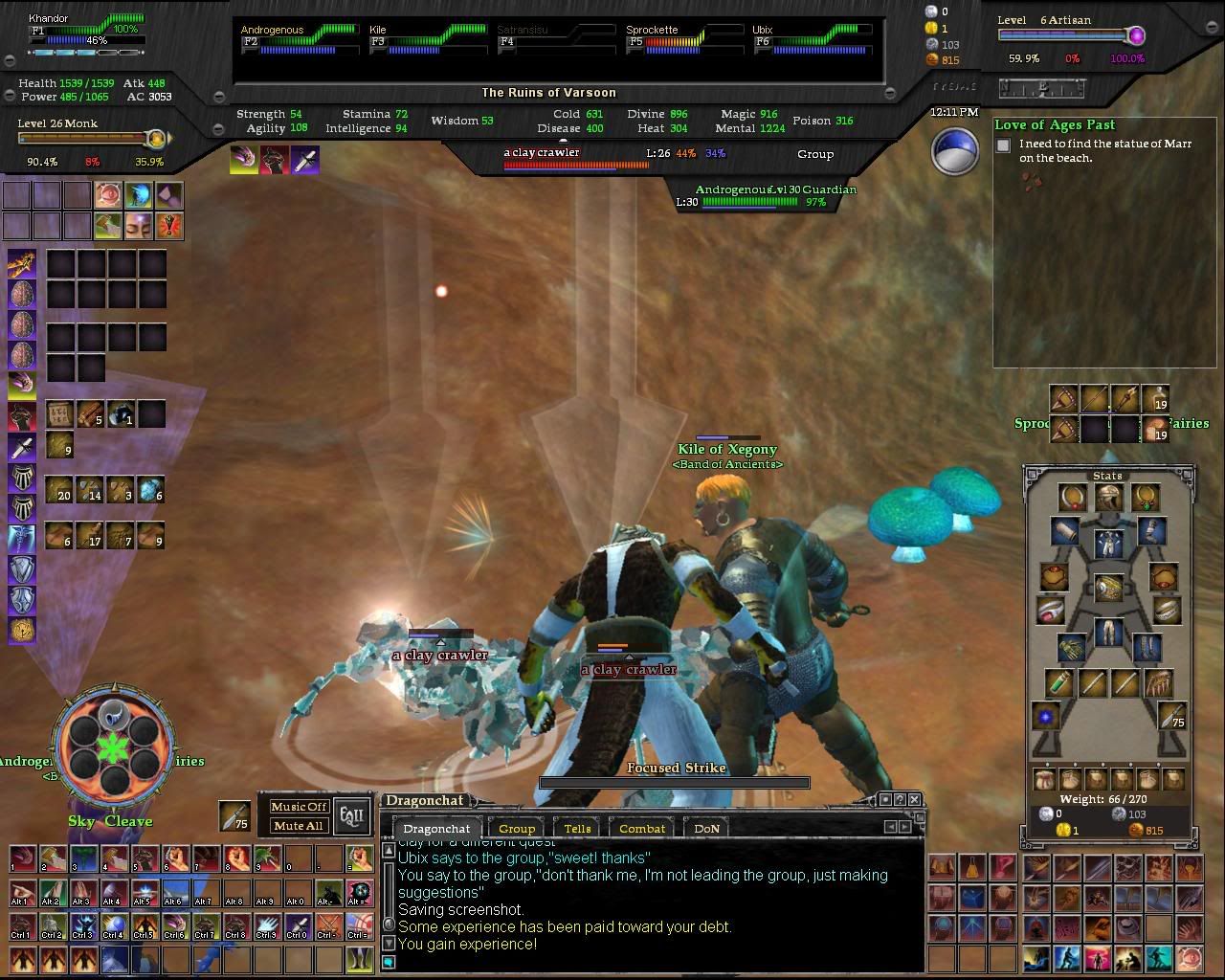 I think that this UI would be awesome with the quest journal skinned. I also would like to have more effect on who's being attacked *if possible*. But what I really would like to see is perhaps having the target bars bigger so they can handle names. If you look in the window the target window smashes the name together, and the same goes for main target window as well with names like "swashbuckler" and such. Thanks again for the help.
|
|
#8
02-19-2005, 11:28 PM
|
|||
|
|||
|
I have a couple requests: number one, could someone add a more visible indication of when your auto-attack is on? I sometimes miss it in the combat spam. The other request is for an embedded compass window in the main window.
Really glad that this UI is coming along even with TyeJae unable to work on it as much as he'd like! Great job guys.
|
|
#9
02-12-2005, 11:05 PM
|
|||
|
|||
|
Quote:
Code:
<Page DynamicDataFilter="0001" Location="0,0" Name="Target Stuff" ScrollExtent="253,71" Size="253,71"> <Text AbsorbsInput="false" actiontype="Target" Font="/Fonts.FontZapf15" LocalText="L:" Location="7,42" MaximumSize="152,30" MaxLines="1" Name="Lbl_Level" ScrollExtent="17,17" ShadowStyle="/ShadowStyles.Outline1" Size="17,17" TextAlignment="Right" TextAlignmentVertical="Center" TruncateElipsis="false">L:</Text> </Page> Any other ideas? EDIT: Figured it out. I added DynamicData="/GameData.ImpliedTarget.Health" to the Page tag that held just the L: and now it works. I guess that Data tag also tells things how to act when they are included in that particular page. Fixed implied target file attached. Last edited by aalwein : 02-12-2005 at 11:39 PM.
|
|
#10
02-13-2005, 11:17 PM
|
|||
|
|||
|
ok Guys I have downloaded the files you left, pasted them to the Custon UI folder, Saved them to the Custom UI Folder, Converted them to a Zip file and saved t hem to the custom UI folder and NOTHINGGGG!. Now you see why I dont make my own mods lol. Could you please give me a little techinical support on this one? What am I possibly doing wrong?
M
|
|
#11
02-14-2005, 09:26 AM
|
||||
|
||||
|
HEllo All
 Because some people wanted to have a quest helper that looks like the other interface part, I made one using TyeJae Graphics. Here is what it looks (1280*1024): [edit] updated with Aalwein correction Last edited by perdition : 02-15-2005 at 06:02 AM.
|


 Hybrid Mode

 |
© MMOUI
vBulletin® - Copyright ©2000 - 2026, Jelsoft Enterprises Ltd. |
 |
