EQ2Interface.com
Search Downloads


Go Back   EQ2Interface > Interface Pieces > Macro / Scripting

Category: Macro / ScriptingToggleBuffing
Interface Information
Download
How do I install this? (FAQ)
Name: ToggleBuffing   Popular!
Author:
Date: 01-31-2026 07:34 AM
Size: 9.40 Kb
Version: 1.6
Rate Addon: 5 out of 5 with 1 votes  
Pictures
Click to enlarge 

Views: 0
Size: 4.04 Kb
Dimensions: 200 x 96
Mod window
 
Click to enlarge 

Views: 0
Size: 24.70 Kb
Dimensions: 467 x 400
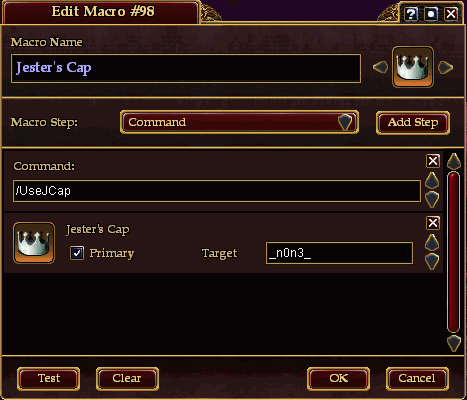
Sample macro window
 
Description
Changes:
Version 1.6 (2026-01-31):
  • added support for the illusionist's Prismatic Chaos I - XX spell.
Version 1.5 (2023-11-28):
  • added support for the troubador's Jester's Cap IV - X spell.
  • added target name editor.
Version 1.4 (2021-11-29):
  • added support for the troubador's Jester's Cap III spell.
Version 1.3 (2020-12-27):
  • added support for the dirge's Confront Fear spell.
Version 1.2 (2019-11-26):
  • added support for the troubador's Jester's Cap II spell.
  • Clearwater Current timer changed from 30 sec to 24 sec.
Version 1.1 (2019-07-28):
  • added support for the warden's Clearwater Current spell.


Description:

Helps the troubadours to sequentially use the Jester's Cap on 1-3 players.
Helps the wardens to sequentially use the Clearwater Current on 1-5 players.
Helps the dirges to sequentially use the Confront Fear on 1-5 players.
Now also helps the illusionists to sequentially use the Prismatic Chaos on 1-3 players.
No need to edit macros in every group, no need to remember who got the Jester's Cap (Clearwater Current, Confront Fear, Prismatic Chaos) last time. Create one macro and just use it without any further editing.


Installation:

This is a standalone "Custom" UI mod, it does not replace any other UI piece. Thus you *are* required to be using a non-default UI in order to view this UI piece. If you are using Default as your current UI, you will need to create a new UI folder for this mod as you cannot simply copy it into the Default folder and have it function. If you fall into this category, please follow this guide to set up a non-Default UI folder.
FAQ: How to install

As this is a "Custom" namespace UI mod, you will either need to have a "eq2ui_custom.xml" file to add this file's reference to, or use a new one. If you do not already have this file, one is included in the download archive. If you do already have it, do not overwrite it, open it in a text editor and within the "Custom" page element add the following:
Code:
<Include>eq2ui_custom_ToggleBuffing.xml</Include>

Usage:

This window automatically shows when you enter the game with your 65+ level troubadour, 92+ level warden, 50+ level dirge or 28+ level illusionist. Also you can show this window with the command:
Code:
/show_window Custom.ToggleBuffing
Press {T} button to set selected player as target for the Jester's Cap (Clearwater Current, Confront Fear, Prismatic Chaos). If there is no player selected, then target is you.

Current target for the Jester's Cap (Clearwater Current, Confront Fear, Prismatic Chaos) is highlighted by arrows. Casting the Jester's Cap (Clearwater Current, Confront Fear, Prismatic Chaos) switches current target to the next one. For the current target created an alias with the command to use the Jester's Cap (Clearwater Current, Confront Fear, Prismatic Chaos) on this player. This alias updates when current target changes.

Jester's Cap alias name:
Code:
/UseJCap
Clearwater Current alias name:
Code:
/UseCWCurrent
Confront Fear alias name:
Code:
/UseCFear
Prismatic Chaos alias name:
Code:
/UsePChaos
Use this alias as a command in the macro to sequentially use the Jester's Cap (Clearwater Current, Confront Fear, Prismatic Chaos) on selected in this window players.
To be able to see when the Jester's Cap (Clearwater Current, Confront Fear, Prismatic Chaos) is ready you may add Jester's Cap (Clearwater Current, Confront Fear, Prismatic Chaos) spell to the same macro and set it's target to some nonexistent target ( _n0n3_ for example).
Archive List (Old Versions)
File Name
Version
Size
Author
Date
1.5
8.27 Kb
Enter37
11-28-2023 03:36 PM
1.4
7.41 Kb
Enter37
11-29-2021 02:00 PM
1.3
6.84 Kb
Enter37
12-27-2020 07:38 AM
1.2
6.88 Kb
Enter37
11-26-2019 12:35 PM
1.1
6.84 Kb
Enter37
07-28-2019 04:04 PM
1.0
5.56 Kb
Enter37
07-13-2018 01:57 PM
File Statistics
User Rating:
5 out of 5 with 1 votes
Downloads: 46728
Views: 83175
Favorites: 2
Uploaded By:
 
Last Modified: N/A

View Pictures. Download Now! Post A Comment


Post A Reply
Author Comments Comment Options
Unread 12-12-2025, 07:56 PM  
FoxdenVixen
A Young Mystail Rat
 
FoxdenVixen's Avatar

Server: Freeport
Forum posts: 5
File comments: 26
Uploads: 0
Re: Re: Re: Rage of Cthurath

Quote:
Originally posted by Enter37
Version 1.5 already supports Jester's Cap I - X. Perhaps you are still using an older version. If so, please update it to the latest version (1.5).

PS: There are no changes in the game UI that affect this mod.
My window isn't showing me who I am jcapping and how much time is left. I am having to do it manually. I do have the current 1.5 version. I may have to reinstall it.
FoxdenVixen is offline Report comment to moderator   Reply With Quote Reply With Quote
Unread 12-11-2025, 03:02 PM  
Enter37
A Coastal Crab
Interface Author - Click to view interfaces

Server: Unkown
Forum posts: 0
File comments: 5
Uploads: 1
Re: Re: Rage of Cthurath

Quote:
Originally posted by FoxdenVixen
I had the same problem. We are getting a new spell with the new expac. It is version V instead of IV. I tried to add the verbage for V but still couldn't get it to work. Hopefully there will be a new version to download soon that includes version V.
Version 1.5 already supports Jester's Cap I - X. Perhaps you are still using an older version. If so, please update it to the latest version (1.5).

PS: There are no changes in the game UI that affect this mod.
Enter37 is offline Report comment to moderator   Reply With Quote Reply With Quote
Unread 12-06-2025, 09:01 AM  
Darqwood
A Griffon
 
Darqwood's Avatar
Interface Author - Click to view interfaces

Forum posts: 965
File comments: 921
Uploads: 9
Re: Re: Rage of Cthurath

Quote:
Originally posted by Enter37
Changes:
Version 1.5 (2023-11-28):
added support for the troubador's Jester's Cap IV - X spell.
• added target name editor.
It looks like v1.5 of the window was modified to use any level of Jester's Cap IV through X. Mine seems to be working in Beta when using the /UseJCap alias without changing anything (unless I'm doing something wrong?) Not sure how to help troubleshoot aside from re-downloading.

Darqwood is offline Report comment to moderator   Reply With Quote Reply With Quote
Unread 12-05-2025, 12:13 PM  
FoxdenVixen
A Young Mystail Rat
 
FoxdenVixen's Avatar

Server: Freeport
Forum posts: 5
File comments: 26
Uploads: 0
Re: Rage of Cthurath

Quote:
Originally posted by Airenx
Seems when I added this to my BetaServer UI it isn't working. Is there something that has changed UI wise between Live and the Beta for the new expansion coming in?
I had the same problem. We are getting a new spell with the new expac. It is version V instead of IV. I tried to add the verbage for V but still couldn't get it to work. Hopefully there will be a new version to download soon that includes version V.
FoxdenVixen is offline Report comment to moderator   Reply With Quote Reply With Quote
Unread 12-04-2025, 03:34 PM  
Airenx
A Coastal Crab

Server: Unkown
Forum posts: 0
File comments: 2
Uploads: 0
Rage of Cthurath

Seems when I added this to my BetaServer UI it isn't working. Is there something that has changed UI wise between Live and the Beta for the new expansion coming in?
Airenx is offline Report comment to moderator   Reply With Quote Reply With Quote
Unread 04-07-2024, 02:44 PM  
Enter37
A Coastal Crab
Interface Author - Click to view interfaces

Server: Unkown
Forum posts: 0
File comments: 5
Uploads: 1
Re: won't advance

Quote:
Originally posted by eqcrack
This just suddenly stopped working for me.

It won't advance to the next person in the window list even though they're in the list and checked.
For troubies updating to the latest version (1.5) is required, as a new version of Jester's Cap has been added in Ballads of Zimara.
Enter37 is offline Report comment to moderator   Reply With Quote Reply With Quote
Unread 04-05-2024, 12:06 PM  
eqcrack
A Coastal Crab

Server: Unkown
Forum posts: 1
File comments: 5
Uploads: 0
won't advance

This just suddenly stopped working for me.

It won't advance to the next person in the window list even though they're in the list and checked.
eqcrack is offline Report comment to moderator   Reply With Quote Reply With Quote
Unread 04-02-2024, 04:07 PM  
ThaiTanic
A Young Mystail Rat

Server: Unkown
Forum posts: 5
File comments: 13
Uploads: 0
I want to thank you for this. We also added Illusionist support for Prismatic Chaos and just wanted to stop by and say thanks for all the ground work!

Last edited by ThaiTanic : 05-30-2024 at 02:34 PM.
ThaiTanic is offline Report comment to moderator   Reply With Quote Reply With Quote
Unread 02-11-2024, 10:34 PM  
eqcrack
A Coastal Crab

Server: Unkown
Forum posts: 1
File comments: 5
Uploads: 0
Not working

Did anyone else's stop working recently? On both of my computers it won't toggle to the next person and just casts on me only.
eqcrack is offline Report comment to moderator   Reply With Quote Reply With Quote
Unread 01-03-2024, 04:27 AM  
Enter37
A Coastal Crab
Interface Author - Click to view interfaces

Server: Unkown
Forum posts: 0
File comments: 5
Uploads: 1
Quote:
Originally posted by Nimmerin
Hi. I notice in some of the screenshots in this thread, the window seems to have more then 3 people in it. How do I get the window to show more than 3 please?
Maximum 3 targets for Jester's Cap. For other spells up to 5 targets. Just resize window.
Enter37 is offline Report comment to moderator   Reply With Quote Reply With Quote
Unread 12-31-2023, 09:33 AM  
Nimmerin
A Grizzled Badger

Server: Crushbone
Forum posts: 45
File comments: 2
Uploads: 0
Hi. I notice in some of the screenshots in this thread, the window seems to have more then 3 people in it. How do I get the window to show more than 3 please?
Nimmerin is offline Report comment to moderator   Reply With Quote Reply With Quote
Unread 10-24-2023, 08:11 PM  
FoxdenVixen
A Young Mystail Rat
 
FoxdenVixen's Avatar

Server: Freeport
Forum posts: 5
File comments: 26
Uploads: 0
Jester's Cap IV coming in new BoZ expac

I've been playing the new beta and doing groups in heroics and will start raid testing tomorrow. The current version does not work with the upgraded Jester's Cap IV spell. Hopefully it can be fixed before the expac goes live.
FoxdenVixen is offline Report comment to moderator   Reply With Quote Reply With Quote
Unread 08-29-2023, 10:27 AM  
Sai4es
A Coastal Crab

Server: Unkown
Forum posts: 0
File comments: 1
Uploads: 0
Good afternoon. does not work on the pvp server. if a player has a pvp title, it gives an error. pvp titles are not disabled.
Sai4es is offline Report comment to moderator   Reply With Quote Reply With Quote
Unread 06-29-2023, 12:00 PM  
Darqwood
A Griffon
 
Darqwood's Avatar
Interface Author - Click to view interfaces

Forum posts: 965
File comments: 921
Uploads: 9
Quote:
Originally posted by zaradann
Does this customui.xml look right?

<?xml version="1.0" encoding="utf-8"?>
<Page IgnoreTab="false" ismodule="true" Name="Custom" PackSize="1,1" ScrollExtent="1024,768" Size="1024,768" Visible="false">
<include>darqui_custom_vars.xml</include>
<include>darqui_custom_transport.xml</include>
<include>darqui_custom_statmon.xml</include>
<include>darqui_custom_navbar.xml</include>
<include>darqui_custom_iconbar.xml</include>
<include>darqui_custom_harvesting.xml</include>
<include>darqui_custom_gearbuff.xml</include>
<include>darqui_custom_extplayer.xml</include>
<include>eq2ui_Custom_ToggleBuffing.xml</include>
</Page>

Also, where does the window show up on the screen normally? I have been trying to get this app to work for about 2 weeks. Maybe certain custom elements of DarqUI block this from working? I have no ui.log so no errors being posted.
It looks fine, although make sure the file name is eq2ui_custom.xml, not customui.xml. I just tried this again from a fresh install of DarqUI and had zero issues getting it to show up. Using the chat command

/show_window Custom.ToggleBuffing

Nothing in DarqUI will block a custom piece unless there is a name conflict which is not the case here. Unless moved manually, the window will appear at 200 x 200 pixels away from the upper left-hand corner of the game window.


The only possible thing I can think of would be if there is some unexpected issue with one of your other custom windows causing it to fail loading. Try putting the ToggleBuffing include line at the top of the list instead of the bottom and see if that fixes it. Mine was at the bottom like in your example and there was no problem.


.
Darqwood is offline Report comment to moderator   Reply With Quote Reply With Quote
Unread 06-28-2023, 08:26 PM  
zaradann
A Rumbleroot Sapling

Server: Antonia Bayle
Forum posts: 65
File comments: 12
Uploads: 0
Does this customui.xml look right?

<?xml version="1.0" encoding="utf-8"?>
<Page IgnoreTab="false" ismodule="true" Name="Custom" PackSize="1,1" ScrollExtent="1024,768" Size="1024,768" Visible="false">
<include>darqui_custom_vars.xml</include>
<include>darqui_custom_transport.xml</include>
<include>darqui_custom_statmon.xml</include>
<include>darqui_custom_navbar.xml</include>
<include>darqui_custom_iconbar.xml</include>
<include>darqui_custom_harvesting.xml</include>
<include>darqui_custom_gearbuff.xml</include>
<include>darqui_custom_extplayer.xml</include>
<include>eq2ui_Custom_ToggleBuffing.xml</include>
</Page>

Also, where does the window show up on the screen normally? I have been trying to get this app to work for about 2 weeks. Maybe certain custom elements of DarqUI block this from working? I have no ui.log so no errors being posted.
zaradann is offline Report comment to moderator   Reply With Quote Reply With Quote
Post A Reply

 
Category Jump:
Search this Category:
 

All times are GMT -5. The time now is 05:03 PM.


Our Network
EQInterface | EQ2Interface | WoWInterface | LoTROInterface | ESOUI | MMOUI