 |
 |
 |
|
 |


|
|
|
#1
 07-05-2011, 02:21 AM
|
||||
|
||||

Quote:
 Should I happen to have some extra spare time next time I'm messing around in photoshop, I could easily create other simple color styles (background, buttons, etc) but nothing super fancy!
__________________
"I'm afraid you're guilty of thought-crime. Don't bother getting the door, we'll let ourselves in..." <Donate to DrumsUI> < [DrumsUI] Updater > < [DrumsUI] Full Interface> < 
|



|
#2
07-05-2011, 04:49 AM
|
||||
|
||||
|
If you need/want some help with art files Drumstix. Drop me a line, i would be more than happy to help,
Draven
|





|
#4
07-05-2011, 04:56 PM
|
||||
|
||||
|
hehe, its up to drumstix, its his work

|
|
#5
09-12-2011, 07:47 PM
|
|||
|
|||
|
Chat window & Drums
Drums has been a great UI for me, and I haven't had any problems until now.
On a lark, I decided to use the updater for drums, and upon logging in, found that I could no longer type anything in my chat window. Whenever I try to initiate typing something (i.e., pressing "r" to respond to a tell, etc.), I get a very brief graying out of the bottom line of my chat window which then reverts back to its default appearance. Since I'm still able to use my voice chat feature, I asked around in guild and someone commented that they had a similar problem with Drums. I followed their suggestion to open a new chat window to replace the one that didn't seem to be working, but it didn't help. Any idea?
|
|
#6
09-13-2011, 02:30 AM
|
||||
|
||||
|
Quote:
Quote:
|

|
#7
09-17-2011, 12:52 AM
|
|||
|
|||
|
I'm having this exact same problem after installing DrumsUI for the first time and I don't understand your solution above.
When I was running through the installer or download, I saw a big warning that said "If you find yourself unable to type, go to... " and of course I clicked right through it expecting not to need it or if I needed it, I expected I'd be able to find it again. But for the life of me, I can't. What did it say and where was it? I remember something about chat options.
|
|
#8
09-17-2011, 03:41 AM
|
||||
|
||||
|
all you need to do is go to your chat box and right click and go to window settings and make sure that its set to "frame & title" in the drop down box. should fix all issues.
Hope this helps
|

|
#9
09-19-2011, 12:15 AM
|
|||
|
|||
|
Quote:
Is there any desire by Mr. DrumsUI to have a more ProfitUI like login screen?
|
|
#10
11-29-2011, 11:37 AM
|
||||
|
||||
|
I can not get the UI to work or the updater. Updater gets to the downloading application window then an error pops up, unable to run application. If I am seeing this correctly, the UI will NOT work unless the updater updates it correct? If that is indeed the case, why does the updater crash and how do I fix it?
I've been back to the game for almost 3 months after a 6 year leave and never had these UI problems before. Now I can not get any custom UI's to work at all and can not seem to get help anywhere. This is my last resort. Any and all help will be greatly appreciated!!
|
|
#11
10-08-2011, 09:02 AM
|
|||
|
|||
|
Request
First, thanks for creating a wonderful UI!
Issues -After a /load_uisettings the "experience window" often reverts to a default location. It doesn't seem to consistently save its own location. -Menu/stat bar will often disappear after a /load_uisettings. Request I'm a big fan of redundant target and implied windows, so I manually use /show_window MainHUD.target and /show_window MainHUD.impliedtarget to bring up spare windows. DrumsUI windows (with full effects) I place at the top, the default (?) I place over my hotbar cluster. Unfortunately these "default" target windows are lacking in style and function. It looks silly having "Group" and the AA Star constantly up (regardless of what I target). I tried replacing them with various aftermarket windows yet I cant seem to change the windows I manually bring up. Is there a way you could naturally implement complex/simple redundant target windows? 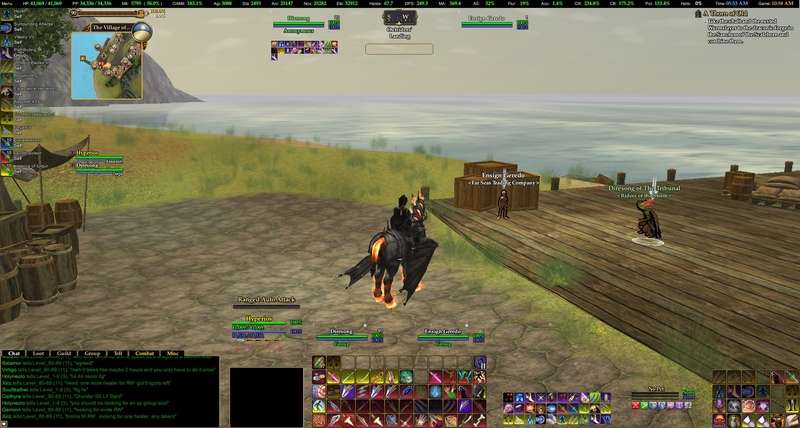
|
|
#12
10-10-2011, 05:11 PM
|
||||
|
||||
|
Quote:
The biggest pet peeve for me is managing multiple verisons of the same window, so there is much doubt that I would ever get around to something like this, simply because I would not use it. If you or someone you know could do what you want, I could include it in say the Updater, and then leave it up to the coder to send me update when needed. Beyond that, I'll simply say no for now.
__________________
"I'm afraid you're guilty of thought-crime. Don't bother getting the door, we'll let ourselves in..." <Donate to DrumsUI> < [DrumsUI] Updater > < [DrumsUI] Full Interface> <
|
|
#13
10-10-2011, 08:24 PM
|
|||
|
|||
|
Quote:
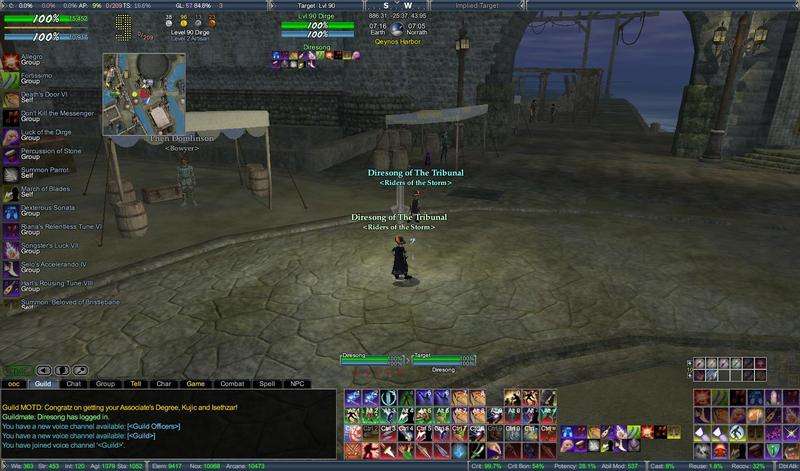 The goal is for people with very large monitors to focus on the "meat-n-potatoes" portion of the UI (hp/power, target, hotbars, detriments) with minimal data clutter. The only difference is they put click-2-cure on the players redundant (not on the primary w/ the concentration slots).
|
|
#14
10-10-2011, 09:48 PM
|
||||
|
||||
|
I gotcha. My issue with that is the minimalism overall is reduced by having more duplicate data, and the extra elements on screen eat more away the precious FPS of any given user. Every extra window simply reduces performance of the game's UI engine.
I understand the function of it, but am unlikely to get to something like that anytime soon on my own free time coding/messing with the UI.
__________________
"I'm afraid you're guilty of thought-crime. Don't bother getting the door, we'll let ourselves in..." <Donate to DrumsUI> < [DrumsUI] Updater > < [DrumsUI] Full Interface> <
|
|
#15
10-13-2011, 07:12 PM
|
|||
|
|||
|
Actually...
Those "minimalistic" dataelements from profit is nothing new .. here is how it works in profit The Small bars with <Me> <Target> <implied Target> in profit is in actuallity the "Player Window" which have expanded elements to contain target and implied target - which is why you cant interact with anyone but yourself when right clicking it. The left top is the XP window with expanded info to function as a "Player window"
|
|
#17
12-02-2011, 03:55 AM
|
||||
|
||||
|
Quote:
__________________
"I'm afraid you're guilty of thought-crime. Don't bother getting the door, we'll let ourselves in..." <Donate to DrumsUI> < [DrumsUI] Updater > < [DrumsUI] Full Interface> <
|
|
#19
12-02-2011, 08:39 PM
|
|||
|
|||
|
its me again.. guess what ? *rattles the cookiejar*
|
|
#20
12-02-2011, 09:21 PM
|
||||
|
||||
|
xmas cookies?!
__________________
"I'm afraid you're guilty of thought-crime. Don't bother getting the door, we'll let ourselves in..." <Donate to DrumsUI> < [DrumsUI] Updater > < [DrumsUI] Full Interface> <
|
|
#21
03-04-2012, 08:02 PM
|
|||
|
|||
|
menu/stats not there
ok im just returning to eq2 after a bit of a beak and installed drums but for some reason there is no menu/stats bar. i even went into options and unchecked allow windows offscreen and did a windows reset putting everything in the center of my screen and it wasnt there. i first thought i was being a noob and did something wrong and uninstalled and reinstalled and still no menu/stats window....what am i missing?
|
|
#22
03-04-2012, 10:59 PM
|
||||
|
||||
|
Try using this command:
/show_window MainHUD.StartButton
__________________
"I'm afraid you're guilty of thought-crime. Don't bother getting the door, we'll let ourselves in..." <Donate to DrumsUI> < [DrumsUI] Updater > < [DrumsUI] Full Interface> <
|
|
#23
03-05-2012, 02:45 PM
|
|||
|
|||
|
sorry i should have said that in my post i tried that as well but still nothing.

|
|
#24
03-06-2012, 01:22 AM
|
|||
|
|||
|
no menu
I sometimes get this error and it auto fixes if I reload game. If you cannot see it after try this trick...1. make a new character 2. you should see the window menu 3. log off and on to main char 4. load_uisettings from the new char
also sometimes when reinstalling game "did a few times due to some bs bug that swaps me over to streaming" the spell icon setting or what have you is giant sized and is covering up the menu so I hit F10? and shrink the bar and move it away. Drums is great!
|


 Hybrid Mode

 |
© MMOUI
vBulletin® - Copyright ©2000 - 2026, Jelsoft Enterprises Ltd. |
 |
