|
| Category: Group windowDarqUI Group Window with Macro/Spell Icons and Cure Check |
Group Window:
v2.1.0:
Please click the link below to visit the new DarqUI v2.1 page which includes a new update for this window. Thank you for using the DarqUI interface pieces.
v1.42 Update for Non-English Clients. This update adds a class tag to the five spell sets to load cures automatically for non-English clients. If you have already downloaded v1.4 for an English client, you do not need this update. No other features were changed from version 1.4. The updated DarqUI raid window v1.42 is also included in this package. You do not need to download both packages separately.
Please note, you will need to re-run the button utility (included) to add the new class tag to your character sets. Thanks to Taxor for his assistance with this update.
v1.4 New Features:
Auto-load Spell Sets: Spell sets are now selected automatically by tagging them with your characters' names. No more scrolling through button sets every time you log in with an alt.
Auto-detect Curing Classes: Click-to-cure buttons are now automatically populated according to the capabilities of your class. You can optionally attach class-specific tells, commands, etc. to the buttons.
More Spell Sets: Two more spell sets have been added to accommodate more of your alt characters.
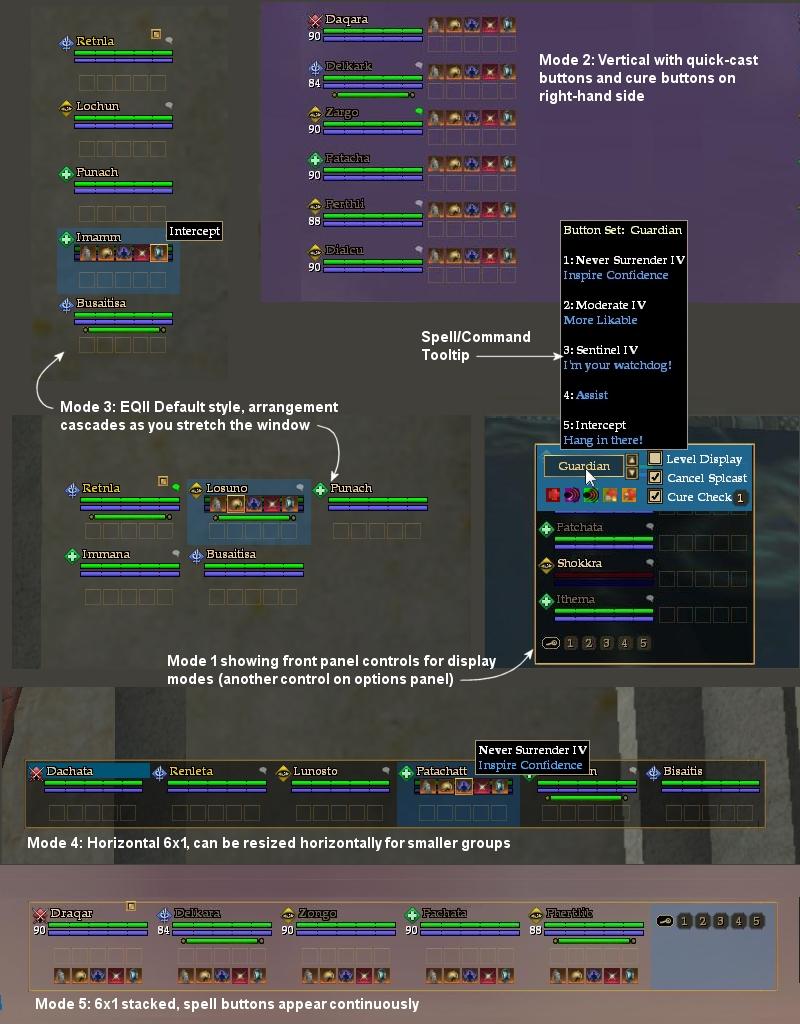
New Display Modes: The arrangement of display mode 2 has been improved, and a new stacked display mode (#5) has been added for more flexibility.
Other improvements: Preset spell choices have been updated to reflect the new Sentinel's Fate level tier. The DarqUI Button Utility has been reworked for the new and expanded features.
Please take a few minutes to read through the help file included with the download. It contains extensive instructions and advice for getting the most out of this interface piece.
For current users: The format of an individual spell set did not change from the last version, but the new XML data block requires five spell sets instead of three. The first three sets can be safely replaced with your current ones and the last two can be left blank or configured with the utility. (Re-label the sets with your characters' names to activate the auto-load feature.) Your current click-to-cure block will be obsolete, so if you have added any custom cure code you will need to use the updated configuration utility. Each curing class/archetype now has its own custom code area instead of all in one.
v1.3:
Command macros on the click-to-cure buttons. This was added to give curing classes a way to coordinate healer channel information, although creative players who don't have cures can use the command function to build new targeted commands into the raid and group windows. (The new DarqUI raid window is also included in this package. You do not need to download both separately.)
Audible Groupwide Detrimentals. New interface controls provide you with instant audible feedback when selected impairments land on members of your group. Choices can be customized on-the-fly so you can re-combine as needed for each encounter. Allows priests to respond more freely to other gameplay elements without constantly watching the group's detrimentals during difficult encounters. Switch monitoring on and off for each impairment type with a single click.
Simplified Default Settings. All default options can now be set with simple variables. Previously several of the choices required digging into the XML code.
Version 1.20: Two new display modes have been added: a compact horizontal mode and a cascading default style. Mouse-over controls for all four display modes have been added to the front panel (see image) which can be turned off if they are distracting. See the help file for details.
Other improvements:
* An assist command and icon have been added to the preset options for all subclasses.
* Help file has been expanded to include instructions for setting window default preferences.
* Paladin AA cures have been added as a preset option in the button utility.
Version 1.10: Both windows have been updated to include a command (macro) facility which extends the use of the quick-cast buttons to non-spellcast commands. Optionally execute a targeted command string of your choice along with, or instead of, the spell or combat art using the familiar %T mnemonic. Use the new command feature to assist, follow, do emotes, send targeted text to specific channels or players, create more complex group/raid/say/tells, cast a follow-up spell. A new tooltip format lists your macro commands along with spell name text.
Other improvements: Cure Check feature now prevents casting cures when the detrimental is uncurable.
Quick-cast Buttons with Spell Icons: These targeted spell buttons can be configured with the actual spell icons instead of numbers. A simple utility (with a complete help file) is included with the download for setting up your buttons. Switch between three sets of four buttons in the raid window, and three sets of five in the group window. Choose one of two locations for the quick-cast icons: over top of the player health bars where they appear only for the player you are mousing over, or on the right side where they appear continuously. If you can cut-and-paste text in Notepad, you can set up your spell icons.
Click-to-Cure with Cure Check: These cures work as expected, but they have a feature that I haven't seen on other interfaces which I call Cure Check. If this option is turned on, the click-to-cure button will do a check to see if there is at least one detrimental effect of that type on the player at the moment you click. If not, the button doesn't respond, your spellcast is not interrupted, and the tell/groupsay/raidsay does not go into chat. This will help in some cases where the same player would have been over-cured by multiple priests. Also with this feature, a priest could cast a long heal and then pre-spam a cure button without missing the heal if the cure turned out to not be needed. 
I hope you enjoy using this mod. I have included the group window with the raid window because they were designed together, and they operate the same way. But you can use one without the other if you prefer. If you like these windows, be sure to check out my Clock/Countdown Timer, and my Threat window which uses the Cure Check feature for remedy potions.
|
| Archive List (Old Versions) |
File Name |
Version |
Size |
Author |
Date |
|
1.42 |
2.43 MB |
Darqwood |
04-03-2010 11:08 AM |
|
1.3 |
2.41 MB |
Darqwood |
11-15-2009 02:57 PM |
|
1.20 |
2.41 MB |
Darqwood |
10-27-2009 10:50 PM |
|
1.10 |
2.37 MB |
Darqwood |
10-12-2009 04:56 PM |
|
1.0 |
2.27 MB |
Darqwood |
09-21-2009 07:29 PM |
| File Statistics |
| User Rating: |
|
| Downloads: |
45833 |
| Views: |
123062 |
| Favorites: |
23 |
| Uploaded By: |
|
| Last Modified: |
10-01-2010 12:16 PM by Darqwood |
|
|  |
|
 |
|
 07-10-2013, 06:05 AM
|
|
A Griffon
Forum posts: 965
File comments: 921
Uploads: 9
|
Quote:
Originally posted by Altietwo
Absolutely amazing work thank you!
I've two issues though I hope you might be able to help me with. The first is that default mode 5 simply doesn't work for me when I set it in the XML file; all other modes work great. I've set it to 4 and simple login and set it to 5.
Secondly - any way to scale this? I play at 2560 x 1440p and I suspect even if I did play at a lower res it would still be a bit small for my lobster accountant clickage.
Many Thanks - Altie
|
Altie, thank you for your comments. There are newer versions of the DarqUI Group window with many improvements that may be better choices for you. You can scale the DarqUI Group window (found here) up to about double its size in 10% increments while keeping all the features from the version on this page. If you want to choose from several preset group window layouts or create an entirely new, custom layout you can try the DarqUI Live Group window found here.
You may like one of these complete interfaces, but if you only want to use the group window you can specify that in the updater for the version you choose.
. |


|


|
|
07-09-2013, 07:40 PM
|
|
A Young Mystail Rat
Server: Antonia Bayle
Forum posts: 4
File comments: 2
Uploads: 0
|
Absolutely amazing work thank you!
I've two issues though I hope you might be able to help me with. The first is that default mode 5 simply doesn't work for me when I set it in the XML file; all other modes work great. I've set it to 4 and simple login and set it to 5.
Secondly - any way to scale this? I play at 2560 x 1440p and I suspect even if I did play at a lower res it would still be a bit small for my lobster accountant clickage.
Many Thanks - Altie
|
|
|
|
|
03-25-2013, 08:37 PM
|
|
A Crazed Gnoll
Server: Unkown
Forum posts: 23
File comments: 4
Uploads: 0
|
Quote:
Originally posted by Darqwood
Alugilac, the VanGurK skin uses a gradient background in those windows which is found in the windowelements.dds graphics file. You could delete that file out of your \images folder, but you would also be reverting several other important visual elements of that skin to the default. If you're handy with Photoshop, you can replace the gradient with something more consistent without losing the other elements.
.
|
Work complete! All done and it has a nice smooth solid background, ty for the help and the super quick reply!!
Last edited by alugilac : 03-25-2013 at 08:38 PM.
|
|
|
|
|
03-25-2013, 08:30 PM
|
|
A Crazed Gnoll
Server: Unkown
Forum posts: 23
File comments: 4
Uploads: 0
|
Quote:
Originally posted by Darqwood
Alugilac, the VanGurK skin uses a gradient background in those windows which is found in the windowelements.dds graphics file. You could delete that file out of your \images folder, but you would also be reverting several other important visual elements of that skin to the default. If you're handy with Photoshop, you can replace the gradient with something more consistent without losing the other elements.
.
|
Shoot! well I guess I'll give it a shot. I do have the .dds plugin for gimp, might look for one for PS as well since I know it much better. TY for the pro tip!! |
|
|
|
|
03-25-2013, 07:54 PM
|
|
A Griffon
Forum posts: 965
File comments: 921
Uploads: 9
|
Quote:
Originally posted by alugilac
Here is a pic of the background of the group window, Can I make this solid for both the group and raid window?
http://screencast.com/t/EXgp9t8pMpUM
I would love to make it a solid opacity all the way down, I like the background being dark so I can see the window contents better. Can you explain how I can make that happen please?
Thank you and your UI rocks!
|
Alugilac, the VanGurK skin uses a gradient background in those windows which is found in the windowelements.dds graphics file. You could delete that file out of your \images folder, but you would also be reverting several other important visual elements of that skin to the default. If you're handy with Photoshop, you can replace the gradient with something more consistent without losing the other elements.
. |
|
|
|
|
03-25-2013, 05:27 PM
|
|
A Crazed Gnoll
Server: Unkown
Forum posts: 23
File comments: 4
Uploads: 0
|
Here is a pic of the background of the group window, Can I make this solid for both the group and raid window?
http://screencast.com/t/EXgp9t8pMpUM
I would love to make it a solid opacity all the way down, I like the background being dark so I can see the window contents better. Can you explain how I can make that happen please?
Thank you and your UI rocks! |
|
|
|
|
01-13-2013, 03:02 PM
|
|
A Coastal Crab
Server: Unkown
Forum posts: 0
File comments: 9
Uploads: 0
|
Re: Re: Defiler Spells
Quote:
Originally posted by Darqwood
LGRaxa, yes I can add Death Cries to the list, although in the meantime you can choose Death Ward in the utility to get the correct icon and then change the spell name to Death Cries before saving. The Spell ID for Death Cries is 169022251 if you are using those instead of the name.
Eddarion, send your group window to darqwood at hotmail dot com and I'll see if I can figure out what's going on with your spell buttons.
.
|
Never knew it was THAT easy to do Darq. Thank you so much, just solved a huge problem I was having with other chars as well.
Sorry to bug you AGAIN Darq, but is there a Raid ui? For some reason I can't get the icons to show up in raid or even the 1-5 numbers next to the targets. The Raid UI is really screwy to me and figured I am either A) Doing something wrong or B) there isn't one.
Tried to look up the raid portion of the DarqUI utility program and its not registering
Last edited by LGRaxa : 01-14-2013 at 09:58 PM.
|
|
|
|
|
01-12-2013, 09:01 AM
|
|
A Griffon
Forum posts: 965
File comments: 921
Uploads: 9
|
Re: Defiler Spells
Quote:
Originally posted by LGRaxa
Do you think you could add certain spells to the quick cast spells of the defiler. In the Prestige tree many people spec into "Death Cries" which replaces "Death Ward" as an upgrade. Was wondering if you could add that to the spells list please.
|
LGRaxa, yes I can add Death Cries to the list, although in the meantime you can choose Death Ward in the utility to get the correct icon and then change the spell name to Death Cries before saving. The Spell ID for Death Cries is 169022251 if you are using those instead of the name.
Eddarion, send your group window to darqwood at hotmail dot com and I'll see if I can figure out what's going on with your spell buttons.
. |
|
|
|
|
01-12-2013, 07:42 AM
|
|
A Coastal Crab
Server: Unkown
Forum posts: 0
File comments: 1
Uploads: 0
|
Problem
Hi Darq!
My Groupwindow doesn't work correct: when casting i press spell buttons, but it doesn't work saying in chat, there's no groupmember with such name *** (symbol set)  |
|
|
|
|
01-11-2013, 12:48 AM
|
|
A Coastal Crab
Server: Unkown
Forum posts: 0
File comments: 9
Uploads: 0
|
Defiler Spells
Do you think you could add certain spells to the quick cast spells of the defiler. In the Prestige tree many people spec into "Death Cries" which replaces "Death Ward" as an upgrade. Was wondering if you could add that to the spells list please.
|
|
|
|
|
06-04-2011, 04:55 PM
|
|
A Griffon
Forum posts: 965
File comments: 921
Uploads: 9
|
Quote:
Originally posted by eq2fanatic0001
Is there any way I can make it visible? I've tried alt-g and trying to group and so on and so forth, but atm the raid window only works.. Have been using it for bout a month now and changed out my ui and had a problem with it so far.. Any suggestions or solutions? Its awesome btw 
|
Try pressing F10 to show the location of all your windows, and see if you can find it like that. You may have the window opacity set at zero (invisible). Right-click the group window, choose Window Settings, and move all the sliders to the right. Press F10 twice more to get back to normal screen mode.
Otherwise, if you have alts that can see the window, you can type /load_uisettings and choose the alt's window layout which will put the group window in the same place as the alt.
A last resort would be to go to Options (alt+O) then click User Interface, Game Windows, Reset location for all windows. This will do just what it says, so be prepared to move all your windows back into their custom locations.
__ |
|
|
|
|
06-03-2011, 11:16 AM
|
|
A Coastal Crab
Server: Unkown
Forum posts: 1
File comments: 3
Uploads: 0
|
Group Window, Not Visible
Is there any way I can make it visible? I've tried alt-g and trying to group and so on and so forth, but atm the raid window only works.. Have been using it for bout a month now and changed out my ui and had a problem with it so far.. Any suggestions or solutions? Its awesome btw |
|
|
|
|
11-20-2010, 09:27 AM
|
|
A Griffon
Forum posts: 965
File comments: 921
Uploads: 9
|
You can find Spell ID numbers using the following thread:
http://www.eq2interface.com/forums/s...ad.php?t=13034
and you are correct, replace the spell name with the ID number.
Quote:
Originally posted by Levlelfe
Thx for your quick support.
How can i get the ID of a spell/ability ? and How i'm supposed to put it in my .xml ?
<Data Name="Spell4" SpellName="867465487" Tell=" " Gsay=" " Rsay=" " BG="O" Cmd=" " CmdTT=" " /> ???
Did i need to replace SpellName by SpellID or something like that ?
|
|
|
|
|
|
11-19-2010, 08:11 PM
|
|
A Coastal Crab
Server: Antonia Bayle
Forum posts: 0
File comments: 2
Uploads: 0
|
Thx for your quick support.
How can i get the ID of a spell/ability ? and How i'm supposed to put it in my .xml ?
<Data Name="Spell4" SpellName="867465487" Tell=" " Gsay=" " Rsay=" " BG="O" Cmd=" " CmdTT=" " /> ???
Did i need to replace SpellName by SpellID or something like that ?
|
|
|
|
|
11-19-2010, 06:19 AM
|
|
A Griffon
Forum posts: 965
File comments: 921
Uploads: 9
|
Levlelfe, the diacritical marks are most likely the problem. The Group window version on this page does not offer any international support. The DarqUI updater found elsewhere on EQ2Interface has newer settings that may help, but using the ID number would be a good alternative since you only have one spell giving you trouble. The spell icon will appear correctly either way.
Quote:
Originally posted by Levlelfe
I have some issue configuring the groupUI for some spells.
I'm on Storms, French server.
My problem is with "Back into the Fray" (T9 one) the translation was "Retour dans la mêlée" :
Back into the fray III > Launch nothing
Back into the fray > Launch Back into the fray II
Retour dans la mêlée III > Launch nothing
Retour dans la mêlée > Launch nothing
For all the other spells i put the translated spell without number, i E to launch "Regrowth III" i just enter "Renaissance" and it launch "Renaissance III" so it's ok.
Seems for "Back into the fray" the word "mêlée" was the problem ?
|
|
|
|
|
|
|
All times are GMT -5. The time now is 10:00 AM.
|
|