 |
 |
 |
|
 |


|
|||||||


|  |
| ||||||||||||||||||||||||||||||||||||||||||||||||||||||||||||||||||||||||||||




 |
|

 07-19-2017, 09:54 PM
|
|||
|
A Young Mystail Rat
Server: Oasis
Forum posts: 4
File comments: 16
Uploads: 0
|
I have a couple of raid buttons that need to be able to issue multiple commands in order to coordinate with other raiders.
For example, I need to send one /tell each to 2 non-targets. As far as I can tell I can only send a /tell to the target and then use the command field to add another tell to another player. Is it possible to accomplish what I'm after? Could it be implemented if not? |
||


|


|
|
03-06-2017, 12:48 PM
|
|||
|
A Young Mystail Rat
Server: Unkown
Forum posts: 2
File comments: 3
Uploads: 0
|
Re: Re: Re: No icons?
Figured it out
 Thanks again for your help! |
||
|
|
|
|
03-05-2017, 05:17 PM
|
|||
|
A Young Mystail Rat
Server: Unkown
Forum posts: 2
File comments: 3
Uploads: 0
|
Re: Re: No icons?
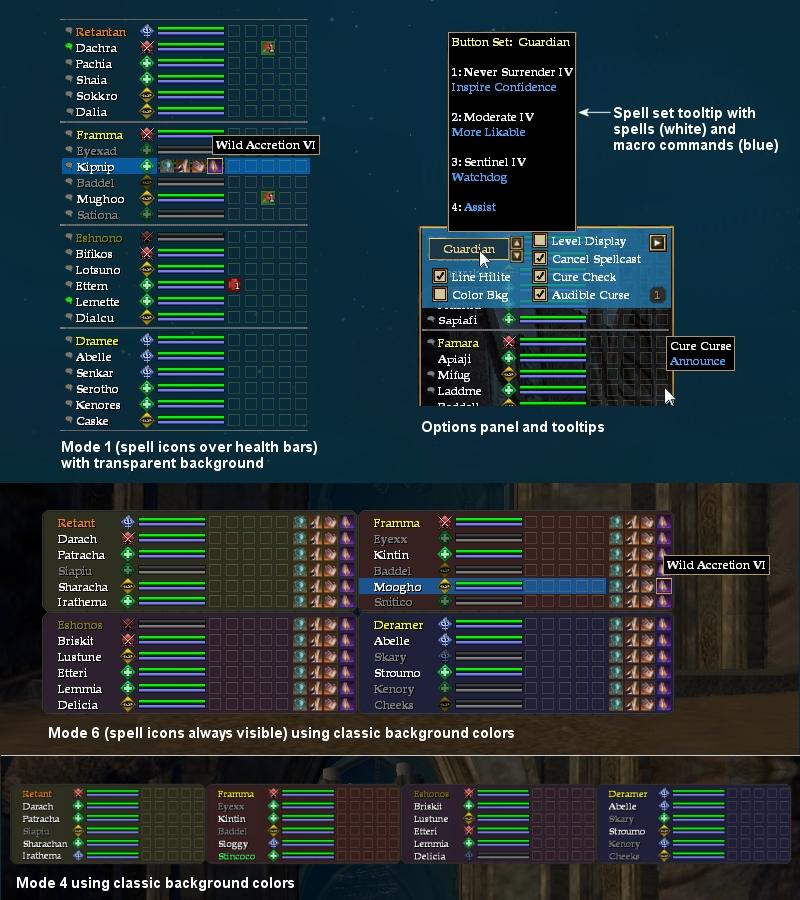
Thank you! The raid window works perfectly. The only question I have, is there a way to remove the cure buttons? As a dirge I can't use any of that so its just blank buttons.
Thank you for your help. It will really make a huge difference in my raiding. |
||
|
|
|
|
03-05-2017, 08:38 AM
|
||||
|
A Griffon
Forum posts: 965
File comments: 921
Uploads: 9
|
Re: No icons?
Quote:
You can use the newest raid window without the entire UI. Run the DarqUI Unified Utility and in the auto-setup click "Do these items myself." Then check for updates and only choose Raid, Spell Suggestions (the icons), and Window Manager (in-game editor). Lastly, on the Files page of the utility click "Make this UI the default." You will be happier in the long run setting it up like this. . Last edited by Darqwood : 03-05-2017 at 08:39 AM. |
|||
|
|
|
|
03-05-2017, 06:15 AM
|
|||
|
A Young Mystail Rat
Server: Unkown
Forum posts: 2
File comments: 3
Uploads: 0
|
No icons?
Hi,
This is the first custom UI I have tried to use. Not sure if I am missing something obvious. When I use the DarqUI Spell Button Utility v1.42 I am not able to click icon and have any options show up. I see that this page hasn't had any comments for a long time but I hope that someone notices this question. I am trying to avoid using an entire UI since a raid window is all I need. Thanks |
||
|
|
|
|
07-09-2011, 08:34 PM
|
|||
|
A Coastal Crab
Server: Antonia Bayle
Forum posts: 0
File comments: 1
Uploads: 0
|
hi, i lost my raid window somehow, i have the complete ui loaded if that makes any difference, please let me know if there's someway to retrieve it
|
||
|
|
|
|
10-01-2010, 12:06 PM
|
||||
|
A Griffon
Forum posts: 965
File comments: 921
Uploads: 9
|
 Re: how do I add to say in guild
Hi evertommy2002, to get the message to appear in guildchat, use the Command field. In the Command field type
gu Curing Curse on %T Quote:
|
|||
|
|
|
|
10-01-2010, 06:36 AM
|
|||
|
A Coastal Crab
Server: Unkown
Forum posts: 0
File comments: 2
Uploads: 0
|
how do I add to say in guild
Hello, how do I add when curing a curse to say it in guild "Curse Curing %t"
Thanks for your help |
||
|
|
|
|
09-15-2010, 12:57 PM
|
||||
|
A Griffon
Forum posts: 965
File comments: 921
Uploads: 9
|
Re: Having issue with setting up %T
Hello rxspace, you have it almost right. Make the changes shown in blue below and let me know if it works any better. In each case, I moved the text intended as a private tell for the targeted player into the Tell field, and added gsay to the beginning of the Cmd field to send that text into the group chat.
<Page Name="Spells1"> <Data Name="Label" Value="name" Class="Pal" /> <Data Name="Spell1" SpellName="Holy AId VII" Tell=" " Gsay=" " Rsay=" " BG="O" Cmd=" " CmdTT=" " /> <Data Name="Spell2" SpellName="Prayer of Healing VII" Tell=" " Gsay=" " Rsay=" " BG="P" Cmd=" " CmdTT=" " /> <Data Name="Spell3" SpellName="Intercept III" Tell=" " Gsay=" " Rsay=" " BG="O" Cmd=" " CmdTT=" " /> <Data Name="Spell4" SpellName="Elixir of Resuscitation" Tell=" " Gsay=" " Rsay=" " BG="O" Cmd=" " CmdTT=" " /> <Data Name="Spell5" SpellName="Amends" Tell="giving you amends" Gsay=" " Rsay=" " BG="O" Cmd="gsay Amends on Parent.Parent.T.Value" CmdTT="Macro enabled" /> <Page Name="Spells2"> <Data Name="Label" Value="name" Class="Coe" /> <Data Name="Spell1" SpellName="Enraging Demeanor III" Tell="Increase Your Hate Gain BY 17% & Inc Potency BY 10%" Gsay=" " Rsay=" " BG="O" Cmd=" " CmdTT=" " /> <Data Name="Spell2" SpellName="Coercive Healing" Tell="Let me make you a Better Healer" Gsay=" " Rsay=" " BG="O" Cmd="gsay Coercive Healing to parent.Parent.T.Value" CmdTT="Groupsay Coercive Healing" /> <Data Name="Spell3" SpellName="Mana Cloak IV" Tell=" " Gsay="Mana Cloak inc" Rsay="Mana Cloak inc to the group of" BG="P" Cmd=" " CmdTT=" " /> <Data Name="Spell4" SpellName="Mana Flow" Tell=" " Gsay=" " Rsay="Inc Mana FLow to" BG="B" Cmd="gsay Inc Mana Flow to Parent.Parent.T.Value" CmdTT="Macro enabled" /> <Data Name="Spell5" SpellName=" " Tell=" " Gsay=" " Rsay=" " BG="R" Cmd="assist Parent.Parent.T.Value" CmdTT="Assist" /> Quote:
|
|||
|
|
|
|
09-15-2010, 01:49 AM
|
|||
|
A Forest Scavenger
Server: Antonia Bayle
Forum posts: 18
File comments: 2
Uploads: 0
|
Having issue with setting up %T
hey i have tryed everthing and for some reason when i hit my button to put the the other player name in chat it dont work iam new to xml so sorry if i am a noob
<Page Name="Spells1"> <Data Name="Label" Value="name" Class="Pal" /> <Data Name="Spell1" SpellName="Holy AId VII" Tell=" " Gsay=" " Rsay=" " BG="O" Cmd=" " CmdTT=" " /> <Data Name="Spell2" SpellName="Prayer of Healing VII" Tell=" " Gsay=" " Rsay=" " BG="P" Cmd=" " CmdTT=" " /> <Data Name="Spell3" SpellName="Intercept III" Tell=" " Gsay=" " Rsay=" " BG="O" Cmd=" " CmdTT=" " /> <Data Name="Spell4" SpellName="Elixir of Resuscitation" Tell=" " Gsay=" " Rsay=" " BG="O" Cmd=" " CmdTT=" " /> <Data Name="Spell5" SpellName="Amends" Tell=" " Gsay="giving you amends" Rsay=" " BG="O" Cmd="Amends on Parent.Parent.T.Value" CmdTT="Macro enabled" /> <Page Name="Spells2"> <Data Name="Label" Value="name" Class="Coe" /> <Data Name="Spell1" SpellName="Enraging Demeanor III" Tell=" " Gsay="Increase Your Hate Gain BY 17 % & Inc Potency BY 10 % " Rsay=" " BG="O" Cmd=" " CmdTT=" " /> <Data Name="Spell2" SpellName="Coercive Healing" Tell=" " Gsay="Let me make you a Better Healer" Rsay=" " BG="O" Cmd="parent.Parent.T.Vaule " CmdTT=" " /> <Data Name="Spell3" SpellName="Mana Cloak IV" Tell=" " Gsay="Mana Cloak inc" Rsay="Mana Cloak inc to " BG="P" Cmd="Parent.Parent.T.Value Group" CmdTT="Macro enabled" /> <Data Name="Spell4" SpellName="Mana Flow" Tell=" " Gsay="Inc Mana FLow to " Rsay="In Mana FLow to" BG="B" Cmd="Parent.Parent.T.Value Group" CmdTT="Macro enabled" /> <Data Name="Spell5" SpellName=" " Tell=" " Gsay=" " Rsay=" " BG="R" Cmd="assist Parent.Parent.T.Value" CmdTT="Assist" /> Please help Thank |
||
|
|
|
|
04-15-2010, 04:17 PM
|
||||
|
A Griffon
Forum posts: 965
File comments: 921
Uploads: 9
|
Quote:
Peter, thank you for your comments. Changing a single spell or icon can be very quick and simple if you familiarize yourself with the way the spell sets work inside the UI files. You can change an icon using the utility, then copy and paste only the parts you need, leaving all the other spells intact. The help file (included in the download) has a section that explains how the spell sets work, and how to update them without starting over from scratch. Similarly, there are a number of defaults you can set directly inside the UI files to customize their behavior. The help file has full descriptions of everything. Using your raid window example, change the following blue values in the defaults section: <Data Name="LineHilite" Value="false" /> <Data Name="AudCurse" Value="quest_item" Active="false" /> <Data Name="ColorBkg" Opac="1.000" Value="true" /> __ |
|||
|
|
|
|
04-15-2010, 01:07 AM
|
|||
|
A Coastal Crab
Server: Unkown
Forum posts: 0
File comments: 1
Uploads: 0
|
First off, I want to just let you know that I love your UI, and the fact that you update it so frequently.
I've personally had 2 issues with it though. First off (and I'm sure you've heard it before) the current method you use to configure the buttons doesn't do any type of lookup for previously made configurations. I found this particularly annoying when I had to add a spell to my buttons only to realize I had selected an incorrect icon for it. I then had to completely start from scratch because I had closed out the window. Is there any way to add a browse or save feature so you may point the script in the right direction? Second, is there any way to get the UI to save your preferences for how the window looks and behaves? Every time I log out it reverts to the default setting for the UI. For example I prefer to play in group window mode 3 scaled vertically and with a raid window with colored background/no line highlight/no audible cure. |
||
|
|
|
|
04-08-2010, 07:25 PM
|
||||
|
A Griffon
Forum posts: 965
File comments: 921
Uploads: 9
|
Quote:
Taxor, please check your private messages on this website. Thank you! __ |
|||
|
|
|
|
04-08-2010, 10:53 AM
|
|||
|
A Young Mystail Rat
Server: Antonia Bayle
Forum posts: 4
File comments: 8
Uploads: 0
|
I have to ask something more...
Now, we are able to see detrimentals ;-) but, me and my friends, playing at a german server are not able to cure them. Can it be, your automatic cure class detection is not working on german clients? the problems are at both windows, group + raid classes i checked: defiler (Schänder in german) warden (Wärter in german) necromancer (Nekromant in german) when i hover mouse over a curefield it displays "Parent.Cures0.Cure1.SpellName" in white words and Parent.Cures.Cure1.CmdTT in blue words. So i think window is thinking, my defiler is a noncuring class and uses cureset 0 Last edited by Taxor : 04-08-2010 at 11:33 AM. |
||
|
|
|
|


All times are GMT -5. The time now is 09:07 AM.
 |
© MMOUI
vBulletin® - Copyright ©2000 - 2026, Jelsoft Enterprises Ltd. |
 |
