EQ2Interface.com
Search Downloads


Go Back   EQ2Interface > Interface Pieces > Start Button

Category: Start ButtonHimay's Startbar 2.0
Interface Information
Download
himay's Portal Bug Reports Feature Requests
How do I install this? (FAQ)
Name: Himay's Startbar 2.0   Popular!
Author:
Date: 04-02-2009 03:23 PM
Size: 72.11 Kb
Version: 51.1
Rate Addon: 5 out of 5 with 3 votes  
Patch & Add-on List
File Name
Version
Size
Author
Date
Type
53.0
913 b
10-03-2009 01:13 PM
Patch
43.1
3.46 Kb
04-02-2008 04:46 PM
Patch
39.0
3.67 Kb
04-29-2007 07:37 PM
Patch
Pictures
Click to enlarge 

Views: 0
Size: 5.05 Kb
Dimensions: 204 x 59
Startbar Collapsed
 
Click to enlarge 

Views: 0
Size: 28.65 Kb
Dimensions: 231 x 400
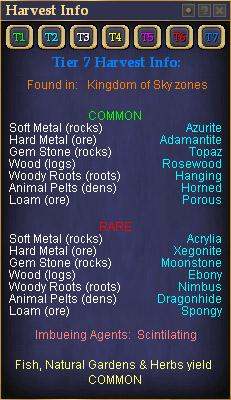
Harvest Window
 
Click to enlarge 

Views: 0
Size: 63.12 Kb
Dimensions: 529 x 384
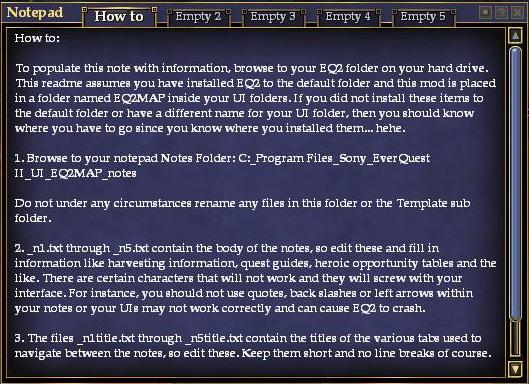
Notepad
 
Click to enlarge 

Views: 0
Size: 15.58 Kb
Dimensions: 204 x 196
Startbar Expanded
 
Description
51.1 Updated for GU51 - I mean it this time...

51.0 Updated for GU51

48.1 Added Guild point history window to eq2u1_mainhud.xml. Don't know how I missed it...

48.0 Changed the Info Center to look for the custom page instead of the Journal page (see comments below). I also changed the ear clickie to a neck clickie.

47.0 Updated for GU47. Voice windows now appear.

43.1 Somehow my last changes didn't get saved... So now it actually has T8 info instead of T2.

43.0 Updated Harvest Window... finally

42.1 Updated to work with recent changes to ProfitUI

42.0 Added Connection window to mainhud.xml making it display correctly.

39.1 Now Fetish compatable! You will however lose the Fetish Bagstrip.

39.0 Updated for GU39

This is the next generation of my Startbar. The original is still available here.

This new style now has 4 clickables in the top left corner:
Both charm slots
ear slot
primary weapon

The buttons across the top are (from left to right):
Night Vision
Auto Follow Target
Sprint
Panic (/yell, /target self)

The second row of buttons are (left to right):
Toggle Zone Reuse window
Toggle Raid window
Toggle Bags
Show/Hide Cloak
Show/Hide Helm/Hood
Show/Hide Illusion
Click to Eat
Click to Drink

The text buttons are fairly self explanatory:
Web - Opens browser
Info Ctr - Opens Milquetowst Info Center
Notepad - Opens Notepad (can be configured outside game, see txt file instructions)
Naked - Unequips all equipment, except food and drink
Harvest - Opens handy harvest window
/con - Changes target window mode from default to arrowed version

The sliders are:
Master - Master Volume
Music - Ambient Music Volume
Combat - Combat Music Volume
Shader - Complex Shader distance (turn down to 0 for a quick frame lag fix)

The Performance Panel:
Quality - change the presets from Extreme Performance to Extreme Quality (and everything in between) without opening the options menu
Custom Sets - Build your own Custom Performance Settings and quickly change between them (directions in txt file)

If you can't get it to work please try this:

Quote:
Type: /show_window MainHUD.Inventory
If that doesn't work: Options -> User Interface -> Game Windows -> (Uncheck) Keep Main HUD Windows Visible then click accept and Press the [Alt ~] to make it show. After you have it loaded up then you can go back and recheck the option to keep your Main HUD windows from being hidable.
Thanks to-
Goldi - The original startbutton mod
Jaxel - Taking it the next step
Kosmos - Night Vision guru and performance panel pieces
Krull - Panic button and other ideas

V35.0 Updated for GU35
Archive List (Old Versions)
File Name
Version
Size
Author
Date
51.0
72.10 Kb
himay
04-01-2009 04:18 PM
48.1
72.09 Kb
himay
09-06-2008 11:53 AM
48.0
72.09 Kb
himay
09-05-2008 11:04 PM
47.0
72.11 Kb
himay
08-02-2008 01:48 PM
43.1
72.08 Kb
himay
03-25-2008 11:00 PM
43.0
72.01 Kb
himay
03-25-2008 09:50 PM
42.1
72.31 Kb
himay
02-29-2008 10:38 PM
42.0
72.40 Kb
himay
02-07-2008 10:53 AM
39.10
72.39 Kb
himay
11-01-2007 12:58 AM
39.1
72.74 Kb
himay
10-23-2007 08:57 PM
35.0
72.70 Kb
himay
05-27-2007 10:14 PM
34.0
72.55 Kb
himay
04-29-2007 06:32 PM
File Statistics
User Rating:
5 out of 5 with 3 votes
Downloads: 1761
Views: 16518
Favorites: 37
Uploaded By:
 
Last Modified: 10-10-2009 10:18 PM by himay    

View Pictures. Download Now! Post A Comment
Remove Ads


Post A Reply
Author Comments Comment Options
Old 10-10-2009, 10:15 PM  
himay
A Sea Turtle
 
himay's Avatar
Interface Author - Click to view interfaces

Server: Befallen
Forum posts: 31
File comments: 102
Uploads: 28
Re: Ah HAH!

Quote:
Originally posted by Chilthre
After nearly an hour of trying to get the window to show by hitting alt+~, moving the start button around the screen, resetting my interface, and a variety of other methods...

I finally typed the following:

/show_window MainHUD.Inventory

The window popped up right next to the startbutton.
Sorry you had so much trouble, but glad you figured that out!
himay is offline Report comment to moderator   Reply With Quote Reply With Quote
Old 07-16-2009, 01:59 PM  
Chilthre
A Coastal Crab

Server: Antonia Bayle
Forum posts: 0
File comments: 8
Uploads: 0
Ah HAH!

After nearly an hour of trying to get the window to show by hitting alt+~, moving the start button around the screen, resetting my interface, and a variety of other methods...

I finally typed the following:

/show_window MainHUD.Inventory

The window popped up right next to the startbutton.

Last edited by Chilthre : 07-16-2009 at 02:14 PM.
Chilthre is offline Report comment to moderator   Reply With Quote Reply With Quote
Old 07-06-2009, 09:44 AM  
druadon
A Brown Bear

Server: Blackburrow
Forum posts: 9
File comments: 7
Uploads: 0
Re: Not working

Quote:
Originally posted by Adder
Is there an update for this or am I missing something? I installed the latest one listed here and all I have is the standard Start Button.

I have been away for awhile, and had to reacquaint myself with the interface protocols, but I have already managed to install the EQ2Map, the POI Finder Window, Alternate POIs, and the InfoCenter - all are working perfectly.

I used the Goldi Button the entire time I was here before, so I wanted to get this one set. I'm actually attempting to rebuild the interface that I used before as close as possible, which consisted of over 20 seperate pieces from here as well as a few of my own, but this piece is a major component.

Any help would be greatly appreciated.

EDIT - I also installed the X2 Patch if that makes any difference.

EDIT#2 - I finally got this to work. The bar itself was hidden and offscreen for some reason. I also forgot that the Start Button stays where it is until you move the Bar, then the Button jumps to its upper right location of the Bar. (After you have your Interface set the way you want it, manually move the Start Button to the correct spot instead of letting it reposition itself. Then at logon, the two will match-up.)

A Note here on the InfoCenter Button - the code for the button needs to be changed in the eq2ui_mainhud_startbutton.xml. The reference in this file points to Journal.InfoCenter, but should now point to Custom.InfoCenter
im having the same problem but no matter what i do i cant find the bar,just have the start button.
what did you have to do to find the bar,i have this installed in fetish,i also used to use goldi untill goldi stoped updating it.

Last edited by druadon : 07-06-2009 at 09:44 AM.
druadon is offline Report comment to moderator   Reply With Quote Reply With Quote
Old 08-02-2008, 03:08 AM  
himay
A Sea Turtle
 
himay's Avatar
Interface Author - Click to view interfaces

Server: Befallen
Forum posts: 31
File comments: 102
Uploads: 28
Re: Web button too

Quote:
Originally posted by Adder
1. A note here Himay. The web button doesn't seem to be working either although I haven't looked into a fix for it. It may be something as simple as the InfoCenter button was.

2. A Note here on the InfoCenter Button - the code for the button needs to be changed in the eq2ui_mainhud_startbutton.xml. The reference in this file points to Journal.InfoCenter, but should now point to Custom.InfoCenter
1. What do you mean by doesn't work? Cause it works fine with me...

2. Which version of infocenter are you using, because the ones I see are still using the journal references.
himay is offline Report comment to moderator   Reply With Quote Reply With Quote
Old 07-16-2008, 11:29 PM  
himay
A Sea Turtle
 
himay's Avatar
Interface Author - Click to view interfaces

Server: Befallen
Forum posts: 31
File comments: 102
Uploads: 28
Re: Web button too

Quote:
Originally posted by Adder
A note here Himay. The web button doesn't seem to be working either although I haven't looked into a fix for it. It may be something as simple as the InfoCenter button was.
I'll have to look into it. I'm using an old mod, so it may be that.
himay is offline Report comment to moderator   Reply With Quote Reply With Quote
Old 07-10-2008, 12:43 PM  
Adder
A Grove Wisp
 
Adder's Avatar

Server: Befallen
Forum posts: 27
File comments: 6
Uploads: 0
Web button too

A note here Himay. The web button doesn't seem to be working either although I haven't looked into a fix for it. It may be something as simple as the InfoCenter button was.
Adder is offline Report comment to moderator   Reply With Quote Reply With Quote
Old 07-08-2008, 06:34 PM  
himay
A Sea Turtle
 
himay's Avatar
Interface Author - Click to view interfaces

Server: Befallen
Forum posts: 31
File comments: 102
Uploads: 28
Re: Not working

Quote:
Originally posted by Adder
Is there an update for this or am I missing something? I installed the latest one listed here and all I have is the standard Start Button.

I have been away for awhile, and had to reacquaint myself with the interface protocols, but I have already managed to install the EQ2Map, the POI Finder Window, Alternate POIs, and the InfoCenter - all are working perfectly.

I used the Goldi Button the entire time I was here before, so I wanted to get this one set. I'm actually attempting to rebuild the interface that I used before as close as possible, which consisted of over 20 seperate pieces from here as well as a few of my own, but this piece is a major component.

Any help would be greatly appreciated.

EDIT - I also installed the X2 Patch if that makes any difference.

EDIT#2 - I finally got this to work. The bar itself was hidden and offscreen for some reason. I also forgot that the Start Button stays where it is until you move the Bar, then the Button jumps to its upper right location of the Bar. (After you have your Interface set the way you want it, manually move the Start Button to the correct spot instead of letting it reposition itself. Then at logon, the two will match-up.)

A Note here on the InfoCenter Button - the code for the button needs to be changed in the eq2ui_mainhud_startbutton.xml. The reference in this file points to Journal.InfoCenter, but should now point to Custom.InfoCenter
I'm glad you got it working. I'll update the Info Center button. I just haven't updated my info center in a while...
himay is offline Report comment to moderator   Reply With Quote Reply With Quote
Old 07-07-2008, 09:57 PM  
Adder
A Grove Wisp
 
Adder's Avatar

Server: Befallen
Forum posts: 27
File comments: 6
Uploads: 0
Exclamation Not working

Is there an update for this or am I missing something? I installed the latest one listed here and all I have is the standard Start Button.

I have been away for awhile, and had to reacquaint myself with the interface protocols, but I have already managed to install the EQ2Map, the POI Finder Window, Alternate POIs, and the InfoCenter - all are working perfectly.

I used the Goldi Button the entire time I was here before, so I wanted to get this one set. I'm actually attempting to rebuild the interface that I used before as close as possible, which consisted of over 20 seperate pieces from here as well as a few of my own, but this piece is a major component.

Any help would be greatly appreciated.

EDIT - I also installed the X2 Patch if that makes any difference.

EDIT#2 - I finally got this to work. The bar itself was hidden and offscreen for some reason. I also forgot that the Start Button stays where it is until you move the Bar, then the Button jumps to its upper right location of the Bar. (After you have your Interface set the way you want it, manually move the Start Button to the correct spot instead of letting it reposition itself. Then at logon, the two will match-up.)

A Note here on the InfoCenter Button - the code for the button needs to be changed in the eq2ui_mainhud_startbutton.xml. The reference in this file points to Journal.InfoCenter, but should now point to Custom.InfoCenter

Last edited by Adder : 07-08-2008 at 02:06 AM.
Adder is offline Report comment to moderator   Reply With Quote Reply With Quote
Old 03-25-2008, 10:29 PM  
himay
A Sea Turtle
 
himay's Avatar
Interface Author - Click to view interfaces

Server: Befallen
Forum posts: 31
File comments: 102
Uploads: 28
Quote:
Originally posted by revsmitty
This would be nice. I believe your first version was this way.
Actually it wasn't (the buttons were just in different places). I did make this an option. See under patches Himay Startbar XL patch.
himay is offline Report comment to moderator   Reply With Quote Reply With Quote
Old 03-22-2008, 12:44 PM  
revsmitty
A Young Mystail Rat

Server: Antonia Bayle
Forum posts: 3
File comments: 11
Uploads: 0
Quote:
And is it possible to lower the 'minimize' button so when the window is minimized I can see the notepad/naked/harvest line?
This would be nice. I believe your first version was this way.
revsmitty is offline Report comment to moderator   Reply With Quote Reply With Quote
Old 03-14-2008, 12:11 AM  
himay
A Sea Turtle
 
himay's Avatar
Interface Author - Click to view interfaces

Server: Befallen
Forum posts: 31
File comments: 102
Uploads: 28
Re: good mod

Quote:
Originally posted by inz0mn1ak
I like the mod good stuff.

Questions is there a way to have the open menu click above ? Currently when you click on it , it drops down. Thanks
I'll look into it.
himay is offline Report comment to moderator   Reply With Quote Reply With Quote
Old 03-01-2008, 10:31 AM  
inz0mn1ak
A Coastal Crab

Server: Antonia Bayle
Forum posts: 0
File comments: 1
Uploads: 0
good mod

I like the mod good stuff.

Questions is there a way to have the open menu click above ? Currently when you click on it , it drops down. Thanks
inz0mn1ak is offline Report comment to moderator   Reply With Quote Reply With Quote
Old 02-26-2008, 03:21 PM  
himay
A Sea Turtle
 
himay's Avatar
Interface Author - Click to view interfaces

Server: Befallen
Forum posts: 31
File comments: 102
Uploads: 28
Quote:
Originally posted by abbelyn
I myself have never gotten the /load_uisettings to work correctly ingame, I would suggest using something like this:

1. ) copy your working character's UI.ini file and rename the new file temp.ini

2.) create a text file with the following information (replace server & character names of course).

copy temp.ini temp1.ini
del "Lucan DLere_Pyretta_eq2_uisettings.ini"
rename temp1.ini "Lucan DLere_Pyretta_eq2_uisettings.ini"

3.) Copy the above block and rename as needed for all of your characters.

4.) Save the text file as UI.bat in your everquest 2 directory

5.) Run the file

6.) When you have a new update, repeat steps 1 & 5
Good info and a great idea abbelyn. One thing you might also want to do is remove the character you are going to copy from all level/class specific chat rooms. These are attached to the same .ini file and can cause a major headache to straighten out.
himay is offline Report comment to moderator   Reply With Quote Reply With Quote
Old 02-23-2008, 02:13 PM  
abbelyn
A Mist Grinnin
 
abbelyn's Avatar
Interface Author - Click to view interfaces

Server: Lucan DLere
Forum posts: 77
File comments: 30
Uploads: 3
Quote:
Originally posted by himay
I have no idea what to have you do except for maybe trying to reset all window positions (I think that is an option) and then do the alt~ thing.If that gets it back then you could copy over your settings from an alt.
Quote:
Originally posted by blackroseanjel
tried doing /load_uisettings and getting the ui of my alts and even that didn't work, tried checking the keep UI visible and that didn't work... tried alt ~ and that didn't work
I myself have never gotten the /load_uisettings to work correctly ingame, I would suggest using something like this:

1. ) copy your working character's UI.ini file and rename the new file temp.ini

2.) create a text file with the following information (replace server & character names of course).

copy temp.ini temp1.ini
del "Lucan DLere_Pyretta_eq2_uisettings.ini"
rename temp1.ini "Lucan DLere_Pyretta_eq2_uisettings.ini"

3.) Copy the above block and rename as needed for all of your characters.

4.) Save the text file as UI.bat in your everquest 2 directory

5.) Run the file

6.) When you have a new update, repeat steps 1 & 5
abbelyn is offline Report comment to moderator   Reply With Quote Reply With Quote
Old 02-23-2008, 12:04 PM  
himay
A Sea Turtle
 
himay's Avatar
Interface Author - Click to view interfaces

Server: Befallen
Forum posts: 31
File comments: 102
Uploads: 28
Quote:
Originally posted by blackroseanjel
I just got a quick question, I had to alt enter out of the game to get vent working and when I switched back to it the startbar was missing... I figured I would log out and then back in to get it to come back... nothing =/ but when I log onto my other toons it is still there... its only one character that has it missing lol.....

tried doing /load_uisettings and getting the ui of my alts and even that didn't work, tried checking the keep UI visible and that didn't work... tried alt ~ and that didn't work
I have no idea what to have you do except for maybe trying to reset all window positions (I think that is an option) and then do the alt~ thing.If that gets it back then you could copy over your settings from an alt.
himay is offline Report comment to moderator   Reply With Quote Reply With Quote
Post A Reply

 
Category Jump:
Search this Category:
 

All times are GMT -5. The time now is 10:33 AM.


Our Network
EQInterface | EQ2Interface | War.MMOUI | WoWInterface | VGInterface | LoTROInterface | MMOInterface