I posted this a while ago in (the wrong) section and never got any replies, so re posting here.
Specifically working on the trade window but if I can get this I plan to also make press enter for bell/druid ring/spire (all the others from the press enter sets still work). I want it to cosmetically be the same, and just have the press enter to accept trades.
I kind of figured it out partway, the accept button is in the wrong spot & I have 2 but that is cosmetic. It functions ok which is a huge ++++ for the physical pain I have in my hands.
Any help much appreciated.
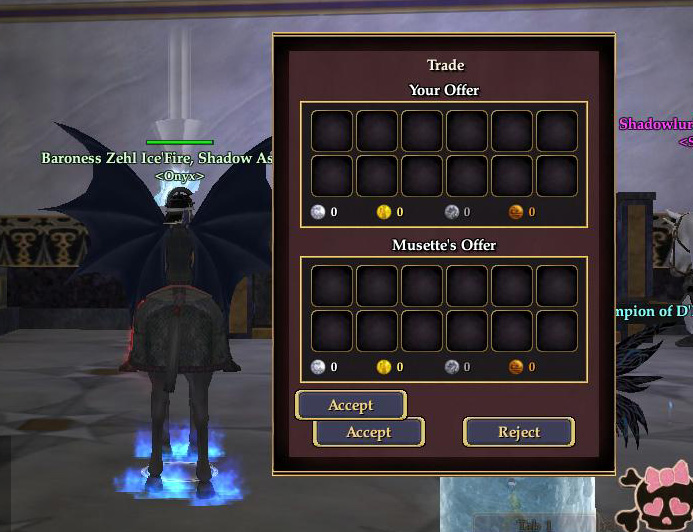
I added this code:
Code:
<Button IsDefaultButton="true" LocalText=":b71b3b774b7317fd:Accept" Location="32,365" MaximumSize="16384,38" MinimumSize="32,38" Name="buttonAccept" ScrollExtent="120,38" Size="120,38" Style="/CommonElements.LargePushButton.data.style">:b71b3b774b7317fd:Accept</Button>
BETWEEN these 2:
Code:
<Text AbsorbsInput="false" Font="/TextStyles.Large.LargeStyle" Location="32,365" Name="acceptedText" PackLocation="left,bottom" PackSize="absolute,fixed" ScrollExtent="307,28" ShadowStyle="/ShadowStylesNew.OutlineDrop.style" Size="307,28" TextAlignment="Center" TextAlignmentVertical="Center">:b71b3b774fd195fd:ACCEPTED</Text>
Code:
<Button Location="50,392" MaximumSize="16384,38" MinimumSize="32,38" Name="buttonAccept" PackLocation="cfc,bottom" ScrollExtent="120,38" Size="120,38" Style="/CommonElements.LargePushButton.data.style">:b71b3b774b7317fd:Accept</Button>