
|
Press enter code help
I posted this a while ago in (the wrong) section and never got any replies, so re posting here.
Specifically working on the trade window but if I can get this I plan to also make press enter for bell/druid ring/spire (all the others from the press enter sets still work). I want it to cosmetically be the same, and just have the press enter to accept trades. I kind of figured it out partway, the accept button is in the wrong spot & I have 2 but that is cosmetic. It functions ok which is a huge ++++ for the physical pain I have in my hands. Any help much appreciated. 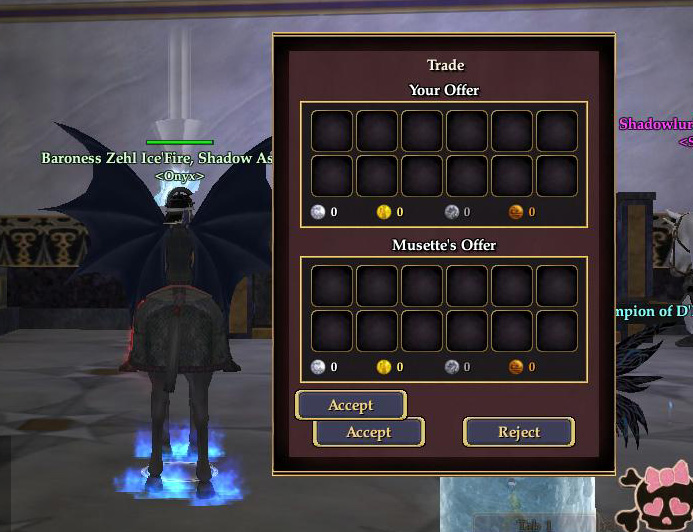 I added this code: Code:
<Button IsDefaultButton="true" LocalText=":b71b3b774b7317fd:Accept" Location="32,365" MaximumSize="16384,38" MinimumSize="32,38" Name="buttonAccept" ScrollExtent="120,38" Size="120,38" Style="/CommonElements.LargePushButton.data.style">:b71b3b774b7317fd:Accept</Button>Code:
<Text AbsorbsInput="false" Font="/TextStyles.Large.LargeStyle" Location="32,365" Name="acceptedText" PackLocation="left,bottom" PackSize="absolute,fixed" ScrollExtent="307,28" ShadowStyle="/ShadowStylesNew.OutlineDrop.style" Size="307,28" TextAlignment="Center" TextAlignmentVertical="Center">:b71b3b774fd195fd:ACCEPTED</Text>Code:
<Button Location="50,392" MaximumSize="16384,38" MinimumSize="32,38" Name="buttonAccept" PackLocation="cfc,bottom" ScrollExtent="120,38" Size="120,38" Style="/CommonElements.LargePushButton.data.style">:b71b3b774b7317fd:Accept</Button> |
Do you want to have two accept buttons, or is it just the "press enter to accept" functionality that you want?
In the latter case, just add isDefaultButton="true" within the existing button (the lower of your two code snippets) and take out the extra button entirely. That line is what allows enter to activate a button, adding that to the existing button should get what you want without having a second button. As an aside, the second button isn't at the same spot as the first button because the locations are different: your new button is at 32,365 which is where the accept text is (that's the text that tells you when the other player has accepted the trade), while the existing button is at 50,392 (lower and slightly more to the right). |
Your last post likely got no response if, as in this one, there's just no question.
To make a button use the Enter key add IsDefaultButton="true" to it. edit: beaten by the lord ;) |
The other one was stated directly as a question. This one was similar but edited, I thought it was rather obvious that I would like it to look normal and not have 2 accept buttons :)
Someone else informed me of that code too just recently, I will give it a try when I get home, thanks for the input! Quote:
|
Ok I tried it sooner, I couldn't wait. (I remote access to my home pc from work) That was a little thing I needed to help me understand a bit more of the coding. I'm going to try messing with the UIBuilder too now, I never have, and I would really like to re-make some UI pieces.
|
| All times are GMT -5. The time now is 06:31 AM. |
vBulletin® - Copyright ©2000 - 2026, Jelsoft Enterprises Ltd.
© MMOUI