
|
GU100 Updates
GU100 goes live today. Darq has updated the theme graphics, but more functional changes are up to us.
The first task will be to identify what has changed. I have preserved a copy of the current default UI to use as a reference so I can run diffs. The biggest change is the new Resolve stat, but there are probably other surprises waiting. -= Therendil =- |
Zidu has posted fixes to the bottom bar. I have pushed those file to the update server.
-= Therendil =- |
Dedith said that: Resolve is now listing under Fevor in the Offense section.
We do not have either Resolve, or Fevor showing. Of course he is looking at the API data. If that helps anyone? |
Probably need a way to access the new xp vials, unless it's there and I can't find it.
|
1 Attachment(s)
Quote:
If anyone wants a updated Persona Window I still suggest using the one from DarqUI. Even though it's simple to add Fervor and Resolve into Profit's Persona the other missing features make it just not very usable. DarqUI Persona Window with Fervor and Resolve below. |
I do not like Darq's persona window. It is nice it is an option, but it is not the option I would choose.
Unfortunately I do not know how to do anything with the UI bits other than use them. So I guess until someone figures out Profit's, I will just not worry about seeing Fervor, or Resolve. |
I'm sure Therendil is working on the update for the new features and stats in GU 100. We just need to be a bit patient.
|
At this point we don't seem to have anyone ready to tackle the changes to the persona window. I don't think I can do it. My role here is to coordinate the efforts and make sure that fixes get sent to the updater so everyone can have them.
I plan to try out Darq'a persona window myself so I know how it compares to the same window in Profit. If we can't get someone to fix Profit's persona window, we might consider asking permission to use Darq's. I'd much rather see Profit's persona window brought up to date, but that would at least give us a persona window with all the features. -= Therendil =- |
1 Attachment(s)
Hi, To help out, I updated the profit persona window a little.
-Added Fervor -Added Resolve -Removed Decline Legends Of Norrath Challenges from Options as LON was removed from EQ2. I don't know what else is missing. Question: Is there a place to go to see what changes were made to the UI? Or do you just have to compare from the old? Because I can't seem to find the new vials thing anywhere. Thanks. EDIT: Just saw your thread about commenting in the file about what was done. Corrected this in the file. Sorry about that. EDIT2: Had Resolve a little misaligned, fixed it, sorry about that. EDIT3: Had background of stat area highlighted. File updated. sorry. Won't be working on anything late at night agian :) *Removed persona download from this post* |
GU 100 Added XP Vials to XP Window
2 Attachment(s)
I took a look at adding the XP Vials and it went well after testing two vials.
The vials are to the right of everything so if anyone doesn't care to use it they can shrink the window and hide it.    The following file can be downloaded below. Edit: I'm also posting the updated dds images file from Profit Community Edition in case anyone needs it who is using a mixed UI. Edit: 5/1/16 Fixed Tithe XP% overlapping Deity Points. Mistake from testing location of xp vials. |
Quote:
Zidu this looks very good, although in its current form the persona window can't be added to ProfitUI CE. Since the DDS image files are now being kept current on the update server, duplicate graphics files are no longer supported. Could you share a version of the persona window that references window_elements_specific.dds instead of window_elements_specific2.dds. This way, Therendil only needs to publish the updated xml file. |
I guess I could of been clearer for that new(copied dds file). The only thing window_elements_specific2.dds refrences is the new pending and filled xp vials.
I couldn't use the default window_elements_specific.dds because Profit references that for custom blue bars on the window menus instead of blue and gold like Default and other images like coins, etc. I have no clue how to add images to a existing custom .dds image file so I just have the vials reference a new file. I probably should of just called it vials.dds or something(It's just the original Default window_elements_specific.dds) I'm not messing with Profits Persona window in anyway and just letting others know they should use Darqui's. The Profit Persona and Group/Raid windows are the only lagging behind pieces of the UI I think and I recommend to everyone DarqUI for these windows if they want the best play experience. Sorry for long post, I only look at this code and use trial and error when I fix things for Profit. |
Quote:
Quote:
Quote:
Quote:
Thank you for pitching in to help. :) -= Therendil =- |
As to the XP vials, we shouldn't need another graphics file. I should think that the new images would have been added to an existing elements file. I will try to track that down today.
In the meantime, the mods to the XP window look good. Putting the vial to right of the rest of the content works just fine. -= Therendil =- |
Quote:
You have to make a decision if you wanna remove custom profit images in favor of using the default images file. Custom Profit images on left and Default UI(new vials) on right shows the differences.   |
For some reason the Utility will not come up on the screen. I can see it on the task bar, even the fact that there is something there, but it will not pop up at all.
Yes, even running as Admin. |
Quote:
That's what I'm getting at. ProfitUI Community Edition, which folks are accessing with the ProfitUI_CE downloader, offers the popular classic ProfitUI graphics and the new vial graphics, so falling back on default with the gold tinsel is no longer necessary. The vials have already been added to window_elements_specific.dds for all ProfitUI_CE skin choices, but your updated persona window would need to reference window_elements_specific.dds in order to work. |
I have now updated my local installation of EQ2 and have captured a list of changed UI files from the Launchpad logs. I just did this and have not had time to run any diffs, but this will at least tell us which file might need attention.
Code:
Replacing UI/Default/images/icons/icon_is123.dds |
Quote:
-= Therendil =- |
2 Attachment(s)
Quote:
The confusion resulted because even though I update some Profit windows I'm using my same UI for the last few years. I do keep a copy of Profit CE but it's not my current UI. New file below and I'll update it in my other posts. Edit: I'm also posting the updated dds images file from Profit Community Edition in case anyone needs it who is using a mixed UI. Edit: 5/1/16 Fixed Tithe XP% overlapping Deity Points. Mistake from testing location of xp vials. |
Hey Z thanks for all the updates again, one thing is my Tithe is now showing a percentage, is that the amount to gain another point? I think it used to just show points total and I'd rather have it back to being that way again.
|
There is missing something...
Persona Window Display more then 100.000 Platin (It display only 99.999 Platin) Restore Items Tab Can someone fix this ? |
Quote:
|
1 Attachment(s)
Quote:
EDIT: I expanded the page a little bit so Restore Items and Passive Effects are not truncated. I don't use this persona window, but I thought it looked bad. So file updated. *If this changed is not wanted, let me know, I can revert.* |
Therindal, I have been using Profit for years, and this new updater utility since you first set it out.
This is not the first time I have seen this either, but it is rather vexing right now. Only the CE Utility is displaying this, and only since I noted the issue of of Breath and that other file not listing as updated, when they were. Has anything changed in the past few days otherwise? I can see it on the task bar, I can see it is running, I just cannot bring it up. ALT + TAB does not jog it out either. |
Quote:
Right-click on a blank area of the taskbar and choose Task Manager, then right-click on the ProfitUI_CE task and click "Maximize." Does this make it visible? (You may have to choose "Expand" from the context menu and then click Maximize.) |
I was able to do that, thank you, there were not new updates, other than Breath and Images (which we already know have issues).
I see that there should be 2 server messages, but that window is blank when I click on the cloud. Restore down, to a smaller window, just minimizes it, and then will not bring it back up again. In my experience bar, the vial thingy, I am not seeing that either, however, I have not bought any yet. Will that icon only show if I have a vial to use/remove? I am starting to wonder if I need to get a new link to the Utility? |
Quote:
I was able to duplicate the issue you are having. If you close and reopen the utility while it is minimized, it stays minimized and you can't restore up to a normal window. If you have Windows 8 or higher, you can fix this. Do the maximize trick from above, then grab the maximized title bar and pull the window away from the top edge of the screen. You should get a normal window that will open and close as expected. This may or may not work with Windows 7, I can't remember if it has the feature where you can drag the window onto/away from edges. I'll see about fixing this permanently in a future version of the utility. . |
Well, at least we know that the issue is real and reproducible. I'm sure we'll get it fixed as soon as we can.
That breath file is annoying. Darq made an invisible change in it to test the server uploads. I don't know how it got stuck in this zombie state, but I'll try to get that corrected. -= Therendil =- |
Darqwood's fix worked.
It had the experience bar to update, and did that. Still do not see a vial icon, but as I mentioned earlier, I have not bought any yet. |
Quote:
You may have previously checked the "Skip" checkbox for your images folder if you were using one of the other themes. This would prevent you from getting the new images needed to see the vials. Check for updates with the utility and check the "Accept" checkbox for the images folder near the bottom of the list. We are working on utility updates to make using the ProfitUI theme files much less confusing. Stay tuned. . |
I was trying to update to see if you all had pushed anything till Saturday, then I started looking here and decided to wait till the updater was ready with updates.:cool: Thanks again for all your hard work.
|
I need to check and make sure the updated images file got properly sent upstream. I was seeing the vial icon during testing, so I know it should work.
That's on the to-do list along with doing something about the zombie breath file. -= Therendil =- |
I see the vial icon now.
I had to stretch the window a bit to see it. |
I see the vial, but I don't see the resolve...I also see there is still an issue with the breath window ghosting.
|
Crystalstar -
I fixed the issue with the breath window, but after your post. Should be good now. I didn't have to expand my XP window to see the vial, but I know I had messed with the size in the past. Anyone who doesn't see the vial should try stretching the window. Might be good if someone tweaked the default size of the XP window. I checked the settings on the bottom bar as it is now and Resolve is not checked by default. I had to open the ProfitUI control panel and turn it on. -= Therendil =- |
1 Attachment(s)
Quote:
Its looks now so : Its the same as Blackhood, i only added more Space for Platin. 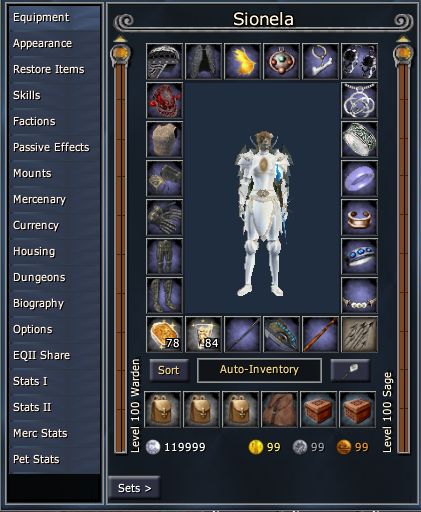 |
Any way we could get the old shiny black theme(?) on the updater? It was just black, and shiny. Or point me to which file I need to pull from the old Profit directory, and I can just block the new stuff from updating that file?
Thanks, that probably isn't really descriptive enough but hopefully you know what I mean. |
1 Attachment(s)
Quote:
Here are the shiny black files from the original UI. You can unzip and copy the folder into your ProfitUI_CE folder and use the utility to select the theme. Alternatively, copy the dds files directly into the ProfitUI_CE\images folder. But one warning: the old color files have not been updated since 2014 and there are quite a few things missing including deity graphics and XP vials. . |
Red background on dressing room?
I have all the CE updates, but for some reason, my dressing room background is now that reddish brown color (#291919) instead of normal ProfitUI blue (#19293C).
 The file involved is eq2ui_inventory_dressingroom.xml From what I can tell, the background color is being set here: <PaperDoll backgroundcolor="#FF0000" Name="Paperdoll" PackSize="absolute,absolute" PackSizeProp="0001/0001,0051/0001" paperdollheading="-180.0" paperdolltype="dress" ScrollExtent="235,398" Size="235,398"/> However, #FF0000 is pure red, so I am baffled. |
| All times are GMT -5. The time now is 08:07 AM. |
vBulletin® - Copyright ©2000 - 2026, Jelsoft Enterprises Ltd.
© MMOUI