|
Try going to http://advancedmod.com/DrumsUI/ and clicking the Launch button. Use the Open With option when you get the popup.
You can try disabling your Anti-virus. |
Auto updater will not update since latest java update
DrumsUI auto updater will not update since the latest Java update. It looks like Java moved everything from where it was to C:\Program Files\Java\jre7\bin. Thus the shortcut that was created is broken. Able to launch from the website, but DrumsUI will not update the needed files do to launching from the website the program does not have the needed write permissions. Also since the latest Java update unable to install the desktop icon or reinstall it.
|
Quote:
Will try to look into it. For now you can try downloading the file manually to your PC: http://updater.pala.de/drumsui.jnlp Try Updater->Uninstall and then re-opening it afterward. Otherwise, you may have to just use this file locally to run/update for now. |
Update Log:
2013.04.30 - Update [Journal]: New Daily Objectives tab (GU66). Toggle quest helper checkbox is now clickable. - Update [Pet]: Pet AutoAssist button added (GU66). |
Daily objectives tab doesn't seem to work, or is it supposed to be completely blank? Also, what happened to the achievements tab?
|
Adding shiney
When I have the UI set to automatically open the page so that I can add my new shiney, it auto-opens to the (second tab) Daily Objectives tab (which is blank) ... every time.
The Collections tab used to be the second tab, but now it's the third. And I'm also missing the achievements tab (I wanted to see where I might be able to get more exploration experience). |
Should be fixed by tomorrow.
|
Thanks, looking forward to it!
|
Java Issues
I have had some minor issues with Java updates and generally it has to do the upgrade process. So now what I generally do is if a Java update is announced or flagged I will go to the Control Panel and completely uninstall Java from my computer. You can also delete the Sun directory manually in %AppData% or:
C:\Users\xxxxx\AppData\LocalLow\Sun\ Then I will download the non-spam-ware version of Java instead of one at java.com. This is found here on the Oracle website: http://www.oracle.com/technetwork/ja...s-1880261.html You click to accept the Agreement then pick the Windows x86 Offline installer. Seems to work a lot better and doesn't try to install ad-ware. |
leaves no shortcut
For some reason the updater leaves no shortcut in start menu or desktop and there's 1 file it says it can't update and to try later: UI/DrumsUI/eq2ui_journals_active.xml so what did I do wrong? lol
|
Quote:
As for the XML, I'm about to re-update that file, so check again tonight/tomorrow. |
Update Log:
2013.04.30 - Update [Examine]: Removed Xanadu search button, added u.eq2wire button, and re-organized the button order in the Item Examine window. - Update [Inspect]: Changed u.eq2wire tab into a button that pops up the in-game browser window. - Fix [Journal]: Collection tab functionality returned to working order. - Fix [Persona]: Fixed the Weapon/Spell weapon buttons from moving. Fixed Housing tab template row size. |
Quote:
|
Other people have reported this same problem. The newer versions of java seem to have broken the Launch application feature in the Updater. I'm not sure if there is currently a workaround.
An alternative could be to make a batch file that simply launches both Updaters simultaneously. |
Quote:
|
Quote:
So basically each line is just a program to launch essentially. If you would like to change the icon of your batch file, the best way is to move the batch file into your Documents, right-click it and Send To Desktop (Create Shortcut). This will make a Shortcut to the batch file. Shortcuts can have their icons changed by right-clicking them, and hitting Change Icon. |
Dont work now help
I just downloaded drums ui and was just getting used to it (always used profit). I find this ui much nicer surprisingly since I loved profit. It is 5/29/13 and we just had a short down time with eq2 and now my drums ui dont work. With profit it never stopped working with short updates, maybe somethings didnt work with the large updates but, never the small ones. I am sure it is me doing something wrong. I have windows 7 and I downloaded not the updater and put the drums in the eq2 file and it worked great. So since it didnt work I went and downloaded the updater and it is on my desktop. I uploaded the files that needed to be updated and it still dont work PLEASE help me I really dont want to use sony UI I need this drums .
|
Not too sure on that one. I would make sure that you don't have two EQ2 installations. Your desktop shortcut for EQ2, if you right-click it and view the properties: Check the Target line, and what folder it points to. Make sure that's where you've been installing the UI to.
|
Help please
I have been running on profit and now I switched to drums. I am still getting used to it , when I would click the cross under my name I cure myself from nox, trauma ect. I have tried a few things I have found in forum but still don't work. It says on screen only when crafting LOL I don't know what that means. That is with default hit. I am raiding and I also would like to be able to sent up the numbers to rez (Im a dirge) That would really help . Thank you for your time:):nana:
|
Omg
I found where I cure myself yippy:) Now please could you let me know how to rez with the number buttons it would be sooo much faster . (im a Dirge)
Dirges ROCK:nana: |
Quote:
useabilityonplayer SELECTED "Elegy at Death's Door" |
Tradeskill side by side not working
As of today, the Side-by-side view for tradeskills is not working. Also, there seems to be some issues of focus whereby I can't interact with the window on occassion. Things like, can't check/uncheck box or pull down menu.
Is this my settings or the Drums? |
Initial installation went fine, using DrumsUI no problem.
When I run updater either from my PC or from the website I get this error though: Code:
Exception thrown while getting location |
Try restarting your PC once, or if you're familiar with Task manager, find and end all java exe applications. I'm not positive if that's what that error is, but I know people in the past have tried opening the updater twice as the same time, and it bugs out.
|
This has been happening for quite some time now. The DrumsUI Updater window opens fine and says Your files are up to date! But then a 2nd window opens up with those errors.
I just went in and shut down every non-essential process and application and got the same error. After the initial installation of DrumsUI the only other thing I did was followed the steps on the thread regarding using default map icons. *Downloaded latest version of java just incase. Same errors *Completely un-installed and re-installed, works fine without errors now. Who knows... |
im hoping that update comes addressing problems of player window.
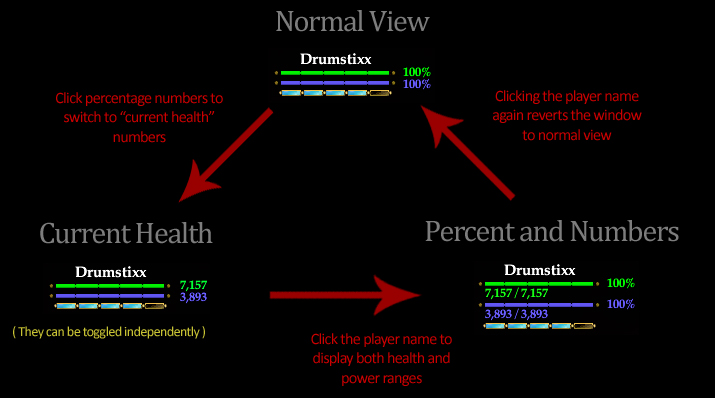
http://www.eq2interface.com/downloads/full6631.jpg i use current health version but its health and power numbers aren't displayed correctly, their left portions are cut off. also upon logging on for first time in the session, UI itself loads as if percent and numbers version is default. so my chosen current health version is ending up locating player window upper than intended. /load_uisettings can fix this but often it makes spell timer window disappear in the process, then extra click to open drumsui window to pop it again on screen is needed. maybe variant player windows with fixed HP and power display? |
exception error
I just checked to see if there was an update and I got an error. I tried to copy it so you could see but, it wont let me:(( Is there a problem with update or is it my download I finally got it the way I like it. Love this UI better then Profit:)
|
exception error
Sorry the date is wrong when I posted . It is 7/18/13
|
Quote:
I fixed it by using the Settings > Updater > Reset all Settings in the Updater. Just remember if you are doing it this way to ignore all the files it wants to change if you've got extra UI addons/changes in the DrumsUI folder.. |
There is a sticky topic regarding doing things such as this. If you're ever having troubles with the updater, the best thing is to reset settings, or re-install as instructed.
|
exception error
Well now it comes up I have to put the file path which I did when installed. I try to put it in and it wont except it just comes up and error and that is where it is. Do I just put it to everquest 2 folder or do I go to the drums UI in the eq2 folder. Love this UI but , have problems with updates sony side:(
|
Point it to the EverQuest folder. It needs to be able to find the everquest exe
|
error
I keep trying to put in the path and it wont take it:( I am correct where it is but..... wont work
|
GU67 update.
Update Log: 2013.07.23 - Update [Container]: Harvest container has new Hide checkbox (GU67). - Update [Journal]: Journal window updated with new Daily Mission tab. Active Quest window also updated. Click the icon next to the Daily Objective to hide/show the quest details. - Update [Colors]: Color DDS files updated to support GU67 graphic file changes. |
error
Well I finally got it working:) I rebooted my computer a couple times and it worked yippy. In game the AA box does not have that scroll so you can pick your new AA. It has the pull down box but, not the scroll next to the commit button. I have the lastest update still not there.
|
Will check it out later today. When I've used the new AA system I've had no problem with it though.
|
Aa
I can switch back and forth between AA the I have saved but , can not change my AA cause need the scroll thing. I have profit running on my laptop so I change it there and get on desktop to play. Not the best set up but, it works till it gets fixed. I did all the updates and rebooted a few times but, still no scroll:( I am wondering if it is just me or others having a problem?
|
Are you talking about the area on the right side of the AA window? Does your scrollmouse work? I'll have to check it out. I don't modify the AA window, but possible a graphic is missing. I've been able to respec here. so maybe I was just using the scroll mouse!
|
They are talking about the Build button (that looks like a scroll in default UI) to the left of the commit button. It's actually there but invisible for me (just click to the left of Commit), I'm guessing the graphic was added to a UI elements file that I've got customized.
|
Will look into it, and get them updated. Been busy!
|
| All times are GMT -5. The time now is 09:55 PM. |
vBulletin® - Copyright ©2000 - 2026, Jelsoft Enterprises Ltd.
© MMOUI