
|
I haven't had time to verify the issue but I can see that SOE decided to completely revamp the EXP bar.
They've changed the structure of the coding completely. The good news is its more in line of how I had mine arranged so the change should be easy ;) I'll upload the modified files ASAP ------------------------------------------- Update: Ok, i've verified the EXP info is indeed working correctly. I am proceeding with updating my coding to accomodate their restructure (should make the next update easier) All I can guess is they had a dynamic data glitch earlier. Quote:
|
Quote:
Upon trying this and deleteing the forementioned file, plugin_4.xml EQ2 crashes directly to desktop upon entering the world. Once the file is replaced again everything is fine, but of course now the plugin is back. Any other ideas :) -Zed |
hehe you have to run the eq2map updater after you delete that file. (It replaces the missing file)
Sorry I should have told you that part huh :o I just assume everyone has the ThorUI AU setup to autolaunch the eq2map AU which then launches EQ2 Quote:
|
i love the ui but how do i make my buttons bigger it is killing my eyes but i dont want to lower the resolution just to have bigger buttons
|
Great UI
First of all I would like to say awesome job. You make it easy for people to use custom UI's, something I'd given up on because of having people create but never update. Thank you both so much for your hard work.
I added the fancy camp button feature where you are supposed to be able to quickly change characters, but all the "character" buttons only say character and pressing any of them gives me an error message that the game can't find the world server after it camps out, and then I have to quit to desktop. I'm sure there is some info the file is missing but I'm not sure how to add it, or whatever needs to be done. Any suggestions? Thanks, Crystyl of Lavastorm |
Quote:
|
Thanks Plus A Quick Question
:o
Thanks for the great UI. Only question I have is do you have an update or something for the target box. The SOE one is way too long and cant be resized, and the one with Thor is pretty big too. I love the UI because it has the "slim" feature" allowing more for less on my screen. So I wonder am I missing something I need to check mark or is there no option for a smaller, slimer, resizable target box. Thanks much! PittyPatsy |
Yes indeed,
I actually have 3 different sizes that I made and offer in the feature section, not to mention 1 or 2 other author's target window mods. After you launch the ThorUI AU, press the advanced button and browse the features section for more options. Quote:
|
Deselect the hotkeys feature within the ThorUI AU then manually delete the "eq2ui_mainhud_hotkey.xml" or delete the entire thorui folder within your EverQuest II\UI directory then relaunch the ThorUI AU so that it may pull the files down again.
Quote:
|
Compas Problems
For some reason my compass is wrong. When I stand facing east the compass tells me south. I don't have my view pointed in the wrong direction and , I have tried to delete the thor ui folder and let the updater pull the files again. When I go back to the standard EQ interface the compass is right. Can you plese help?
|
Sigh, SOE !@#$'d there's up then fixed it by changing the data i'm assuming.
I'll take a look at it today. Quote:
|
no 'advanced' button
great ui, thanks for your hard work :)
want to adjust some aspects of it to suit my playstyle, but there isnt an 'advanced button' on my updater. looks like the window needs to be resized to show it, but it wont let me resize it. was also wondering if there was an ingame window to adjust aspects of thorui. my apologies if this has been asked already, dont have time to read through all the threads Thanks again :) |
Quote:
Well, I deleted the folder and and downloaded the new UI files using the updater and it it the same. The window itself shows perfectly, just no info. It's like I have never sent in a help request, but I have sent probably 4-5 in the last week alone. I do have my settings in the advanced section of the updater set at "enhanced" for the help section. But I wouldn't think that would have anything to do with it. Like I mentioned earlier, I did have a couple in there, but they are not showing up now. I can't really remember if I changed any settings when they disappeared. Thanks again for the help.... |
Thank you!
Thanks a bunch for the help! Going to fix it now!
Crystyl |
I also noticed the compass bug, thanks for looking into it so quickly!
I've found another issue, which may very well just be me not knowing how to fix it. I have an inventory overflowing message that I can't get rid of. I cleaned out a few spaces, but it's still there. You know how the item that's overflowing your inventory appears on your paperdoll image on the regular UI? I'm not getting that, so I can't place said item into my inventory to get rid of the message. I just need to find the item that's screwing up my inventory! Thanks for any help! |
Quote:
If you're using the 'slim' inventory window (the one besides Jaxel's included in this UI), you can clear the overflow slot by opening the inventory window completely (click on the circle in the upper left corner) to be able to see the overflow slot (lower right corner). I just double click on the icon in the slot to auto-move it to an empty inventory/bag slot (not sure if you can manually move it by dragging it to an open slot or not). You can also destroy it directly from the slot, too. |
Thanks for the reply, I'll try that :)
Edit: Yep, another case of user error :p Thanks for the info.... and the great UI mod :D |
found it
Well, got back and had a little more time to search through the threads, found the answer so disregard my last post, thx anyway :)
|
I've noticed that the little sword icon that appears next to the group members' names is now a black box. Is there any way to fix this? Thanks in adance. :)
|
Quote:
|
is any one else haveing zoneing probs? Like locking up or taking forever?
Especially on leaving trade instances or Homes? Sometimes i have to /exit to carry on :( |
Quote:
Hi, Make sure you press the "..." button next to this option so you can see what the author says. Each feature has it's own help page and I typically link the help page directly to the author's detail page for the mod. |
I'm having that compass problem too. It's been like that for a couple days. The patch notes for the game on the 20th said something about resizing the compass to fix it, but I tried that with the ThorUI compass and it still says "W" when I'm facing north.
|
I adjusted the compass yesterday.
Did you run the AU? Quote:
|
Hey Gang!
I have just uploaded a new version up auto-update. This contains the "Do Not Update edited files" option I've been promising. Also, I have changed the GUI to let those users with large fonts / DPI settings to still get to the advanced options. Just run AU and it will patch itself. This should address most of the common issues we've been seeing on the board. |
My thoughts.
A good UI I suppose, but it doesn't take advantage of a few key elements that I feel are important in a UI. You don't have half sized inventory, Effects, Maintained, or hotkey bars. This does not please me. I have decided to stop using it. Nice updater though, good idea. Little too flashy for my tastes, guess I'm a purist. Like my elements as unobtrusive as possible.
|
Quote:
|
I would like give a quick thanks for the excellent work you have done. I have just begun to use your ui but I am already I am finding it a huge help. I am having one problem however. I am unable to see or find my Heroic Opportunities window when I start a chain. I set the ui up with your settings files and everything is as it should be except this. My windows are'nt allowed to be set off screen so I don't know why I can't get this window to show up. I've tried searching elsewhere for a solution but have found none yet. Any help you can find would be greatly appreciated.
|
Two quick things.
First off, thanks for the all the good work. ThorUI keeps getting better and better! I have two questions.
For earlier versions, you had a screenshot where interface elements were captioned. Hotbars had descriptions for them (buffs, utility, etc.) I just think it would be good to have this information included as part of the help for those completely new to ThorUI. For those considering using your default window placements, it would do much to explain the "What do I use 6 hotbars for anyway?" question, that you alluded to (For those that don't need 6 hotbars, delete the middle two...) In the current version, is there documentation for how to use the Custom Video Presets? Specifically, how to create your own three sets to replace the defaults? Be seeing you... ---> TBC (Templar, Brigand, Conjurer) |
Thank you for your thoughts however all of those features are indeed included and available in the features section.
Quote:
|
Thank you, I will try to bring those screenshots back
The instructions are in the feature section for the start button. (Press the "..." button Quote:
|
If you were to delete your "window placement file" for that character, it would revert you back to the default SOE window placments.
The file should look similar to this: UNREST_faetyl_eq2_uisettings.ini Be sure to backup your current. You may then use the window placements wizard to overwrite with the preset provided. Just note you must have the files selected in order to use it. Quote:
|
Missing background color
I haven't seen this problem mentioned, and I was waiting for a program update to see if it would be addressed, but after receiving the new program update, I still have the same problem. I'll post a screenie of it, and you can see for yourself. I am using Firefox as my default browser, can't believe I'm the only one using it and thorui, maybe thats not the problem, but thought I'd mention it since I can see htm coding where I shouldn't. Without further ado, the screenie with the problem:
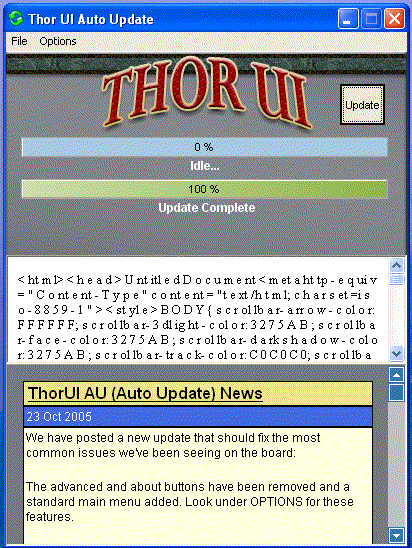 After the initial screen there in black font, it switches to white font on white background, no can read. Not a big deal, but pretty ugly. And yes, I did compress the pic before uploading, that's why the pixelation.... it all still works, just looks ugly. Any ideas or help?? |
Quote:
Even though MrNice has recently updated the AU to correct the issue, it looks like you are running with a high DPI setting and large fonts (could also be a video driver thing). Try looking back a page or two in this thread (about 1/3 or 1/2 way down on page 10, or look for posts #234 - 236 in case your number of posts per page is different than mine) for a brief discussion on a very similar matter. |
Quote:
I developed AUto Updater on my machine, which uses Firefox as a default. As another helpful user pointed out it's probably your font settings. Also, check your info.html file in c:\program files \thorui directory. Sometimes that gets corrupted. Just delete it and see if it gets re-written correctly next time you load. |
Nope, not a similar matter at all. All my buttons are where they are supposed to be, I am running on standard dpi settings, and at 1024x768. Just seems as tho the html commands for the display window there are not being interpeted, they are being displayed.
Just to add I am using a gf6800, with the latest certified nvidia drivers. Thanks for the it's not firefox help tho, I figured a lot of people using mods would be...... :p But still, the quest for the answer goes on....... :confused: |
Quote:
:( |
Quote:
Open up your logfile.html..sorry that IS the correct file. It's generated from a resource string on the newer versions of the app and some computers have problems with this. It should be a simple html file that defines some styles to use when displaying the log file. You can also delete it and see if it regens correctly. If not I'm gonna have to take the time to make another AU upgrade (one I've been putting off but probably needs to get done). |
Quote:
I had the same problem as did someone else. If you open the logfile and view the source code there is a space (sometimes two) between each character. I tried numerous reloads to fix the problem, but it didn't work. So, I edited the logfile by deleting all the spaces between the characters and saved the file and now it works perfectly. Strange that every time it downloaded,the file was corrupt ; yet, changing it on my computer and overwriting the file fixed the issue. |
That's it
I did delete the file a number of times and it does always come back corrupted. There are spaces in between almost every character, sometimes 2 chars then a space. When I open the file to edit, it displays 1 or 2 chars per line only and it's hundreds of lines long. I've tried editing the spaces out manually twice, and messed up not to far in both times, so I'm not gonna bother anymore. If someone wants to cut and paste theirs here, I'd be happy to cut and paste it into mine. Thanks for the solution, and thanks to whoever posts a good logfile.html here for me to copy. :D
|
| All times are GMT -5. The time now is 06:25 PM. |
vBulletin® - Copyright ©2000 - 2026, Jelsoft Enterprises Ltd.
© MMOUI