EQ2Interface

EQ2Interface (https://www.eq2interface.com/forums/index.php)
-   Request (https://www.eq2interface.com/forums/forumdisplay.php?f=25)
-   -   Autoattack timer (https://www.eq2interface.com/forums/showthread.php?t=11124)

reins 11-23-2008 03:15 AM

Quote:

Originally Posted by dragowulf (Post 77876)
Sorry I was gone all day.

reins is right, filtering out misses/riposite/block/etc would be unnecessary code. The way I see it is if Color/ShadowStyle checking is not enough, the Font checking too would be enough. We could also make it so it only fires with a certain color regardless of the ShadowStyle. But the problem with that is the person would have to change the color manually instead of using the default color (which is the orange one), and you could change the color to white or whatever color we choose.

There is no way around the ShadowStyle, if you don't check it then the bar will reset on combat arts, which is incorrect. In the combat bubbles, you can't change the color of only auto attack, you change the color of your outgoing damage. So you have to check that the combat bubble text is the specified color, and has no shadowstyle.

dragowulf 11-23-2008 06:25 AM

Ok I believe I got it working with CombatBubbles. But here are the probs I see: Riposite damage gets counted in and the timer resets, and a secondary weapon screws up the timer as well.

Since this is mainly for DPS classes, I'm sure the riposite problem means nothing because tanks are usually the ones getting attacked. The other problem?? I have no clue

Anyone know where there's an attack dummy????

nluerdarea 11-23-2008 07:03 AM

I would like to use this on my pally, so ripostes would be a problem for me, but I don't see a way around it.

I thought the second problem was already solved. This is the way I saw it

When dual wielding, both fire at the same time initially. Then the delays kick in for both bars. When an autoattack fires, the bar closest to finishing is reset.

Would that not work?

gm9 11-23-2008 07:24 AM

That's what I thought also. Did you see my post here drago?

oldweasel 11-23-2008 09:29 AM

Any way to post this "officially"?

Would love to try it (even in beta shape), but am not really sure how to install and bring it up in-game (new at this).

This information is usually placed on the downloads page, is it ready enough to make a formal page? Is there a page already with install instructions that I am missing?

Thanks for the hard work! This looks incredible!!

reins 11-23-2008 12:17 PM

Quote:

Originally Posted by dragowulf (Post 77881)
Ok I believe I got it working with CombatBubbles. But here are the probs I see: Riposite damage gets counted in and the timer resets, and a secondary weapon screws up the timer as well.

Since this is mainly for DPS classes, I'm sure the riposite problem means nothing because tanks are usually the ones getting attacked. The other problem?? I have no clue

Anyone know where there's an attack dummy????

As far as an attack dummy, go to the tabernacle of pain in Kunzar Jungle, there is a wall there you can attack. You could also get access to a guild hall that has training dummy's.

As far as the secondary weapon, just use gm9's logic tree that he posted, that gives you the entire flow you need to use.

dragowulf 11-23-2008 05:42 PM

1 Attachment(s)
Quote:

Originally Posted by oldweasel (Post 77885)
Any way to post this "officially"?

Would love to try it (even in beta shape), but am not really sure how to install and bring it up in-game (new at this).

When it is ready for release I'll upload it officially.

Quote:

Originally Posted by reins (Post 77892)
As far as the secondary weapon, just use gm9's logic tree that he posted, that gives you the entire flow you need to use.

I'm not sure about that.

After thorough testing I see now that it works well with ShadowStyles/TextColor. It will no longer reset when getting hurt, or using a combat art. Again, the problem is the Secondary weapon. Whether the SecondaryPage is there or not, the Combat bubbles will fire two different autoattacks, which will reset the bars. As of now I see no way around this.

I'll take a look at his tree, but till then here's the newest code:
Code:

<?xml version="1.0" encoding="utf-8"?>
<Page eq2usescomwndcontrols="true" Location="263,327" MaximumSize="16384,54" MinimumSize="44,54" Name="AutoAttackTimer" PackLocation="center,bottom" ScrollExtent="385,54" Size="385,54" UserMovable="true" UserResizable="true">
<Composite AbsorbsInput="false" DynamicData="/GameData.Self.AutoAttack" Name="TimerPages" OnHide="hide_window Custom.AutoAttacktimer" OnShow="MeleePage.Visible=true
show_window Custom.AutoAttacktimer" PackSize="a,f" ScrollExtent="385,54" Size="385,54" SpacingType="Fill" Visible="false">
<Button AbsorbsInput="false" Name="CombatBubbleOnShow" OnPress="Parent.Parent.Parent.Parent.ProxyActor.CombatBubble.OnActivate=TMP2
Parent.Parent.Parent.Parent.ProxyActor.CombatBubble.OnShow=TMP" TMP="Activated=(LowerText.ShadowStyle=='/ShadowStyles.Outline.BlackOutline1')" TMP2="Activated=false
Parent.Parent.AutoAttackTimer.TimerPages.Trigger.Activated=(LowerText.TextColor=='#FF8000')" Visible="false"/>
<Button AbsorbsInput="false" Name="Trigger" OnActivate="Activated=false
Parent.SizeLocationCalc.Press=true
Parent.MeleePage.Primary.ProgressPage.ProgressTimer.Activated=(Parent.MeleePage.Visible=='true')
Parent.MeleePage.Secondary.ProgressPage.ProgressTimer.Activated=(Parent.MeleePage.Visible=='true')
Parent.Ranged.ProgressPage.ProgressTimer.Activated=(Parent.Ranged.Visible=='true')" Visible="false"/>
<Button AbsorbsInput="false" Location="-350,0" Name="SizeLocationCalc" OnPress="Calc1=Size
Calc2=Calc1*2/2
Calc3=Calc2-TMP
Calc4=Calc3/5
Calc5=Calc4/2
LocationCalc=Calc5-Calc4
SizeCalc=Calc5" PackSize="a,f" ScrollExtent="350,8" Size="350,8" TMP="5" Visible="false"/>
<Page AbsorbsInput="false" Name="MeleePage" ScrollExtent="385,54" OnShow="Secondary.Visible=false
Secondary.Visible=Secondary.DelayValue.Visible
Parent.CombatBubbleOnShow.Press=true" PackSize="a,f" Size="385,54" Visible="false">
<Page AbsorbsInput="false" Name="Primary" PackSize="a,f" ScrollExtent="385,37" Size="385,37">
<Text AbsorbsInput="false" Font="/TextStyles.Large.LargeStyle" Location="25,2" Margin="1,0,2,2" Name="AutoAttackText" PackSize="a,f" ScrollExtent="356,21" ShadowStyle="/ShadowStylesNew.OutlineDrop.style" Size="356,21" TextAlignment="Center" TextAlignmentVertical="Center" TextColor="#F0D080">Melee Auto Attack</Text>
<Text AbsorbsInput="false" DynamicData="/GameData.Stats.Primary_Delay" Enabled="false" Font="/TextStyles.Small.SmallStyle" Location="0,24" Name="DelayValue" ScrollExtent="24,12" ShadowStyle="/ShadowStylesNew.Drop.style" Size="24,12" TextAlignment="Right" TextAlignmentVertical="Center" UserScrollable="false"/>
<Page AbsorbsInput="false" Location="28,26" Name="ProgressPage" PackSize="a,f" ScrollExtent="350,8" Size="350,8">
<Page BackgroundOpacity="0.475" Location="68,0" Name="Marker20" PackLocation="npn,nfn" ScrollExtent="1,8" Size="1,8"/>
<Page BackgroundOpacity="0.475" Location="137,0" Name="Marker40" PackLocation="npn,nfn" ScrollExtent="1,8" Size="1,8"/>
<Page BackgroundOpacity="0.475" Location="205,0" Name="Marker60" PackLocation="npn,nfn" ScrollExtent="1,8" Size="1,8"/>
<Page BackgroundOpacity="0.475" Location="274,0" Name="Marker80" PackLocation="npn,nfn" ScrollExtent="1,8" Size="1,8"/>
<Button AbsorbsInput="false" AMT="',0'" Location="-350,0" Name="ProgressTimer" OnActivate="Activated=false
Press=true" OnEffectFinished="Location=Parent.Parent.Parent.Parent.SizeLocationCalc.LocationCalc ## AMT" OnPress="SpeedCalc=Parent.Parent.Parent.Parent.SizeLocationCalc.SizeCalc/Parent.Parent.DelayValue.Text
Parent.TimerTriggerPrimary.Speed=SpeedCalc ## ',0'" OnPressEffector="TimerTriggerPrimary" PackSize="a,f" ScrollExtent="350,8" Size="350,8" Style="ProgressTimerStyle" Visible="false"/>
<LocationEffector Name="TimerTriggerPrimary"/>
</Page>
<Image AbsorbsInput="false" Location="28,26" Name="Bkg" PackSize="a,f" ScrollExtent="350,8" Size="350,8" SourceRect="220,472,380,478" SourceResource="/images/window_elements_generic.dds"/>
<Page AbsorbsInput="false" BackgroundOpacity="1.000" Location="25,23" Name="Frame" PackSize="a,f" RStyleDefault="/rectlist.chat_bubble_frame" ScrollExtent="356,14" Size="356,14"/>
</Page>
<Page AbsorbsInput="false" Location="0,36" Name="Secondary" PackSize="a,f" ScrollExtent="385,14" Size="385,14" Visible="false">
<Text AbsorbsInput="false" DynamicData="/GameData.Stats.Secondary_Delay" Enabled="false" Font="/TextStyles.Small.SmallStyle" Location="0,1" Name="DelayValue" OnHide="Parent.Visible=false" OnShow="Parent.Visible=true" ScrollExtent="24,12" ShadowStyle="/ShadowStylesNew.Drop.style" Size="24,12" TextAlignment="Right" TextAlignmentVertical="Center" UserScrollable="false" Visible="false"/>
<Page AbsorbsInput="false" Location="28,3" Name="ProgressPage" PackSize="a,f" ScrollExtent="350,8" Size="350,8">
<Page BackgroundOpacity="0.475" Location="68,0" Name="Marker20" PackLocation="npn,nfn" ScrollExtent="1,8" Size="1,8"/>
<Page BackgroundOpacity="0.475" Location="137,0" Name="Marker40" PackLocation="npn,nfn" ScrollExtent="1,8" Size="1,8"/>
<Page BackgroundOpacity="0.475" Location="205,0" Name="Marker60" PackLocation="npn,nfn" ScrollExtent="1,8" Size="1,8"/>
<Page BackgroundOpacity="0.475" Location="274,0" Name="Marker80" PackLocation="npn,nfn" ScrollExtent="1,8" Size="1,8"/>
<Button AbsorbsInput="false" AMT="',0'" Location="-350,0" Name="ProgressTimer" OnActivate="Activated=false
Press=true" OnEffectFinished="Location=Parent.Parent.Parent.Parent.SizeLocationCalc.LocationCalc ## AMT" OnPress="SpeedCalc=Parent.Parent.Parent.Parent.SizeLocationCalc.SizeCalc/Parent.Parent.DelayValue.Text
Parent.TimerTriggerSecondary.Speed=SpeedCalc ## &apos;,0&apos;" OnPressEffector="TimerTriggerSecondary" PackSize="a,f" ScrollExtent="350,8" Size="350,8" Style="ProgressTimerStyle" Visible="false"/>
<LocationEffector Name="TimerTriggerSecondary"/>
</Page>
<Image AbsorbsInput="false" Location="28,3" Name="Bkg" PackSize="a,f" ScrollExtent="350,8" Size="350,8" SourceRect="220,472,380,478" SourceResource="/images/window_elements_generic.dds"/>
<Page AbsorbsInput="false" BackgroundOpacity="1.000" Location="25,0" Name="Frame" PackSize="a,f" RStyleDefault="/rectlist.chat_bubble_frame" ScrollExtent="356,14" Size="356,14"/>
</Page>
</Page>
<Page AbsorbsInput="false" DynamicData="/GameData.Self.RangedAutoAttack" Name="Ranged" OnHide="Parent.MeleePage.Visible=true" OnShow="Parent.MeleePage.Visible=false" PackSize="a,f" ScrollExtent="385,37" Size="385,37" Visible="false">
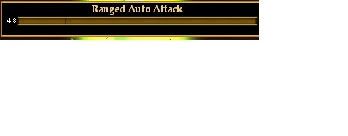
<Text AbsorbsInput="false" Font="/TextStyles.Large.LargeStyle" Location="25,2" Margin="1,0,2,2" Name="AutoAttackText" PackSize="a,f" ScrollExtent="356,21" ShadowStyle="/ShadowStylesNew.OutlineDrop.style" Size="356,21" TextAlignment="Center" TextAlignmentVertical="Center" TextColor="#F0D080">Ranged Auto Attack</Text>
<Text AbsorbsInput="false" DynamicData="/GameData.Stats.Ranged_Delay" Enabled="false" Font="/TextStyles.Small.SmallStyle" Location="0,24" Name="DelayValue" ScrollExtent="24,12" ShadowStyle="/ShadowStylesNew.Drop.style" Size="24,12" TextAlignment="Right" TextAlignmentVertical="Center" UserScrollable="false"/>
<Page AbsorbsInput="false" Location="28,26" Name="ProgressPage" PackSize="a,f" ScrollExtent="350,8" Size="350,8">
<Page BackgroundOpacity="0.475" Location="68,0" Name="Marker20" PackLocation="npn,nfn" ScrollExtent="1,8" Size="1,8"/>
<Page BackgroundOpacity="0.475" Location="137,0" Name="Marker40" PackLocation="npn,nfn" ScrollExtent="1,8" Size="1,8"/>
<Page BackgroundOpacity="0.475" Location="205,0" Name="Marker60" PackLocation="npn,nfn" ScrollExtent="1,8" Size="1,8"/>
<Page BackgroundOpacity="0.475" Location="274,0" Name="Marker80" PackLocation="npn,nfn" ScrollExtent="1,8" Size="1,8"/>
<Button AbsorbsInput="false" AMT="',0'" Location="-350,0" Name="ProgressTimer" OnActivate="Activated=false
Press=true" OnEffectFinished="Location=Parent.Parent.Parent.SizeLocationCalc.LocationCalc ## AMT" OnPress="SpeedCalc=Parent.Parent.Parent.SizeLocationCalc.SizeCalc/Parent.Parent.DelayValue.Text
SpeedCalc=SpeedCalc*2
Parent.TimerTriggerRanged.Speed=SpeedCalc ## &apos;,0&apos;" OnPressEffector="TimerTriggerRanged" PackSize="a,f" ScrollExtent="350,8" Size="350,8" Style="ProgressTimerStyle" Visible="false"/>
<LocationEffector Name="TimerTriggerRanged"/>
</Page>
<Image AbsorbsInput="false" Location="28,26" Name="Bkg" PackSize="a,f" ScrollExtent="350,8" Size="350,8" SourceRect="220,472,380,478" SourceResource="/images/window_elements_generic.dds"/>
<Page AbsorbsInput="false" BackgroundOpacity="1.000" Location="25,23" Name="Frame" PackSize="a,f" RStyleDefault="/rectlist.chat_bubble_frame" ScrollExtent="356,14" Size="356,14"/>
</Page>
</Composite>
<ButtonStyle Name="ProgressTimerStyle" RStyleDefault="Progress_Timer.progress_timer_rect"/>
<Namespace Name="Progress_Timer">
<ImageStyle Name="progress_timer_fill">
<ImageFrame Name="progress_fill" Source="images/window_elements_generic.dds" SourceRect="218,464,219,470"/>
</ImageStyle>
<RectangleStyle Center="progress_timer_fill" CenterShrinkV="true" CenterStretchH="false" Name="progress_timer_rect" NorthStretch="false" SouthStretch="false" TitleStretch="false" WestStretch="false"/>
</Namespace>
<Page AbsorbsInput="false" Name="WindowFrame" PackSize="a,f" ScrollExtent="385,54" Size="385,54">
<Page AbsorbsInput="false" BackgroundOpacity="1.000" Location="-1,-2" Name="Frame" PackLocation="left,top" PackSize="a,f" RStyleDefault="/WindowElements.DesktopWindowFrame.data.frame.rect" ScrollExtent="387,57" Size="387,57"/>
<Page AbsorbsInput="false" BackgroundOpacity="1.000" Location="-1,-2" Name="Bkg" PackLocation="left,top" PackSize="a,f" RStyleDefault="/WindowElements.DesktopWindowFrame.data.bkg.rect" ScrollExtent="390,59" Size="390,59"/>
</Page>
</Page>


dragowulf 11-23-2008 09:04 PM

1 Attachment(s)
How do you do: Visible=false if DelayValue.Text=Parent.Primary.DelayValue.Text

Here's my latest code. My last code was calculating the Size/Location wrong in decimals, so I fixed that.

gm9 11-23-2008 09:26 PM

Quote:

Originally Posted by dragowulf (Post 77911)
How do you do: Visible=false if DelayValue.Text=Parent.Primary.DelayValue.Text

CONDITION=DelayValue.Text==Parent.Primary.DelayValue.Text
Visible=CONDITION ? false : true

dragowulf 11-23-2008 11:53 PM

Thank you gm9, I seem to have got that working . I never took a class for any scripting language (a la xml, lua, etc) or learned it officially, so I'm still learning but I wont forgot what I've been taught. I've been learning xml through EQ2 so bear with me. :p

Now gm9; I understand your logic tree. My problem is that when you are dual wielding with different weapons, the CombatBubbles screw up because of the different delays, and the same color/shadowstyle. I'm not sure how to fix this, but it definitely is an issue. Any ideas?

Code:

if (RangedAutoAttack) {
        start ranged bar;
} else {
        if (SecondaryDelay) {
                if (PrimaryBar.Position == SecondaryBar.Position) {
                        trigger PrimaryBar;
                        trigger SecondaryBar;
                }elseif (PrimaryBar.Position < SecondaryBar.Position) {
                        trigger PrimaryBar;
                }else{
                        trigger SecondaryBar;
                }
        }else{
                trigger PrimaryBar;
        }
}


gm9 11-24-2008 12:02 AM

my only idea how to do it is what you quoted in your post, I still think that should do the job, or at least I don't think we can do better without Rothgar's DD. :)

PS: On conditionals and operators there are some useful stickies in the XML modding forum, that's where I learned from as well.

dragowulf 11-24-2008 12:17 AM

Quote:

Originally Posted by gm9 (Post 77919)
my only idea how to do it is what you quoted in your post, I still think that should do the job, or at least I don't think we can do better without Rothgar's DD. :)

PS: On conditionals and operators there are some useful stickies in the XML modding forum, that's where I learned from as well.

Thanks. I'll take a look.

I'm thinking there's maybe one way I could do it, but I'm not sure. I'll try some stuff out. It is almost finished though.

reins 11-24-2008 12:18 AM

From testing it somethings I have noticed are that...

A) Misses do not show up in orange like they are supposed to, they are showing up a grey color for me, so aren't triggering the reset of the bars.
B) The combatbubbles are appearing later than the auto attack is happening. You may be able to make the bar more accurate by using an event handler that occurs before the OnShow event. I don't know the event hierarchy though.
C) The bar needs to remain visible when the user has entered stealth, otherwise it is a bit confusing.

dragowulf 11-24-2008 12:31 AM

Quote:

Originally Posted by reins (Post 77921)
From testing it somethings I have noticed are that...

A) Misses do not show up in orange like they are supposed to, they are showing up a grey color for me, so aren't triggering the reset of the bars.
B) The combatbubbles are appearing later than the auto attack is happening. You may be able to make the bar more accurate by using an event handler that occurs before the OnShow event. I don't know the event hierarchy though.
C) The bar needs to remain visible when the user has entered stealth, otherwise it is a bit confusing.

A) Melee auto attack misses don't show up at all. Misses only show up when you do a CA/Spell or a Ranged auto attack. I'm aware of this, but I'm not sure how to fix this.

B) Do you use a dual wield weapon with different delays? What's your average latency? Care to elaborate? (I'm not sure if I understand you)

C) When the user enters stealth, autoattack turns off...so I'm not sure what to do there.

I'm going to try to streamline the code with my next update.

speedycerv 11-24-2008 01:59 AM

ok I downloaded the file, and i dont see anything different with my UI. How do I load this? or what folder am I supposed to put it in.

dragowulf 11-24-2008 02:08 AM

Quote:

Originally Posted by speedycerv (Post 77929)
ok I downloaded the file, and i dont see anything different with my UI. How do I load this? or what folder am I supposed to put it in.

Right now it's in testing so it's only about 95% functional. Put the file in your customui directory.
Quote:

Originally Posted by dragowulf
Remember to put <include>eq2ui_custom_autoattacktimer.xml</include> inside your eq2ui_custom file. You don't need to type anything to make it work, just auto-attack

If you don't have eq2ui_custom.xml, copy the one from the default ui folder and paste it in your custom ui folder and follow the instructions of this quote.

dragowulf 11-24-2008 04:33 AM

1 Attachment(s)
Here's my latest version. Nothing major in this test release. I cleaned up some code and streamlined events and calculations. I also added the function which turns off the secondary bar display when Primary/Secondary delays are both the same.

nluerdarea 11-24-2008 07:20 AM

Great work so far dragowulf, even for a freep =P

One suggestion that will take care of one issue is to have the bar remain visible if it is still counting down.

For example, if you kill a mob with auto ranged attack, your bar will continue to be visible while it is counting down. Once it has finished, and you are no longer attacking, the bar disappears. This will also let you know that as a tank, when you press the autoattack button to target the next mob (most tanks do this right?!?!) you may not hit it right away and could hit a few CA's first.

dragowulf 11-24-2008 08:51 AM

Quote:

Originally Posted by nluerdarea (Post 77934)
Great work so far dragowulf, even for a freep =P

One suggestion that will take care of one issue is to have the bar remain visible if it is still counting down.

For example, if you kill a mob with auto ranged attack, your bar will continue to be visible while it is counting down. Once it has finished, and you are no longer attacking, the bar disappears. This will also let you know that as a tank, when you press the autoattack button to target the next mob (most tanks do this right?!?!) you may not hit it right away and could hit a few CA's first.

Good idea. I'll try to do that.

reins 11-24-2008 09:34 AM

Quote:

Originally Posted by dragowulf (Post 77925)
A) Melee auto attack misses don't show up at all. Misses only show up when you do a CA/Spell or a Ranged auto attack. I'm aware of this, but I'm not sure how to fix this.

B) Do you use a dual wield weapon with different delays? What's your average latency? Care to elaborate? (I'm not sure if I understand you)

C) When the user enters stealth, autoattack turns off...so I'm not sure what to do there.

I'm going to try to streamline the code with my next update.

To get auto attack misses to show you, you need to use a command, i believe its
/combatbubble_only_spell_misses 0

When i did that the auto attack misses started showing up, but they were grey instead of orange, and it looked like they had a shadowstyle heh.

And what I mean by B) is that if you watch the chat log, you get the auto attack message before the combat bubble actually appears (Some times). I've seen it take a full second before the combat bubble renders. So if you are running ACT and have the autoattack notification plug in running, you'll hear it fire before the combat bubble appears atleast half of the time.

gm9 11-24-2008 10:56 AM

Quote:

Originally Posted by reins (Post 77938)
but they were grey instead of orange, and it looked like they had a shadowstyle heh.

you can just filter by the text

Quote:

Originally Posted by reins (Post 77938)
And what I mean by B) is that if you watch the chat log, you get the auto attack message before the combat bubble actually appears (Some times). I've seen it take a full second before the combat bubble renders. So if you are running ACT and have the autoattack notification plug in running, you'll hear it fire before the combat bubble appears atleast half of the time.

the question is whether that also makes the bar delayed or whether it is just a visual thing for the floating bubbles. They might well OnShow on time but be scrolled into view only later.

reins 11-24-2008 11:02 AM

Yes it does delay the bar, I was testing it with the both the chat window and the ACT auto attack notification.

The log line would show up a good 1/2 second to 1 second before the bar would reset at least 40 to 50% of the time.

reins 11-24-2008 11:07 AM

I toyed around with all of the /combatbubble commands. none of them made the combat bubbles appear when they were supposed to with any form of accuracy. That is why i'm curious if there is an event that could be used before the OnShow event. Maybe OnActivate... I don't know the event hierarchy for the UI - any event that occurs before the OnShow event.

gm9 11-24-2008 11:09 AM

Hmm, hope somebody finds a solution to that, because I don't see one. :(

You can't run an event script before the event occurs, what you could do it offset the entire bar by the delay but that would be fairly inaccurate.

reins 11-24-2008 11:27 AM

Yeah right now I don't see a way around it, I'll test it more tonight and maybe come up with some ideas.

Jida 11-24-2008 11:31 AM

Just make the last little section of the bar red.. like the last 5% of the 100%.

That will take into account bubble lag.


:nana:

Jida 11-24-2008 11:34 AM

Quote:

Originally Posted by reins (Post 77941)
Yes it does delay the bar, I was testing it with the both the chat window and the ACT auto attack notification.

The log line would show up a good 1/2 second to 1 second before the bar would reset at least 40 to 50% of the time.

What kind of (PC) system you using?

reins 11-24-2008 12:04 PM

Quote:

Originally Posted by Jida (Post 77949)
What kind of (PC) system you using?

I can raid in high quality with no lag :)

SVicious 11-24-2008 12:28 PM

Do you have any plans to add this to the tank side of the game? I would love to have this for my monk :)

speedycerv 11-24-2008 01:34 PM

OK i did what you said, had to make a customui folder and added the part into that default file (i put it in after the first line) and then copied it over to the folder. Hcanged my eq2.ini to point to customui. and The bar came up. But there is no bar going across, counting down for me.

Jida 11-24-2008 01:38 PM

Attack something instead of just having ranged attack on.

That might help?

dragowulf 11-24-2008 03:01 PM

Quote:

Originally Posted by reins (Post 77938)
To get auto attack misses to show you, you need to use a command, i believe its
/combatbubble_only_spell_misses 0

When i did that the auto attack misses started showing up, but they were grey instead of orange, and it looked like they had a shadowstyle heh.

And what I mean by B) is that if you watch the chat log, you get the auto attack message before the combat bubble actually appears (Some times). I've seen it take a full second before the combat bubble renders. So if you are running ACT and have the autoattack notification plug in running, you'll hear it fire before the combat bubble appears atleast half of the time.

I did not know there was combat bubbles commands. Please post more. I think I can make it filter misses as well though. What color are the misses?

For the other thing. I have no clue how to fix that problem. I don't control when the bubbles render, and how they render. Shoot if you have an idea..because I sure don't. It could also be latency. Disable my mod and see if it still happens.

dragowulf 11-24-2008 03:04 PM

Quote:

Originally Posted by Jida (Post 77948)
Just make the last little section of the bar red.. like the last 5% of the 100%.

That will take into account bubble lag.


:nana:

Maybe. We'll see

dionysrothaar 11-24-2008 03:16 PM

Problem with the autoattacktimer-progressbar
 
Hallo mighty handlers of code and numbers,

since I've started reading this thread i'm more then impressed with all the thoughts and trys going on.
So I thought it would a good idea to give this auto-attack-timer a try for my chars. I installed the xml-file and all is going very well except one problem: The progressbar never reaches the full length of the window. It resets by approximately 10% of the length. It resets correctly, when it is supposed to do so, but it has only reached a tenth of his length.
Is came to my mind, that I also had a very similar problem with the original autoattack-calc-window, which is now part of the profitUI. It shows the value of the weapondelay always as ten times the real delay. So I see a 40, there I should see a 4. This is true for meele and ranged delay.
I'm a complete noob in terms of coding and UI-modding, so the only explanation to me could be, that I'm playing with the german version/client of EQ2. Maybe that this gives you guys a hint for a possible solution for this problem. I would love to use the autoattacktimer, because I think it's a huge help for a better timing in fights.
So long and keep up the good work,

Dionys

dragowulf 11-24-2008 03:36 PM

I've concluded that when you enable misses, it turns on misses for you and your enemy. This is bad because the enemy's misses are the same color and shadowstyle as your misses.

Is there any way to do this without using combat bubbles??

Jida 11-24-2008 03:38 PM

What version are you using?

There are MANY different flavors in this thread and it sounds like your using an older version before the shadow styles are fixed.

I would suggest going backwards in time from the last post until you find one, then you are for sure to get the best version of code.

Jida 11-24-2008 03:54 PM

Quote:

Originally Posted by dragowulf (Post 77967)
I've concluded that when you enable misses, it turns on misses for you and your enemy. This is bad because the enemy's misses are the same color and shadowstyle as your misses.

Is there any way to do this without using combat bubbles??

Without additional dynamic data, no.

If that data becomes available to the client, we will see.

dionysrothaar 11-24-2008 03:55 PM

Quote:

Originally Posted by Jida (Post 77968)
What version are you using?

There are MANY different flavors in this thread and it sounds like your using an older version before the shadow styles are fixed.

I would suggest going backwards in time from the last post until you find one, then you are for sure to get the best version of code.

I use the version from post number 257 and I think, that's the latest at this time. I think it's not an issue of an old version because of the very similar problems with the delay-value in the original autoattack-calc-window from gm9.

Regards,

Dionys

samejima 11-24-2008 03:57 PM

Quote:

Originally Posted by dragowulf (Post 77967)
I've concluded that when you enable misses, it turns on misses for you and your enemy. This is bad because the enemy's misses are the same color and shadowstyle as your misses.

Is there any way to do this without using combat bubbles??

Yes. I didn't use combat bubbles, they lag to much and to many problems with them.

dragowulf 11-24-2008 04:26 PM

Quote:

Originally Posted by samejima (Post 77971)
Yes. I didn't use combat bubbles, they lag to much and to many problems with them.

What????? :confused:


All times are GMT -5. The time now is 10:59 AM.

vBulletin® - Copyright ©2000 - 2026, Jelsoft Enterprises Ltd.
© MMOUI