
|
Quote:
To get as far as I mentioned in my post (about getting all but the title of the window looking like the rest of the window) I had to add RStyleDefault values to the background and InteriorGrouper pages for each type of examine window. Basically, I would like to make the title of the window match the appearance of other windows when using a custom UI such as Profit. |
I think he mistyped, setting the opacity to 0 is what you must to do have the background shine through.
|
Quote:
|
The background page needs to keep full opacity, just whatever is in front of it doesn't. The background RStyle needs to be added to be background page. It's probably easiest if you take the default examine window for comparison (depending on how much Drum changed though, maybe he'll chime in).
|
I think I did mistype. I was tired :p
When I modify the windows default elements I don't like to just delete them (which can make things funky with the Titlebar). So I usually delete their style, and then set backgroundopacity to 0, and for the background I just delete the style. When I was talking opacities, I was just thinking about the wrong part of the window in my previous post. Again though, I forgot my examine window still has the titlebar there, it's just not styled. Soo.... Simply edit the Bkg in the WindowFrame to have: RStyleDefault of "/WindowElements.WindowFrame.data.bkg.rect" If you do it in UI builder, and you paste the style in, it will be too long. So double click the text RStyleDefault so you get the big edit box. That'll give the blue background, but you'll have to resize it to fit the window. |
[DrumsUI] Chat Window
Having trouble with this mod lately. No matter what I do, I can't move the windows. I can resize them, but I can't grab them. I get the cursor graphic that shows they can be moved, but it acts like I have click-through enabled for them, which I don't.
It's very frustrating. I've tried everything I can think of. Going to have to switch back to default for a bit. Bah. |
Quote:
|
Updated the Persona, Guild, and Tradeskill windows for Game Update #49.
Will update any outdated screenshots for these mods, as well as the ones I recently updated this week. On the horizon.... -stat bar window update (more stats, more configuration, etc) -group window cures update A full DrumsUI release? :eek: |
New mod for the Maintained Effects window updated and ready for donwload.
Displays time remaining and ward/procs remaining on the icon. With titlebar enabled, you can see buff names and targets as well.  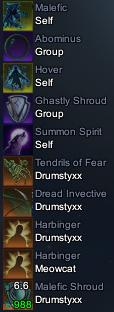 |
invalid or corrupted
I'm getting a "invalid or corrupted" error on several of your most recently updated mods. I've left comments on the ones I tried that I got the error with.
|
Quote:
|
Quote:
|
Huh. I guess I'm just SOL. I'm trying it with compressed files from various sources now, some that I've opened before with no trouble. Some of them I get an error on, some not. I wonder what the problem could be... :(
|
I can verify 7-Zip works just fine as well, you might want to give it a try, it is a free program (open source)
|
What are you using to extract the zip files?
WinZip and WinRar are also other good alternatives. |
I doubt it's his software, sound more like faulty memory, overheating or overburdened power supply, or other things that cause data corruption.
|
I've tried all three. WinRar, WinZip, and 7-Zip. They all have trouble with the same files, and work fine with other files of the exact same format, even if I've cleared temp files and downloaded to different locations... This is frustratingly perplexing.
|
is it posible to get spell reuse timers over the hot bar buttons?
|
Quote:
Not sure how soon I will get this mod out however. I will definitely mess around with it in the next few days though. |
Somebody should finally do this mod:
We expressly got SOE to change the DD to support that but nobody modded it so far... (see here also) |
Hey, now that's a good idea.
I'm about coded out for tonight, but tomorrow I'll tackle this project for sure. But I'm pretty sure the progress bars will have to overlay the icons as previously stated in that topic. |
Yup I agree, unless you accept horizontal icon spacing you'll have to overlay them. But if you overlay it is pretty simple as I stated in the topic I linked, if you take my code you can simply drop the progressbar in there instead of the text and it should work out of the box. I just never got around to do it.
Biggest problem would probably be where to overlay without hiding important information like keybinds or amount. Maybe do a left aligned vertical progress bar? |
Yeah... it would be nice if we could move the numbers around that are on the icons.
ie: re-use bars overlaying top of each icon, and number binds in the bottom-right corner. I'll mess with it... could always put refresh bars on bottom if icon. Vertical bars will probably get in the way of NUMPAD# bind text for those using it... lol |
Putting it at the bottom will hide stack amounts and charges for item links, e.g. potions.
|
Ooopsie :p That's right
|
| All times are GMT -5. The time now is 02:10 AM. |
vBulletin® - Copyright ©2000 - 2026, Jelsoft Enterprises Ltd.
© MMOUI