
|
Alright :), but how come the color and everything is totally different compared to the other Screen shots? Mines just a plain grey and theres hardly any detail on the lower bars? Oh, and my screen is being done in 1280x1024.
|
Quote:
|
Quote:
I'm a bit confused :confused: You SS looks just like the SS from the download page except formated for you resolution. |
1 Attachment(s)
Hi Landiin
i was wondering if i can fix this problem for some reson i cant never see fully ppls names and adresses in broker |
5 Attachment(s)
I have a ton of issues, and thankfully, pictures for each one!
First, I love the concept of the target window swapping between a single target and the implied target. The main thing that irritated me is that the implied target was never lined up right, except if I had someone targeted and they targeted a mob of some sort. See the attached pictures to see what I see when I have a mob targeted (its scooted down a bit) or if a deity pet is targeted (way out of alignment). Pictures 11 and 22. If i tried to adjust it myself, it would automatically reset itself to what you see in my pictures the next time I targeted something. Also, the exp % never showed right in the tiny display when you had the stats showing. See attached pictures also (18, 20 & 21). |
small problems
I love everything about this UI, but I am having two small problems.
1. I cant get the custom backrounds to work properly 2. I cant find the resizable box that has the skin on it that fits behind your hotbars Please help! |
Extreme Ui
I loaded it but I lost my hotbars and i cant open them back up why?
|
Quote:
|
Quote:
Sorry I havn't got to them sooner as I am just coverd up in RL this time of year as I run youth softball league. So I go to work the go to the field and home and sleep.. I'll get to it, it's just finding time.. again sorry |
Custom Profiles
Well heh, dam spell checker here. I had a nice post, then clicked on spell checker since my spelling is not the greatest, and blam, entire message gone :mad:. My fault for not copying the message first.
Anyway gonna keep it short now, wanted to say thanks for the really nice UI and all the hard work you put into it. I wanted to mention 2 things. First there seems to be a problem with saving and loading custom profiles. Since LU34 I really haven't had a chance to mess with the option, but always thought it would be great to have. Well today I loaded up the default UI and it does work. Thought it might have been a joke by Sony or something to bring in something actually useful, but have it not work to mess with people. Not sure where the problem lies. Second is there are several mods for the raid window now with quick click buttons. This would be great to have. I found a guy here that made a program that can customize this for your raid window, but it does not work for Extreme. He is only missing 2 things with his program, one is to be able to pick the spell icon, and other is to have more than one text output per spell. On my conj, I have a macro that sends a message to raid and to the person. Thats all, Thanks again for this UI, Lecore |
Landiin where are you?
Your last update is over one month old and there a lot of small fixes to make I think. Do you make more updates or is your great UI death :confused: |
There isn't any updates needed for LU36 unless you have some other mod also installed.
|
Quote:
But to answer your question no it isn't dead. It has however taken a back seat until I get EQ2 Companion out. I'll take the time as soon as I get reconnected at home to update the exp % readouts. |
Problem with character switch and notes
Hi, I am wondering if you can help me with the problem I am having. I just downloaded and installed this UI and it's so pretty, I love it. But my problem is that although I can get my quick characters and notes to save, I cannot access the notes in-game and I see nowhere to switch characters. I'm sorry if this has already been answered, but I did a search and was unable to find any answer. Am I missing something critical? Thanks for your time, and I'm sorry if I'm making you repeat the answer from somewhere else.
|
you have peeked my interest
"It has however taken a back seat until I get EQ2 Companion out"
eq2 companion? you have my interest peeked |
Quote:
Yeah it is pretty cool, but I'll let Landiin spill the bean on it |
Quote:
For notes there should be a button under the exp bar/number along with many other buttons. This button should read notes. For the char switch, From the EQII menu button click camp from that menu. It will bring up the logout window that has the switch char tab in it. :) |
Quote:
|
inventory overflow
Where is the inventory overflow located? I don't see it .. but I could just be blind as well.
|
Quote:
|
Quote:
I use this window but I'm really confused about this... Thanks a lot... |
Quote:
It's finally quit raining (knocks on wood) and I my ISP has the new wireless tower up so maybe I'll be off dailup again in a day or two and can patch EQ2 so I can play and test again.. |
Quick Char Switch
This has been talked about before but in my case when I installed Extreme
it has not worked plus did not recognized any of my char's in the AUCP. So I manually put the char's in and on every update they disappear. In place of my char's is three other char's that I don't have. And there is no tab in the EQ2 camp window. Should I reinstall? Thanks in advance. BTW love the interface. |
Quote:
Also Fearra reported a couple post back that the quick switch tab didn't get added back in with the last major redo, so I'll have to add that in. I should get that added back in soon. Look for an update around Sat or sun. |
Quick Char Switch
After the last little patch I now have the tab for my char's and now
am able to keep them. All the but the bottom four char's buttons just logs me out of the game instead of switching char's. The bottom four buttons does nothing. I have all the buttons filled with my char's. Hopefully an easy fix. Once again thanks in advance. |
Info Screen
Whenever i try to access the info screen, nothing comes up. I'm not sure if its just appearing off screen by chance, but how can i get it to pop up correctly?
|
Quote:
|
Quote:
|
When you open up all your stats and info in the top right the HP Regen and Power Regen are labeled wrong. The labels should be switched around for these two items.
|
Quote:
|
Quote:
|
Quote:
I normally add them also, just like to stress the point to people to do it, because even that I intend to add it, I still will forget if my brain wonders off on another project.. |
Recipies not showing up
Hi I just downloaded the extreme ui from here and everythign looks good except none of my recipies are showing up when I try to create somthing with tradeskills. any work around for this or am I doing somthing wrong?
|
Not sure why you can't see them. The tradeskill window is a window I mod so the game is loading the default window. I'll take a look and see if I can get mine to not show recipes.
|
Need Help
ok here what the UI looks like now
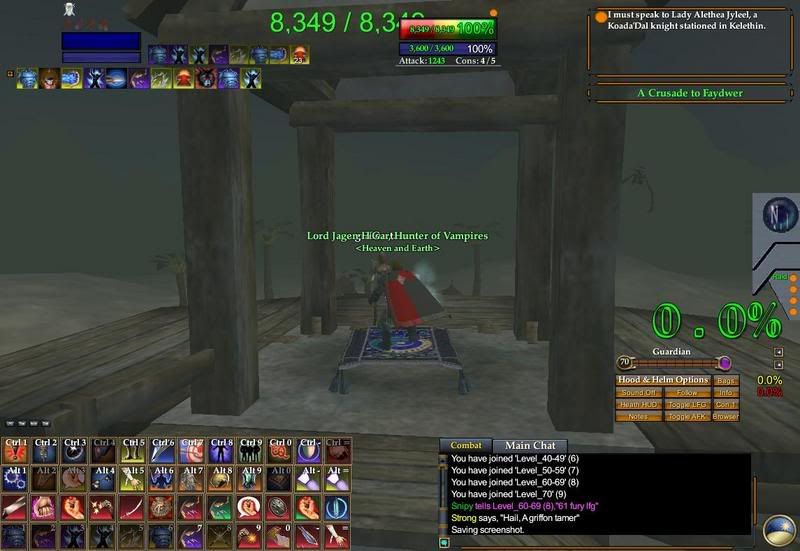 Now how do i get it too look like this one here????  |
from the ss that looks like the user is using res 1600x1024 or at least using the ui setting file from res 1600x1024.
To get yours set up that way open up the AUCP and go to client settings and select the toons user setting file and then the 1600x1024 and click the copy/set button. |
can you take pic and show me what ya mean LOL i still new at this whole UI thing
|
If you press Cancel EQ2MAP nothing happen and it continues downloading.
|
Quote:
I'll look at the code to see if there is an easy fix, but to be honest if it isn't I'll probably not fix it.. Why you may ask.. Because I am working on a project that will replace this updater and it should be out very soon.. |
secound papaerdol
any eta for the secound paperdoll wich came with the LU38 ?
|
| All times are GMT -5. The time now is 05:41 PM. |
vBulletin® - Copyright ©2000 - 2026, Jelsoft Enterprises Ltd.
© MMOUI