
|
I think its just the bag mods that have the problem... and Id use the default, but I dont like going through every bag and setting them up again. >.<
|
I'll see what I can whip up :)
|
New examine windows update:
 Now with search buttons on several of the windows :) |
New bag mod uploaded.
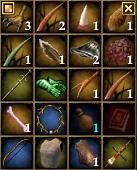 Comes with no border, background, or any extras. Fully resizable and only display the drag handle and close button when the mouse is over each bag. Enjoy :) |
Inventory window update:
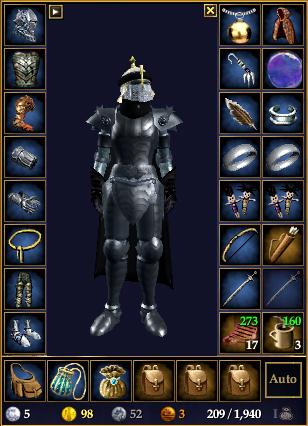 Recoded it from scratch. Display HP/Power regen, has a button to toggle between Equipment and Appearance slots, and a button to toggle inventory bags. Enjoy. :) |
New market window submitted:
 3/4th sized item rows, display coin and button for inventory bags, and is a good bit smaller than default :) |
Small fix to the bag window. The close button should now function correctly on each individual bag.
*Edit* Just uploaded the long-overdue-updated loot window. 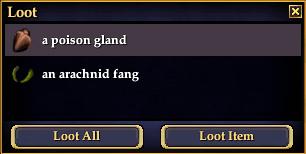 Now with default Enter + Esc buttons, and the updated style. |
Updated the Merchant window
 Moved some stuff around, no more title, added status, and now has a smaller minimum size. woot woot. |
New, updated hotbar released.
 Decided to slim down the default hotbar some, and take out the extra space. |
One small request: Is there a way to shorten the key text using the Numpad from <Numpad #> to NP# on the hotbar?
|
I have an idea that might work. I'll see what I can do.
|
Bank window updated for GU #46, and fixed the buttons to work again. Now with less bank-text spam! :nana:
|
Pet window
Love your mods, but did not find a pet window. Any chance of making one that would match the player/group windows?
Thanks |
Quote:
Player window updated last night. Here's a nifty diagram:  |
Persona window updated to include the extra modifiers and casting-related percentages:
 |
Group window
Having trouble with the group window. The ends of the bars are not showing, just a white retangle on each end. I did put the dds file in the proper place. The player window works fine. Any ideas?
Thanks |
I somehow uploaded the wrong XML into the ZIP. It has the wrong Folder path in the XML. Use this attached XML until the correct zip is updated.
Sorry for the inconvenience. *Edit* removed attached file. I'm uploaded new one with Click-to-Cure update anyhow. The old zip was outdated! |
New pet window with percentages and smaller icons!
 Uploaded new group window zip as well. |
Experience bar
I just installed the experience bar mod and like it. But I can't find the setting to display more than one bar at once. I'm completely new to using EQ2 UI mods, so pardon if the answer is obvious. I didn't see it in window settings nor mentioned in the FAQs here that I could find. How do I show more than one experience bar at a time? Thanks.
|
Quote:
Currently my XP bar only shows 1 bar at a time. The image on the download page simply displays each type of XP bar to show what they look like. And that you can switch between bars by clicking the right side gem. Mostly likely what I'll do is make the window re-sizable vertically in the future, so that you can easily show multiple bars. |
Quote:
|
Player Frame Resetting
First off just wanna say kudos on the awesome mods, I'm using almost every single one. I did run into a problem however with the Player Frame mod. I like to keep it in display percentage AND full health mode, but it seems that everytime I log into EQ2 I have to not only click the player name to display them, but also unlock and re-align the player window as it resets to default percentage only mode which shrinks and moves the whole frame. I tried poking around the xml and editing it with the UIBuilder to make it constant and not require click, but I'm not really sure what part needs to be edited and my random attempts have been futile thus far. Could you please tell me how to modify it to always display both full health and percentages? Thanks in advance.
|
Quote:
This may help you out. On the top line of the file, try adding this to the top tag: Code:
OnShow="LayoutPage.Layout_1.press=true"If you REALLY wanna get rid of the other normal mode, you could just open the window in UIBuilder, and with the "Play" button pressed, you could click the playername text and it would put it in that mode. Then you could just delete the LayoutPage page object. The choice is up to you. Let me know if the code above works alright. |
Quote:
|
Quote:
New Tradeskill window update, currently awaiting validation:  |
| All times are GMT -5. The time now is 02:11 AM. |
vBulletin® - Copyright ©2000 - 2026, Jelsoft Enterprises Ltd.
© MMOUI