
|
Quote:
|
Player Frame Resetting
First off just wanna say kudos on the awesome mods, I'm using almost every single one. I did run into a problem however with the Player Frame mod. I like to keep it in display percentage AND full health mode, but it seems that everytime I log into EQ2 I have to not only click the player name to display them, but also unlock and re-align the player window as it resets to default percentage only mode which shrinks and moves the whole frame. I tried poking around the xml and editing it with the UIBuilder to make it constant and not require click, but I'm not really sure what part needs to be edited and my random attempts have been futile thus far. Could you please tell me how to modify it to always display both full health and percentages? Thanks in advance.
|
Quote:
This may help you out. On the top line of the file, try adding this to the top tag: Code:
OnShow="LayoutPage.Layout_1.press=true"If you REALLY wanna get rid of the other normal mode, you could just open the window in UIBuilder, and with the "Play" button pressed, you could click the playername text and it would put it in that mode. Then you could just delete the LayoutPage page object. The choice is up to you. Let me know if the code above works alright. |
Quote:
|
Quote:
New Tradeskill window update, currently awaiting validation:  |
Experience window updated to display multiple bars at once!
Window is re-sizable to display 1 to 3 bars simultaneously.  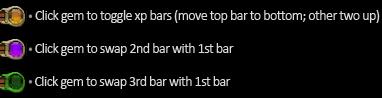 |
Hotbar
I've been looking, but as yet I've seen nobody with the issue I'm having. Its probably something silly I'm overlooking but anyway... I love the hotbar, but for some reason it always stays in front of all other windows. This makes some things difficult when I have to move the other windows away so I can see them.. For example, when I have all the inventory and bank windows open to organize. Now that we have so much box space, I need the room to spread out but the boxes just won't go in front of the hotbar.. always behind it.
Any suggestions would be much appreciated. I have several of your other mods and they work beautifully.. this is the only issue I've ever had :) Thanks! |
Now that is strange. Upon reading this, I was in-game, and all my bags seem to stay above the hotbars. I'm not too sure what would cause that.
Maybe try backing up your UIsettings INI file else where, and try logging in with a default layout. This may or may not help; not too sure. |
New raid window uploaded:
 Keep an eye out for a new Journal update to include the Writ/Quests tab from the Info Center. Also, I'm working on a full [DrumsUI] release. No ETA yet. :o |
Quote:
<?xml version="1.0" encoding="utf-8"?> <Page AlwaysOnTop="True" clientmarginframe="10,10,5,10" Dunno how it happened, but I just changed it to False and now it is behaving :) |
Quote:
|
Quote:
Keep up the great work :) |
New Journal update!
 Now includes tabs from the Info Center! This mod can be used along side with the Info Center, but does not require it! :D |
Update for Group window uploaded:
 |
New Experience windows are great
Thanks a lot for the new update to the experience windows. Showing 2 at once is exactly what I've been looking for.
|
Quote:
|
New Voice Chat window:
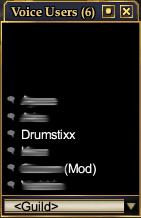 Bottom-aligning voice speakers. :D |
New start button Stat Bar mod released:
  Resizable stat bar with evenly spready statistics, per-class customization, and togglable stats on the fly. Config file is simple to setup. Only list the stats you do not wish to see for each class. The rest default to show up. |
Love the statsbar setup, was wondering if auto resizing aspect is completely tied in or if there is an easy way to add it into another statbar?
I got 1 possibly 2 more bars I need get into a more workable format for my screen. I got setup like your code is, except for the checkboxes & I can't seem to get it to decrease the gap between items (gap is about equal to the textspace of the biggest item). I can post or PM you what I got so far if you wish to take a look =) I'm still rather a n00b at the XML modding. |
Quote:
The stats are in individual pages inside a composite. The composite is set to Horizontal and spacing type is set to Spread (which is default). I give each of those pages a max/min size so that they are not resized when the window is resized, or elements are hidden. Instead, the gap between the objects is the only thing that changes. If you use a spacing type of Fill, it will simply fill from left to right, with the same spacing between the objects. You can adjust this with the "Spacing" property however. The trick though is what I mentioned about the MinimumSize/MaximumSize, set this both to the same thing (the size that it should be), and then the composite can't change that. I did most of it in UIBuilder. It will show composite stuff pretty well. Just when you change the size of an object, toggle it's visibiliy off then back on, so that it re-aligns everything. |
Yeah, checked it over and don't see any major differences. Sent you a PM with the code/file to take a look at. And yes, it is the gaps inbetween the data that are not gapping correctly, they are way too wide.
|
New slim guild window released
|
|
Quote:
|
Thanks Drumstix,
As a very old eq1 UI moder i'm used to correct most of the ui made for eq2 in cause of the same problem. Most of the people forgot that European language such as French and particulary german have text longer than nglish and break 70% of most of the mod i have tested. That's why when i make UI that i use smaller font to be sure it's going to be compatible with all language. Thanks for your work. Regards |
Updated the Guild Window:
 Made the text smaller for the guild level so that other languages show it properly. Sorry about that :) Updated window for Game Update #48, with the points addition, and made some other small tweaks to the window to allow it to re-size it even smaller in the vertical sense. |
Thanks Drum ,) Will check it asap
|
Updated tradeskill window:
 Now includes toggle to keep Recipes visible while crafting. Window is still resizable as before. Enjoy! Note that browsing through recipes will take focus off tradeskill event buttons, and they must be pressed with the mouse rather than keyboard to re-activate focus. --------------------------------- Updated Examine window: minor update - added EQ2LLinks.com button to item window --------------------------------- Player Window updated with new Click-to-cure methods. No longer cancels spell casting to cure. It now will place a cure into queue, and clear any currently queued spell at the same time. Also new code implemented to never change your target, circumventing the player window's self-targeting function when using the buttons. --------------------------------- Updated the Info Center with an EQ2i and an Allakahazam browser button. --------------------------------- Journal window now also has the EQ2i and Allakhazam browser buttons for the Active, Completed, and Group tabs. Active Quest window is now also included in the compiltion which, you guessed it, includes these buttons as well. --------------------------------- |
Examine Window
Regarding the Examine Window.
I noticed the examine window is black and subsequently a different color from the other in-game windows. Is there anyway I can change that? I tried looking but it must be something so simple that I'm missing it =) EDIT: Ok well, part of it was really easy. I have fixed it so everything but the title of the window is blue now. Can't seem to change it. |
Quote:
|
Quote:
To get as far as I mentioned in my post (about getting all but the title of the window looking like the rest of the window) I had to add RStyleDefault values to the background and InteriorGrouper pages for each type of examine window. Basically, I would like to make the title of the window match the appearance of other windows when using a custom UI such as Profit. |
I think he mistyped, setting the opacity to 0 is what you must to do have the background shine through.
|
Quote:
|
The background page needs to keep full opacity, just whatever is in front of it doesn't. The background RStyle needs to be added to be background page. It's probably easiest if you take the default examine window for comparison (depending on how much Drum changed though, maybe he'll chime in).
|
I think I did mistype. I was tired :p
When I modify the windows default elements I don't like to just delete them (which can make things funky with the Titlebar). So I usually delete their style, and then set backgroundopacity to 0, and for the background I just delete the style. When I was talking opacities, I was just thinking about the wrong part of the window in my previous post. Again though, I forgot my examine window still has the titlebar there, it's just not styled. Soo.... Simply edit the Bkg in the WindowFrame to have: RStyleDefault of "/WindowElements.WindowFrame.data.bkg.rect" If you do it in UI builder, and you paste the style in, it will be too long. So double click the text RStyleDefault so you get the big edit box. That'll give the blue background, but you'll have to resize it to fit the window. |
[DrumsUI] Chat Window
Having trouble with this mod lately. No matter what I do, I can't move the windows. I can resize them, but I can't grab them. I get the cursor graphic that shows they can be moved, but it acts like I have click-through enabled for them, which I don't.
It's very frustrating. I've tried everything I can think of. Going to have to switch back to default for a bit. Bah. |
Quote:
|
Updated the Persona, Guild, and Tradeskill windows for Game Update #49.
Will update any outdated screenshots for these mods, as well as the ones I recently updated this week. On the horizon.... -stat bar window update (more stats, more configuration, etc) -group window cures update A full DrumsUI release? :eek: |
New mod for the Maintained Effects window updated and ready for donwload.
Displays time remaining and ward/procs remaining on the icon. With titlebar enabled, you can see buff names and targets as well.  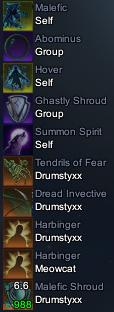 |
invalid or corrupted
I'm getting a "invalid or corrupted" error on several of your most recently updated mods. I've left comments on the ones I tried that I got the error with.
|
| All times are GMT -5. The time now is 09:23 PM. |
vBulletin® - Copyright ©2000 - 2026, Jelsoft Enterprises Ltd.
© MMOUI