
|
Ok I saved these files to my Desktop and then converted them to a Zip file. Do I extract them to my Custom UI Folder or to tha actual EQ2 UI Folder?
M |
dont convert them. just download the xml files from our posts and copy them to your custom ui folder. or just download them straight into the custom folder if you wish.
Perdition: how can I make it so the "L:" only shows when I have a mob targeted in your implied target window? At its default setup now the background and the L: always show, and the health and hp bars dissappear when you esc out. i tried adding the datafilter=0000 etc. but it didnt work. does it not work in a <text> tag? |
this is the way i did it for my implied target window you would have to put it in a page that has the dynamic data of the implied targets level and then set the dynamic data filter to hide it when it doesnt have a level, which should be 0001 as i recall.
|
I first off want to say that I love this UI, and I really like the modifications put on it. I am getting a bit impatient trying to wait for the implied target window so I decided to download the one posted earlier, as well as the other modifications to this UI.
However, the implied target window does not show when I download the proper file and put it in the custom ui folder. I downloaded the eq2ui_mainhud_impliedtarget.xml posted by perditon as well as the compass modification and tried em out. The compass modification works perfectly, but the implied target never appears. I know nothing of xml, but I basically thought that well, perhaps another file was needed to make the game realize the new window was there. So I figured that the eq2ui_mainhud.xml as well as the groupbar *the fixed version* and the mainhud_player as well. As it turns out, now I get the implied window in the proper texture, but now my player window and my target window are both back to default! I've reinstalled the UI from it's original state and added only the compass add on since it seemed to work, but I was wondering what I'm doing wrong here with these. I really would like to have that implied window, it really helps a lot when I play. :D **Woohoo, first post I've ever made in the two months I've been on EQ2interface.com. :D ** |
delete eq2ui_gamedata.xml from your custom folder, it shouldnt be in there, once you delete it it will work.
|
Any chance you could add a more visible indicator for when auto-attack is on? The flashing name is just too easy to ignore. I'm thinking a glowing light in the target window, or something.
Great UI! m |
Thanks, that worked I got the target window now.
btw, this is how I got my UI set up with TyeJae Steel and some others that I found around this site. :cool: *sorry about the pic size, I don't know how to have pictures posted as 'attachments'* :( 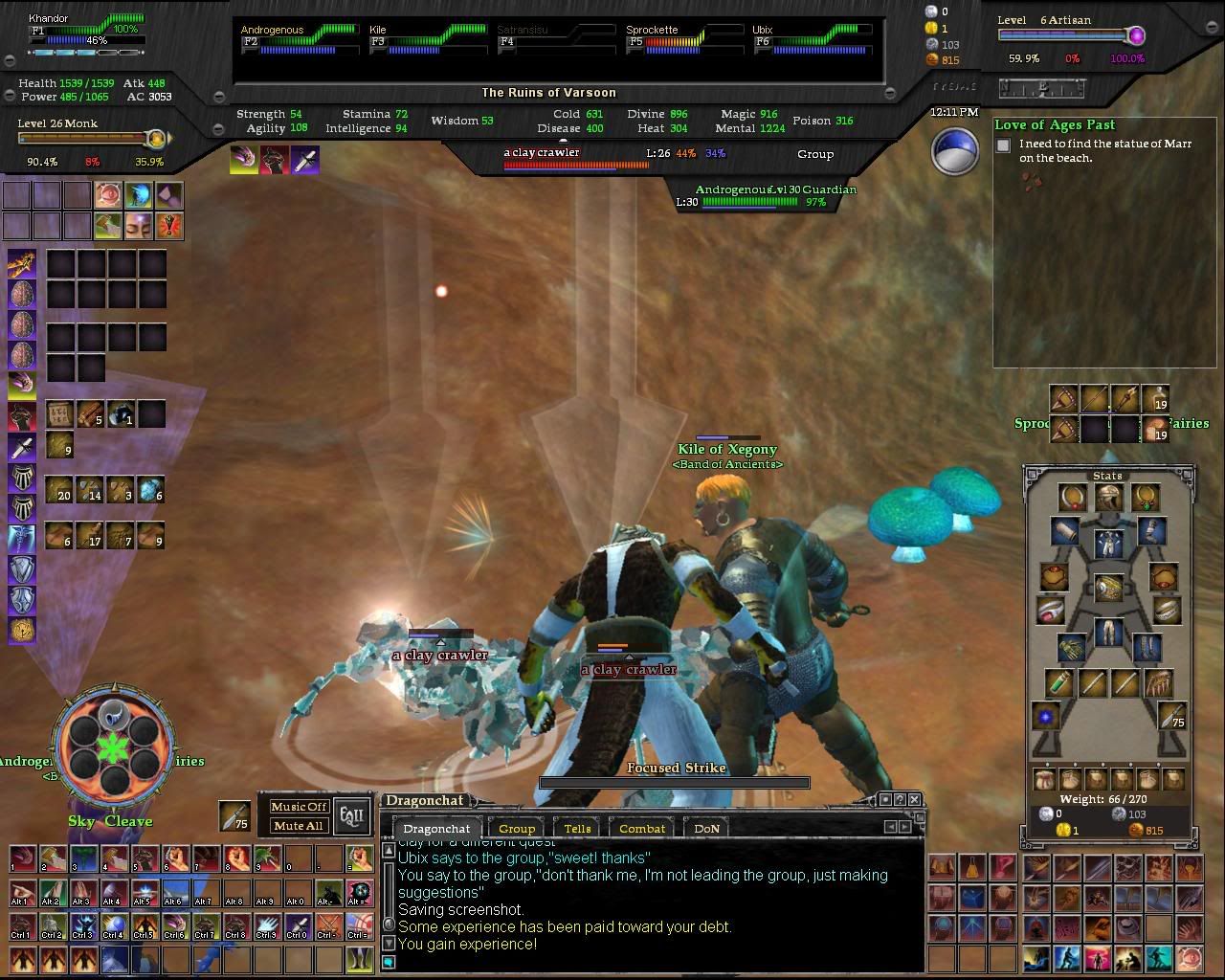 I think that this UI would be awesome with the quest journal skinned. I also would like to have more effect on who's being attacked *if possible*. But what I really would like to see is perhaps having the target bars bigger so they can handle names. If you look in the window the target window smashes the name together, and the same goes for main target window as well with names like "swashbuckler" and such. Thanks again for the help. |
How do you get the graphic for the time to show?
Also, is there a modification that has both exp bars on that little tab, like in the screenshot that was posted earlier? (late january / early february) ? It would be nice to see both bars at once instead of having to click to see one or the other. |
1 Attachment(s)
Quote:
|
1 Attachment(s)
Quote:
Code:
<Page DynamicDataFilter="0001" Location="0,0" Name="Target Stuff" ScrollExtent="253,71" Size="253,71">Any other ideas? EDIT: Figured it out. I added DynamicData="/GameData.ImpliedTarget.Health" to the Page tag that held just the L: and now it works. I guess that Data tag also tells things how to act when they are included in that particular page. Fixed implied target file attached. |
ok Guys I have downloaded the files you left, pasted them to the Custon UI folder, Saved them to the Custom UI Folder, Converted them to a Zip file and saved t hem to the custom UI folder and NOTHINGGGG!. Now you see why I dont make my own mods lol. Could you please give me a little techinical support on this one? What am I possibly doing wrong?
M |
2 Attachment(s)
HEllo All :)
Because some people wanted to have a quest helper that looks like the other interface part, I made one using TyeJae Graphics. Here is what it looks (1280*1024): [edit] updated with Aalwein correction |
awesome, perdition, but don't we need a .dds to put in the images directory along with that .xml file? =)
|
Hello Aalwein :)
No new image is needed because I'm using Tyejae images (just resize and shrink to have this result ;) ) Ps:sorry about yours but I'm not able to use your image and I don"t have photoshop or any other graphics tool to check it. |
Hello all,
Love the UI, and kudos for the improvements on the Implied Target and Journal. I have a problem with my chat windows, when i attach a tab it doesnt show on top the window. So i basicaly have 4 windows open when i only want 2. Any help would be appreciated. |
I aded in the quest helper window and It is in the right place with all the ransparency bars turned to normal and it doent not work, I select a quest in my journal and it doent show up in the window.
I finished a quest as as I got credit for doing parts it still did not work. Do i have to do anything other than add it do the UI directory? |
Awesome mod
I must say this mod is awesome and I really do hope you plan on updating it as new features are added to the game. Every thing seems to work great for me except for I can't get the Implied Target window to show. Is there anything I am missing? I tried a few of the implied target window mods on this site but still cannot get any to show.
|
1 Attachment(s)
Quote:
Quote:
 file attached. file attached. |
Also, I could not get the implied target to work
Thank you for the fixed file I am going to test it out now |
2 Attachment(s)
i'm not sure about the implied target issue. try adding to your eq2ui_mainhud.xml:
Code:
<include>eq2ui_mainhud_impliedtarget.xml</include>also attached is a target_window that stays on at all times for those of you who would prefer that sort of thing. |
ok Guys I have downloaded the files you left, pasted them to the Custon UI folder, Saved them to the Custom UI Folder, Converted them to a Zip file and saved t hem to the custom UI folder and NOTHINGGGG!. Now you see why I dont make my own mods lol. Could you please give me a little techinical support on this one? What am I possibly doing wrong? Even the new Files you have posted I cant get to work. ANY IDEA I love what you guys have done here.
M |
Did you make the custom eq2.ini file?
gotta make sure you open notepad or something and save the file as eq2.ini Inside it you gotta make sure that: cl_ui_skinname TyeJae_Steel cl_ui_subdir UI/ is in the file. Otherwise I don't know what the problem is. :/ :confused: |
Quote:
Thanks Aalwein to fix it, working as a team always better for all :) |
So far so good. I love the way this UI is turning out, especially with the journal skin. Only thing now though, is that I have no place to put my artisan bar. I know people seem to prefer switching between the too, but I actually do like having both on the screen. I really think it'd fit nicely underneath the original exp bar as an attachment of some sorts.
I do have one question, I seem to have trouble inspecting people through the target bar. I target someone, right click the name in the bar and it just shows window options. I don't know if it does this because of how the bar is now made or what. Just wondering if there's a way to fix this to where you can get more options than just "window" in the target box. |
Quote:
Are they zipped in the custom directory or are they normally put in? |
| All times are GMT -5. The time now is 02:03 PM. |
vBulletin® - Copyright ©2000 - 2026, Jelsoft Enterprises Ltd.
© MMOUI