
|
[DrumsUI] Horizontal Journal
The download file is "DrumsUI_horizontal_journal_LU39.zip" and the files inside are dated 11/2 .. is this the correct download?
I ask because it says: Current Version: LU40 Last Modified: 11-14-2007 01:25 AM by Drumstix42 Thanks for the great mods! |
Quote:
Great news that you want to provide (and hopefully maintain) a complete infocenter though. Let me already announce my interest to include it in ProfitUI. :) |
Quote:
I may just change the text on the page to say "compatible with latest update" or something along those lines. And sounds good Gm9. I'll stay posted with any updates on it, and thanks for pointing out your update, as well. |
First of all ... thank you ... for all your work :)
Just a question .... I use your bank UI ... My main UI is Fetish Nightfall ... the only problem Im having is that I cant close my bank window ... have to use escape to do it .... same with the guild bank window atm .... *also sorry if this is the wrong place to ask about this* .... is this just happening to me .... or is it a known problem .... just wondering .... I have no problem waiting if its known and being fixed in the future .... if not Im wondering if Ive done something wrong ?? |
Wynd,
Thanks, you are correct to post here. Thank you for pointing out the bank window. It's not just you, I have an object in the UI covering the close button (whoops). I'll have that fixed and uploaded in a few :) The guild bank on the other hand, I have not modded, so I'm not sure for that one. *edit* Updated and awaiting validation :) |
You just totally ROCK darlin .... thank you so so much !!!
*blows you a big ole smooootch !!!* ;) and WOW you are FAST :) |
1 Attachment(s)
New chat window released
In-game screenshot attached below. |
Great UI, quick question tho...
Target / Implied Target Windows...
Great job, very simple and nice additions. However, is it possible to make it a tad more simple? I'd like to remove the "T" and "I" from the windows, is that possible? Edit: Recent Experimentation, I opened up the UIBuilder for the first time in my life and tried it out myself, nevermind! Bravo job on the windows! |
New Idea!
I was thru your other bits of UI, you seem to be like me. I like the default UI, but I think it could a bit more versatility. ;) I dont need fancy leaf designs or technological borders and all that jazz. Simply put, I like your style.
Now back to the point, as I was looking thru your tid-bits I noticed an obsolete section containing the UI addition to scale your hotbar icons. Bravo btw, tho Sony made short work of it by including it into their default stuff. Oh well, I still give you credit where it is due. Now my question is, are you still able to create such a bar for any "icon window?" My reasoning for this question is because of the lack of icon scaling for the Spells/Maintained Spells/And the more recent Detrimental Spells. They're huge eye sores to me and I'd love to be able to scale them down. Also, a very neat idea, could it be possible to get a timer (in seconds) on the Maintained Spells and Detri Spells? Perhaps just very small numbers along the bottom of the icons. And for those with infinite timers, or "until canceled" timers, have it show nothing? This is just my idea, could be crap, but I'd think it to be very useful! |
Quote:
As for the resizable icons in the maintained/spell/detrimental spell windows, I was already planning to do something similar to what you were saying. Most likely they'll all be individually resized (rather than each window's icons set at the same time), but it should be possible nonetheless. The timer on the buffs, as I know right now, can only be done on the maintained window (not sure on this). And for the remaining time, the dynamic data already hides unlimited duration buffs. For everything else, I would just have to size the numbers correctly, so that it would cut off at a good spot. Such as the "H" from hours or "M" from minutes, and otherwise just show the numbers for remaining seconds. I'll see how it goes. Thanks again for your input, and look out for some released windows. The Info Center is coming along nicely for anyone else interested. |
Guild Bank possibility?
kudos to all your pieces! I use many of them, thank you!
was wondering if you had thought about or had plans to make a guild bank window in the future? I have tried to no avail to 'downsize' the default (just do away with all the extra spacing) but coming from an eq1 interface editor to eq2 is just too different. I could work wonders with the eq1 files but am just completely at a loss on how to do anything with the eq2 xml files lol. there was a 3/4 size guild bank window piece awhile back but with the changes to the window that one doesn't have the bank 'settings' in it and I cannot for the life of me figure out how to put em in there, gave up after 15-20 log-ins with nothing but a black box where the guild bank should be :confused: hehe. any tips, directions, info would be so greatly appreciated on how to accomplish this if you do not plan on anything like it anytime! |
Quote:
I also have a portal now. There's not much over there yet, but hopefully I'll fill it up and use it as I can. People can now submit requests and bug reports, and I think that's pretty cool. :D |
I just wanted to put out an update on the InfoCenter I have in progress. So far everything is going great. The holiday's set me back a lot, but I've made a great deal of progress this week, and I've really been able to piece the window together how I originally wanted it. It should be a nice clean release, and hopefully will be out soon :)
|
InfoCenter soon! I'll be making a separate topic dedicated to it.
|
Updated the persona window a bit.
New guild bank window released. I plan to continue to keep the Info Center updated, as well as implement the quest-related tabs into the Quest Journal. Can make jumping back and forth a bit easier, and it being a default window, it saves which Tab was opened when closed. Other updates on the way include simple player window update, pet window, and the inventory window. Hoping to mess around with the spell recast timers for next Game Update as well. |
Updated and uploaded a target window update, allowing it to be used with both con systems (v0 or v1).
Also uploaded a player window mod, which includes percentages, and click-to-cure buttons. These buttons do not require the player to target their self. |
Thanks to the Living Legacy program being offered by EQ2, I shall be returning and doing some updates finally! I'm excited to get the InfoCenter back into True up-to-date status, as well as getting other updates completed. :nana:
*EDIT* New bank window update!  |
Bagmod please... all the old ones seem to have huge deadspace bugs in them. The bottom and top areas have like half an inch of deadspace. O.o
|
1 Attachment(s)
Hmm Really? I'm using the default UI bags and there's almost no extra deadspace in them.
Here's my setup:
Attached is a screenshot of my settings in action. Let me know if this helps any. (Ignore the offset numbers, I was using /loadui while in-game) |
Target/Implied window update!

Enjoy! Feedback welcomed. |
I think its just the bag mods that have the problem... and Id use the default, but I dont like going through every bag and setting them up again. >.<
|
I'll see what I can whip up :)
|
New examine windows update:
 Now with search buttons on several of the windows :) |
New bag mod uploaded.
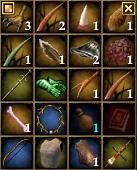 Comes with no border, background, or any extras. Fully resizable and only display the drag handle and close button when the mouse is over each bag. Enjoy :) |
Inventory window update:
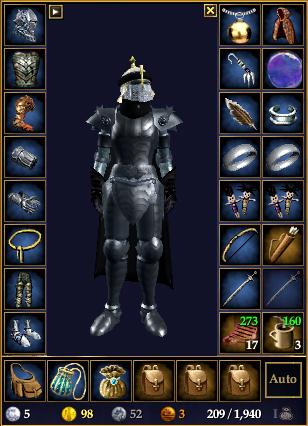 Recoded it from scratch. Display HP/Power regen, has a button to toggle between Equipment and Appearance slots, and a button to toggle inventory bags. Enjoy. :) |
New market window submitted:
 3/4th sized item rows, display coin and button for inventory bags, and is a good bit smaller than default :) |
Small fix to the bag window. The close button should now function correctly on each individual bag.
*Edit* Just uploaded the long-overdue-updated loot window. 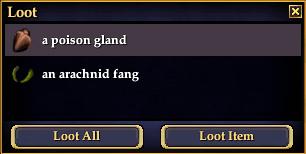 Now with default Enter + Esc buttons, and the updated style. |
Updated the Merchant window
 Moved some stuff around, no more title, added status, and now has a smaller minimum size. woot woot. |
New, updated hotbar released.
 Decided to slim down the default hotbar some, and take out the extra space. |
One small request: Is there a way to shorten the key text using the Numpad from <Numpad #> to NP# on the hotbar?
|
I have an idea that might work. I'll see what I can do.
|
Bank window updated for GU #46, and fixed the buttons to work again. Now with less bank-text spam! :nana:
|
Pet window
Love your mods, but did not find a pet window. Any chance of making one that would match the player/group windows?
Thanks |
Quote:
Player window updated last night. Here's a nifty diagram:  |
Persona window updated to include the extra modifiers and casting-related percentages:
 |
Group window
Having trouble with the group window. The ends of the bars are not showing, just a white retangle on each end. I did put the dds file in the proper place. The player window works fine. Any ideas?
Thanks |
I somehow uploaded the wrong XML into the ZIP. It has the wrong Folder path in the XML. Use this attached XML until the correct zip is updated.
Sorry for the inconvenience. *Edit* removed attached file. I'm uploaded new one with Click-to-Cure update anyhow. The old zip was outdated! |
New pet window with percentages and smaller icons!
 Uploaded new group window zip as well. |
Experience bar
I just installed the experience bar mod and like it. But I can't find the setting to display more than one bar at once. I'm completely new to using EQ2 UI mods, so pardon if the answer is obvious. I didn't see it in window settings nor mentioned in the FAQs here that I could find. How do I show more than one experience bar at a time? Thanks.
|
Quote:
Currently my XP bar only shows 1 bar at a time. The image on the download page simply displays each type of XP bar to show what they look like. And that you can switch between bars by clicking the right side gem. Mostly likely what I'll do is make the window re-sizable vertically in the future, so that you can easily show multiple bars. |
| All times are GMT -5. The time now is 05:27 PM. |
vBulletin® - Copyright ©2000 - 2026, Jelsoft Enterprises Ltd.
© MMOUI