
|
So what are some benefits of the LUA scripting language? I do know that you don't have to keep doing all these useless strings, but that's about it.
|
Quote:
Search Google for tip & tricks and examples. |
COND1=a && b
For some odd reason this screws up the whole interface when put in a On property. Any other way to write it so it doesn't do that? |
Strange.
The threat window has an || conditional in the OnSize property. |
OnTextChanged="COND1=a && b"
When I restart EQ2 for some reason it makes everything Default. Is it the way I'm writing the code? |
Post your code.
If you're only changing the variable COND in OnTextChanged, I don't think anything is gonna be updated. |
Quote:
I'll try something really quick, if it doesn't work than I will post the code. |
Ok I found it I think. It seems that I have to write it as OnTextChanged="COND1=a && b" in a Text Editor rather than OnTextChanged="COND1=a && b"
|
Ah, okay. Yup :D
|
Lol I'm just full of unreleased mods.
Here's a screenshot of my most recent unreleased mod that uses some of the coding methods that was discussed in this thread. Pretty much a more in depth look-a-like of Dolby's proposed Hotkeys, with some added features. 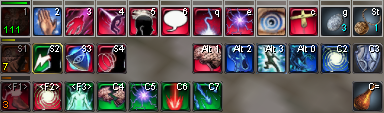 |
Good work. I hadn't thought about putting the bars above the hotbars until now. Looking forward to more expansive modifications.
We can only go up from here :cool: |
I actually had to do a little more work than how it looks. If you want I can post the code, or I will probably release it when I've got the few known bugs fixed.
Some things to notice:
|
I think best of all it looks clean.
For me it's a bit different as the bars I've been messing with go right to red after you've used it (and obviously stay red as I haven't messed with them lately). I like your border/no border idea. I think the borders work well if you're gonna have a bar showing all the time (like green is ready, red is refilling). But for the ones without borders, I like your color scheme better. Though with your color scheme I would think you would fill the bar left to right (go from red to green), LOL. I'm babbling. Feel free to post your code. If anything I just like to see if to spawn new ideas for other windows, and the such. There seems like so much potential for new mods, but it just requires some ideas first :) Did you figure out how to make it works for hotbars that are not horizontal only (I can kinda care less if it's not possible, but I'm curious) ? |
Quote:
|
Right now it only works 100% with it horizontal, I found it too tedious to try to make it work otherwise. I can make it work otherwise, but it wouldn't look the same...any suggestions?
Quote:
left2right rather than right2left? That would look insanely weird for me. |
Depending on how the icons are set to scale, it may be possible to use the new OnSize event to pad the cell height enough to make room for the prog bars.
I'll test this soon as I get a chance since I've been dorking with this stuff myself of late. Possible probs I see with this... A) if the icon scaling is not proportional, icons will stretch the icon vertically to fill the extra space. B) Icon image and label vertical alignment may be an issue if everything isn't either top or bottom relative. |
I thought the problem was that you couldn't pad just the height, but haven't looked at this in ages.
|
Not sure if its possible with an IconBank and not able to test it atm. There's a couple ways this might be possible if IconBank supports any of the attributes. Could revert back to the less efficient Volume page approach originally used for Hotkeys if needed.
Personally, if its gonna require a performance hit, I'd just lay the bars over the icons. |
For me it doesn't really change much performance the way I made it. The only thing that would decrease a little to no performance would be the changing of the colors, but I can make it so that all of the ReuseSec texts refer to one code for OnTextChanged, which is easy.
|
Aye, but the issue comes up if we want a cell format that isn't square but still wraps properly when the bar isn't completely horizontal. Requires forcing the IconBank to use a cell height different than IconSize (not sure this is possible) or replace the IconBank with a less efficient Volume page approach.
Hotkeys where originally implemented as Volume pages. The IconBank was introduced specifically to improve performance, so I hesitate to revert back to Volume for everything just to get non-square cells that wrap properly. |
I don't think you can go back to the volume actually, I remember the old volume coded hotbars stopped working when the IconBank was introduced.
edit: a non-square IconStyle might do the trick but I've never tested that |
I don't think that you can do that anymore. I remember when they did the update that changed it to an IconBank, it broke the Hotbar windows...I could be wrong though
|
Yeah fairly sure you can't do volume at all anymore.
Here was my origal implementation of dolby's original mock-up (with overlay numbers shown as well for original testing purposes): 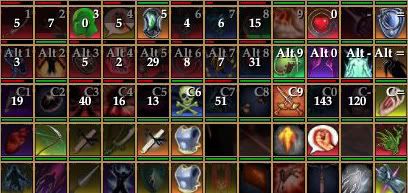 The overlapping isn't horrible. Given my frames + bar = 6 pixels above the hotkeys: 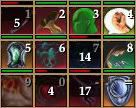 The only problem is charge numbers getting covered up. Bump it down about 2 pixels, and it's even less of an inconvenience. :P |
After dorking with this some more, I decided the bars added too much extra clutter and didn't update smoothly enough for my tastes, so I ditched them.
In any case, I tried various padding and margin settings to force space above or below the icons with no positive results. One option I didn't try... create a new iconStyle that reserves the extra space. Even this may not work as intended if IconBank insists on square icons. Could clip or squish the icons. |
Quote:
To hear EQ2 may finally adopt LUA is mouth watering. |
| All times are GMT -5. The time now is 02:49 AM. |
vBulletin® - Copyright ©2000 - 2026, Jelsoft Enterprises Ltd.
© MMOUI