
|
got it fixed. ignore previous post
|
Just go to Settings -> Updater -> Recreate shortcuts (or something like that) and it will restore your desktop and start menu shortcuts. As long it starts up it is "installed". Actually its not even wrong to always run it from the website, the shortcuts are just a more comfortable way :p
Edit: Didn't notice the last post, will leave this here for reference though (again :P) |
Quote:
|
Quote:
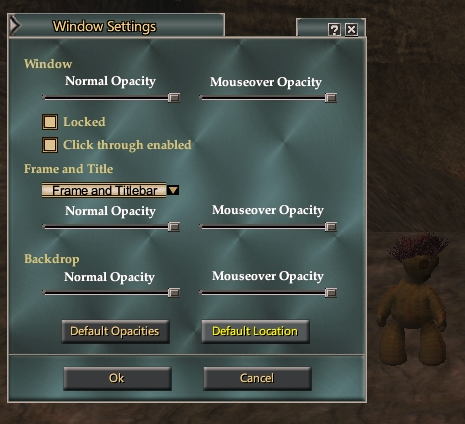 frame and titlebar |
Quick bug report regarding the QuickRaidButtons file. For the inquisitor macros, Ministration is listed as only recognizing up to Ministration VII. The highest tier of Ministration is actually Ministration VIII at lvl 71. Couldn't figure out why my heals kept hitting for a lot lower than I was expecting. :)
I've fixed mine manually, but others may not have even noticed. |
Update, as explained in this thread the manual edit I attempted didn't actually work. Any tips on getting this file to use the correct level of this spell?
|
Quote:
******* updated: somethings wrong on my UI uploader, trying fix. ******* updated: this time shoule be really on the updater.:) |
Any chance we could get compact sized vertical group window again at some point..
Just curious.. Thanks |
Quote:
|
The ClickToShard button in the raid window for conjurors doesn't work. The button was updated for multi-tier spells while Shard of Essence is a T2 spell that will now scale based on your level - there is no I,II,III etc... versions of it.
|
Quote:
|
could you possible update the Profit Standalone Market window?
Thanks |
Quote:
"The point is that the vertical compact one doesn't exist anymore in the latest ProfitUI I released, there is only (default) and (compact). The other files you have are from previous releases and will not work anymore" All I get when try to change them are the default vertical one at normal size and horizontal one at normal size. It doesn't seem to offer a compact vertical one... of course I haven't tried recently.. |
Greetings, I must say I'm just thrilled that you've taken up the task of updating Profit UI. I've just installed Catalyst and it already fixed the issues I was having since GU 51.
I can't thank you enough for picking this up; Profit UI Catalyst is so helpful to healers in particular. We'd be lost without it. Thank you, Eliana Blackburrow Templar |
Quote:
--> FAQ |
Quote:
So in the FAQ, I see: # The new "frame only" mode sets the window to vertical mode Great got it!! # The new "none" mode sets the window to horizontal mode Was able to do that also.. # That means that the separate horizontal/vertical variants are no longer supported, there is now only one default and one compact variant. So with this statement, I would expect to have 2 options for both the vert and horiz windows as we are talking about two different window formats and default and compact for each. it indicates one default for both the vert/horiz windows and one compact for both the vert/horiz windows.. All I see for options are: Frame Only = Vertical windows (Default) None = Horizontal window (Default) There is no option for a compact version of both from what I can see. Just the default vert/horiz group windows.. Ofcourse I could be overlooking something here but after reading the FAQ and trying ingame, I just don't see an option for a compact version of both window formats.. So where is the option to select the compact vertical window? |
Quote:
|
to get the compact version just run the updater assumeing yur useing that
1. go to settings 2. choose Variants 3. scroll to you find Group windows 2 choices Default or Compact then press ok its does the update and done you now have compact group windows ! Then as GM9 has pointed out several times from the F.A.Q it tells you to :- The group window comes in two different variants, default sized and compact, and has many hidden functions including the following: ◦◦The new "frame only" mode sets the window to vertical mode Hope this helps ;) |
Hi,
I tried that awhile ago and was able to get the vert and Horiz default but no compact. I will try again and see. Maybe it wasn't updated when i tried last. Appreciate the info.. Thanks |
Quote:
Anyway thanks for the help and to you GM9 for the patience.. |
There's been no discussion or mention of GU57. Will Profit survive this next UI makeover? I pray it does...
|
You're posting in an outdated thread. There is plenty of discussion about profit past Catalyst.
|
| All times are GMT -5. The time now is 05:27 AM. |
vBulletin® - Copyright ©2000 - 2026, Jelsoft Enterprises Ltd.
© MMOUI